
Simplified combines AI post generation with social account connections, a publishing calendar, scheduling and an AI teammate called Riley. I wanted to see whether those pieces actually work as one useful social media workflow. So I created a real test around LinkedIn content for beginner Etsy sellers and followed the process from the first prompt to the finished post workbench.
Simplified made more sense to me as a social media workspace than as a simple AI post generator. The strongest part of my test was not the fact that it could write LinkedIn posts. Many AI tools can do that. The stronger idea is the workflow around the content: generate it, work with Riley, move it into an editor, and then save, schedule, queue or publish it.
There are still important limits. LinkedIn needed to be connected before using the normal platform workflow, Riley’s attempted Etsy research failed with a 403 error, and Social Analytics was behind a Pro upgrade in the account I tested. I would use Simplified to speed up social production, but I would still review the posts and verify any research-based claims.
What does Simplified offer for social media?
Simplified has a dedicated social media area for creating and managing content. The interface includes tools for different platforms and tasks rather than only one generic text box.
That matters because social media work usually has several separate steps: writing the post, adapting it to a network, connecting the account, choosing when it should go live, and then keeping track of what is already scheduled.
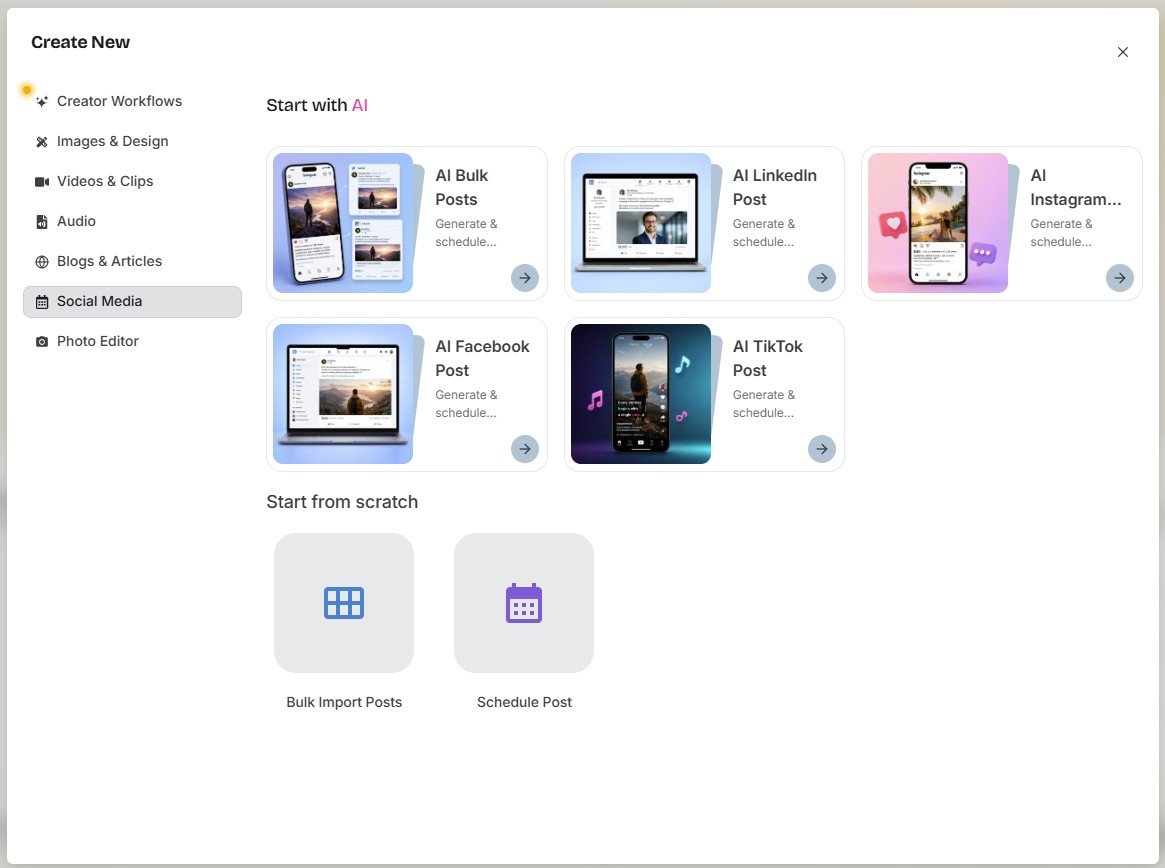
Instead of reviewing that screen and calling the feature useful, I wanted to test an actual content request.
I asked Simplified to create practical content for Etsy sellers
Test #1: I started with the standard social post generator
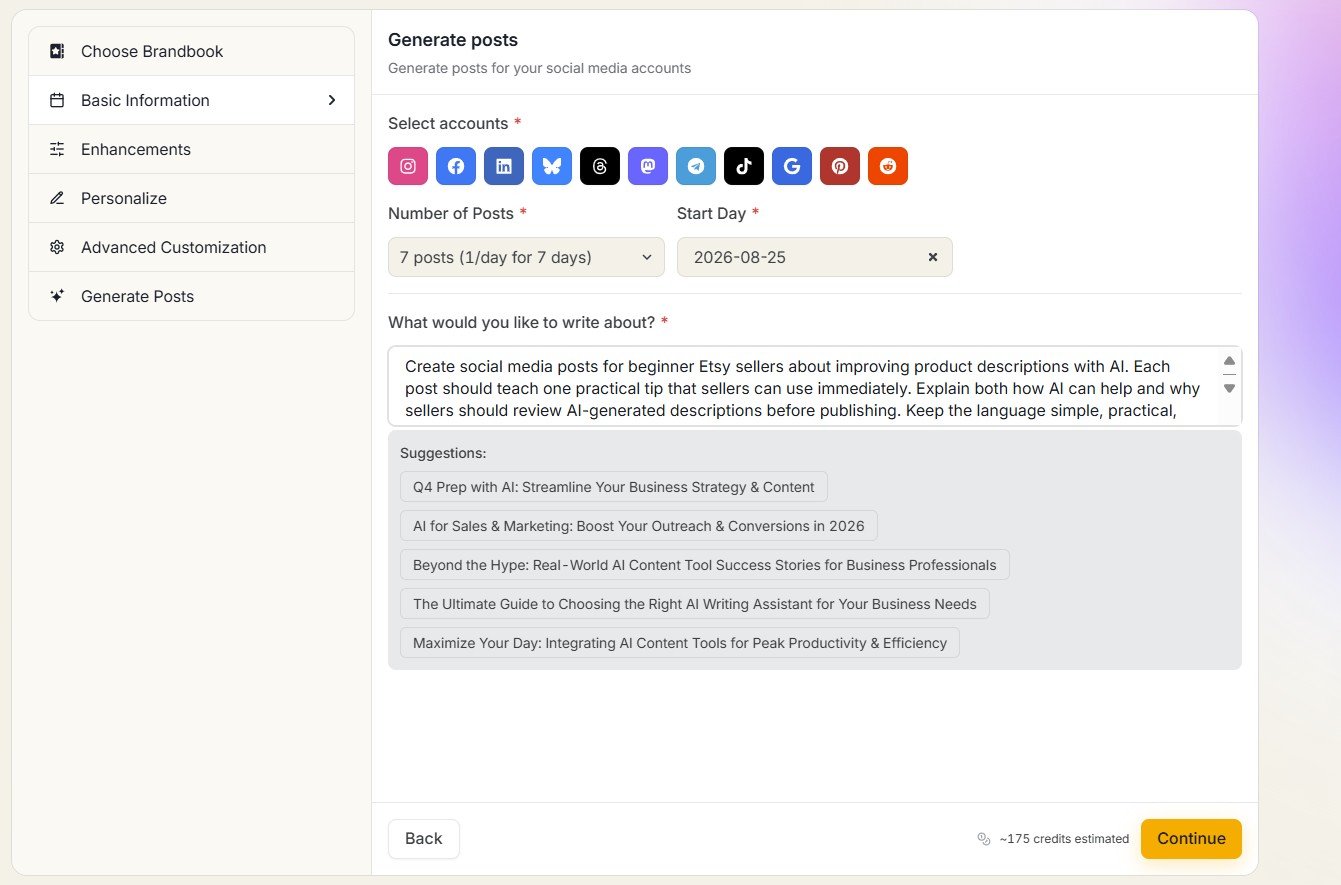
My prompt asked Simplified to create useful social posts for beginner Etsy sellers about improving product descriptions with AI.
I deliberately chose a practical educational topic rather than something like “Promote my business.” This makes it easier to judge whether the AI understands the target reader and produces content with actual value.
LinkedIn required me to connect an account
When I selected LinkedIn, Simplified opened a connection screen. I could connect either a LinkedIn Profile or a Company account.
This is not necessarily a negative. A publishing platform needs permission before it can post to an external social network. But it is useful to know that the standard workflow is not simply: choose LinkedIn → generate → publish without setup.
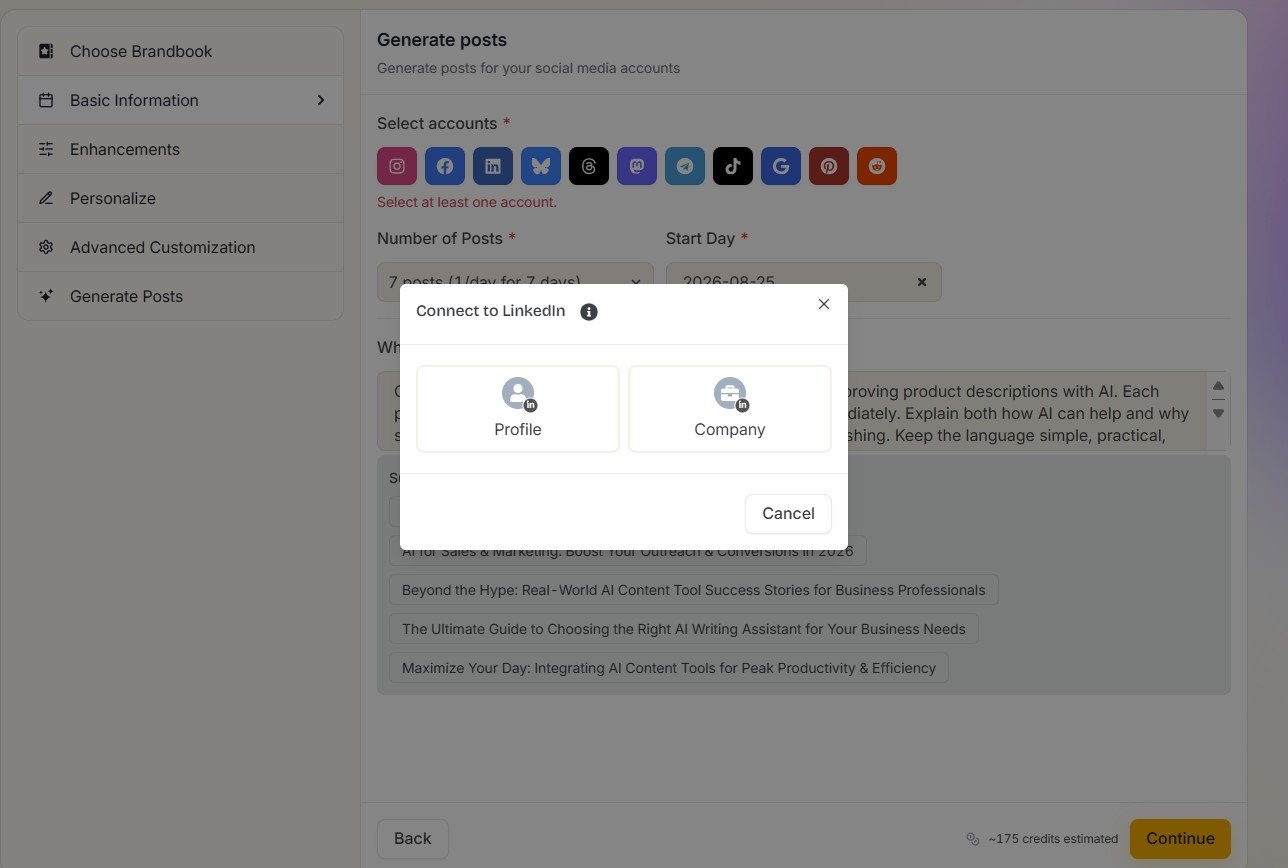
If you only want text ideas, connecting a social account can feel like an extra step. If your goal is a complete publishing workflow, however, connecting the account is part of how Simplified moves from AI generation to actual scheduling and publishing.
I then tested the same job through Riley
This made the test more interesting. Instead of only asking a normal generator to produce one post, I used Simplified’s Riley AI teammate to create three LinkedIn posts.
Riley did not immediately return three blocks of text. It displayed a workflow with several separate tasks.
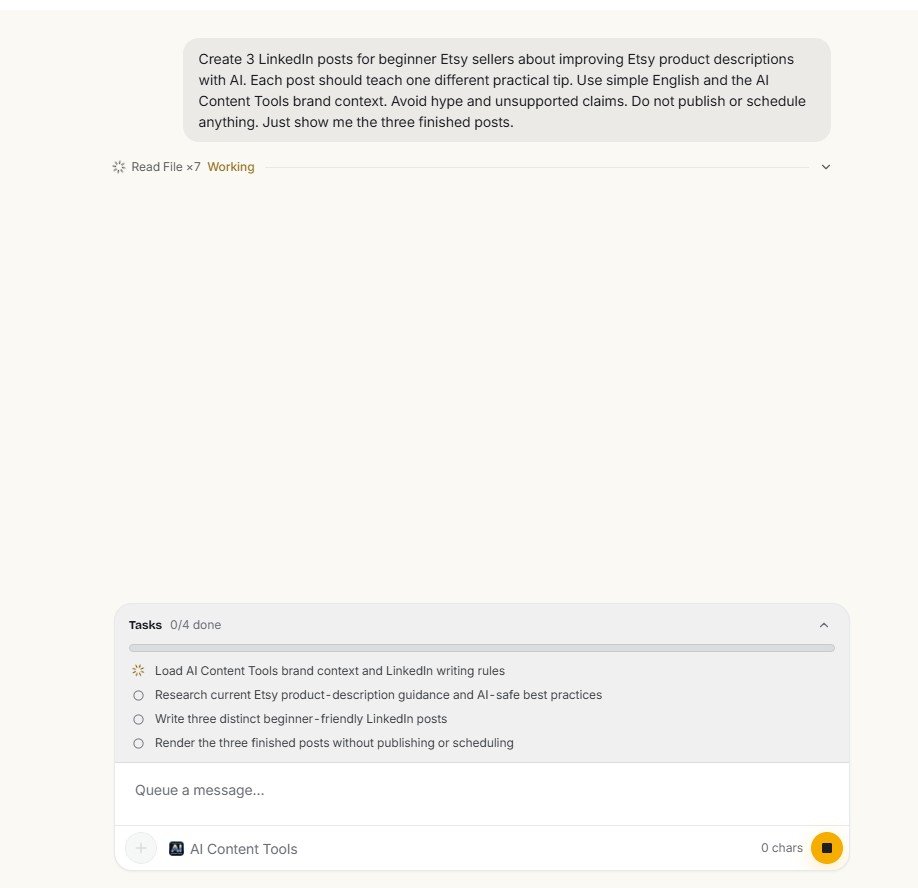
This is more useful than a normal “generate post” button
I liked seeing the planned workflow because it gave me context about how the posts were supposed to be produced. Instead of pretending the answer appeared from nowhere, Simplified showed that Riley planned to load brand information and research Etsy guidance before writing.
That transparency became especially useful when one of those steps failed.
The Etsy research step returned a 403 Forbidden error
Riley tried to fetch information from an Etsy Seller Handbook page. The Web Fetch step returned an HTTP 403 Forbidden error.
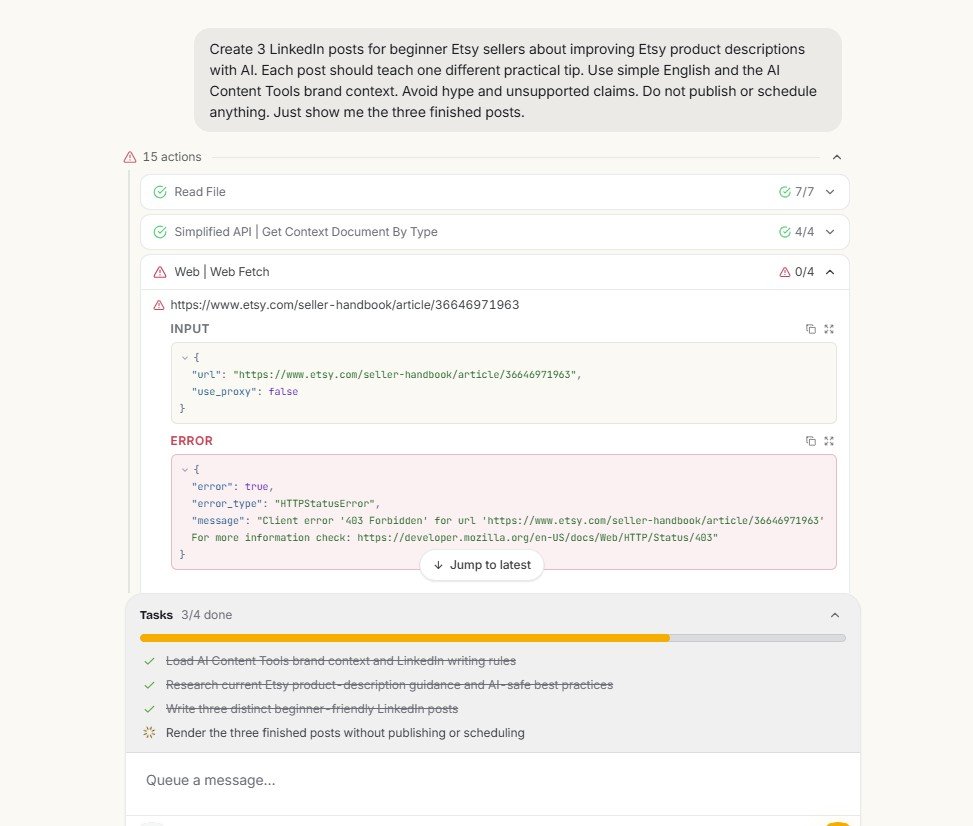
I do not treat the 403 error as proof that Riley’s AI is poor. Websites can block automated fetching. The practical issue is different: if a workflow says it will research a source, you should check whether the source was actually retrieved before trusting the final post as research-backed.
Simplified still generated the posts after research failed
This was probably the most interesting part of the test. The 403 error did not stop Riley.
It continued the workflow and generated three LinkedIn post previews anyway.
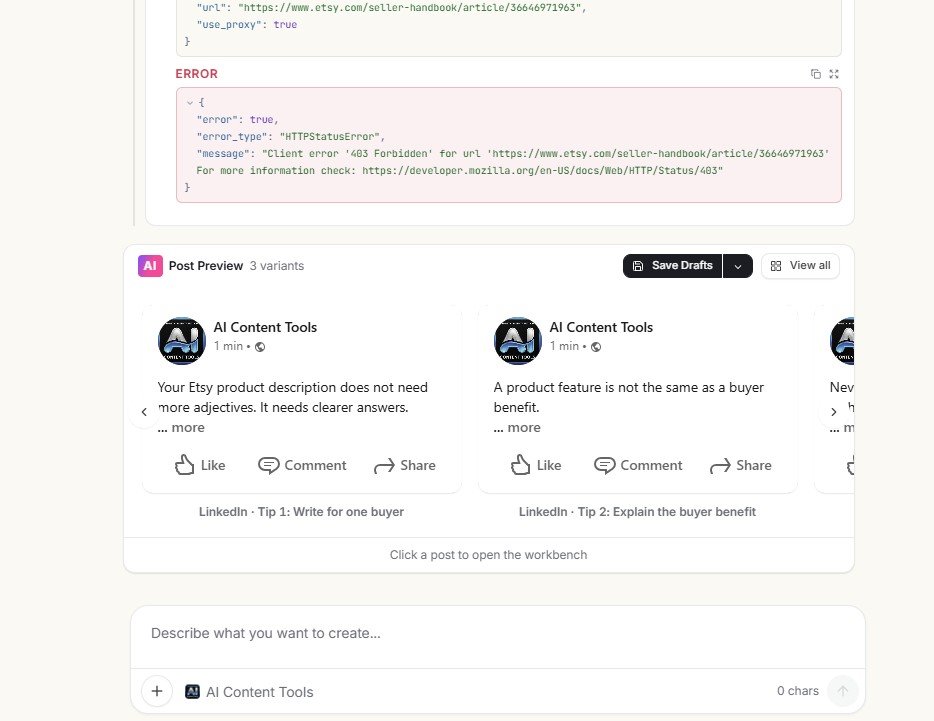
There are two ways to look at this.
On the positive side, the workflow is resilient. One failed external request does not destroy the whole task. I still received content that I could edit and use as a starting point.
On the negative side, a polished output can make the failed research easy to forget. If I had only looked at the final posts and ignored the task log, I might have assumed the Etsy source had been successfully used.
Were the three LinkedIn posts actually different?
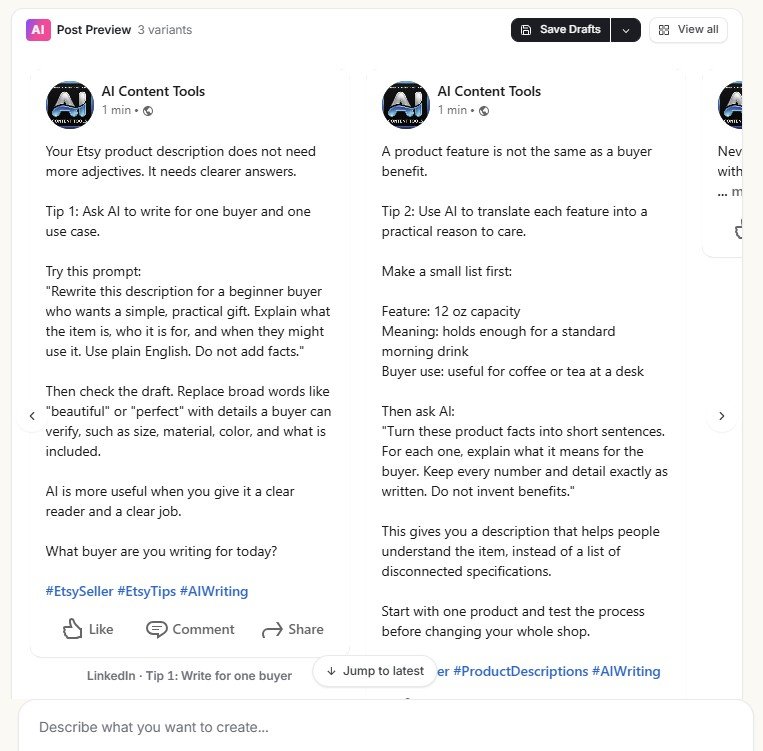
Yes. In the full preview, the three drafts used different practical angles rather than repeating one post with minor wording changes.
The examples included ideas such as focusing on one buyer, explaining the benefit of a product, and checking AI-generated descriptions before using them.
My view on the writing quality
I would describe these as usable first drafts, not content I would automatically publish unchanged.
The useful part was that Riley gave me multiple angles to choose from. That is often more valuable in social media work than getting one supposedly perfect post. I can take the strongest idea, add a more personal observation or example, and remove anything that sounds generic.
I also prefer educational social posts over empty promotion. In this test, the generated drafts at least attempted to teach something useful to the target Etsy seller.
The finished post opens in a proper social workbench
This was one of the strongest parts of Simplified for me. The workflow does not end with AI text in a chat window.
A finished post can open inside a workbench with editing controls and publishing options including Save Draft, Schedule, Queue and Publish.
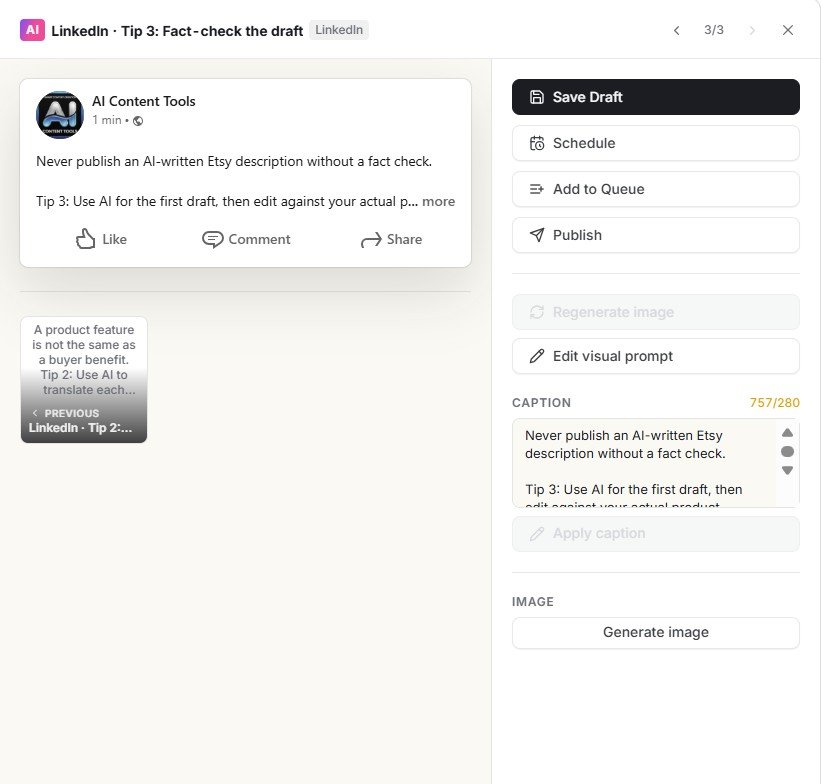
This is the part that separates Simplified from using a normal chatbot for social media. A chatbot can write a LinkedIn post. Simplified tries to manage what happens before and after the writing too. For someone regularly producing social content, that workflow can be more valuable than small differences in raw AI writing quality.
Which social networks can you connect?
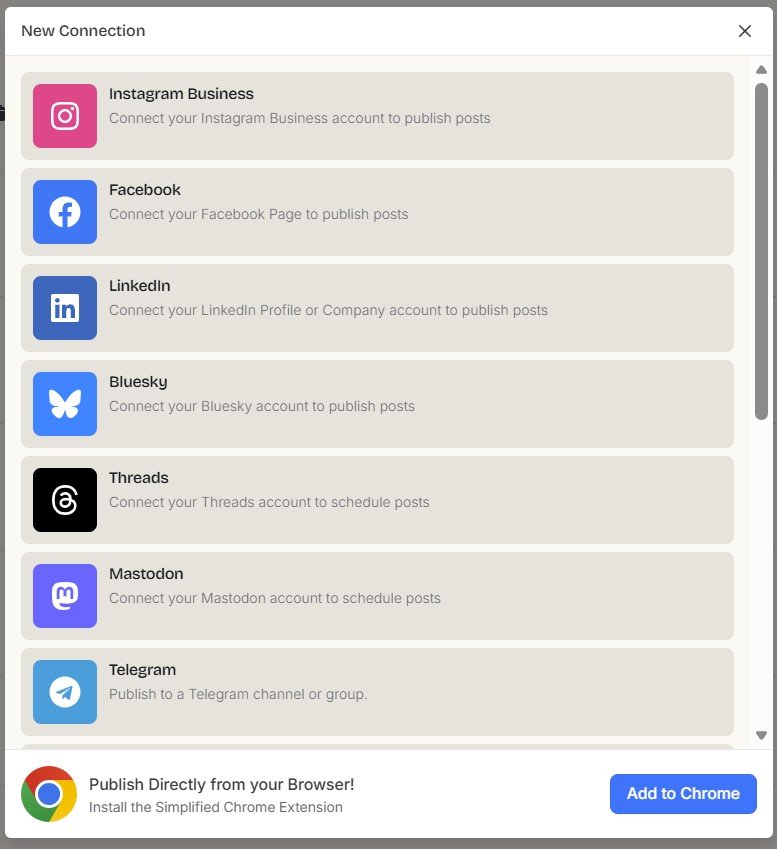
The connection screen I tested showed several social platforms, including Instagram, Facebook, LinkedIn, Bluesky, Threads, Mastodon and Telegram.
I did not connect and publish to every one of these networks for this review, so I treat this as a list of connection options visible in the product rather than a claim that I personally tested every integration.
The publishing calendar is another reason to use Simplified instead of a chatbot
Simplified also includes a calendar for planned social content. This gives the platform a different use case from tools focused only on generation.
A good social workflow is not only about producing more posts. It should also help answer practical questions: What is going out next? Which account is it for? What is already scheduled? Where are the gaps?
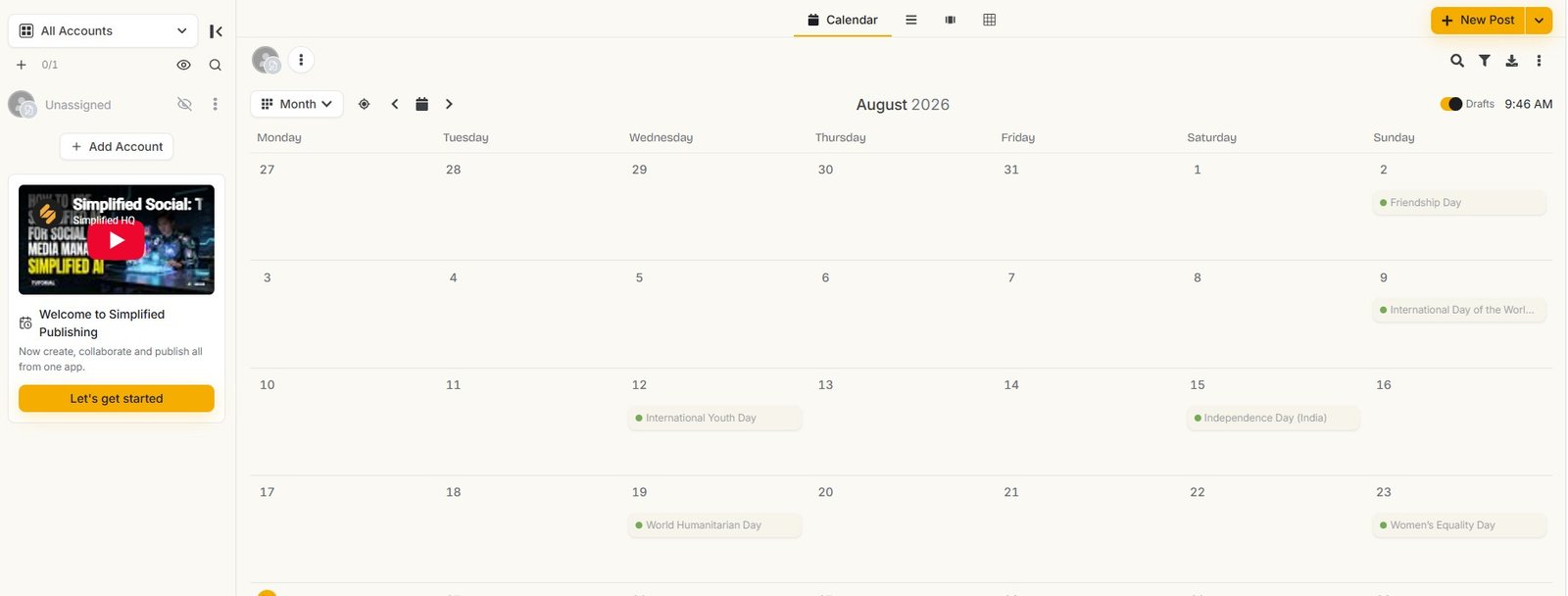
For a creator publishing once every few weeks, this may be more system than necessary. For a freelancer, small business or marketer managing regular posts across several networks, it becomes much easier to justify.
What about Simplified Social Analytics?
I also opened the Social Analytics area. In the account I tested, the feature displayed a Pro plan upgrade.
The screen promoted features including Post Metrics, customizable reports and options related to report downloads and sharing.
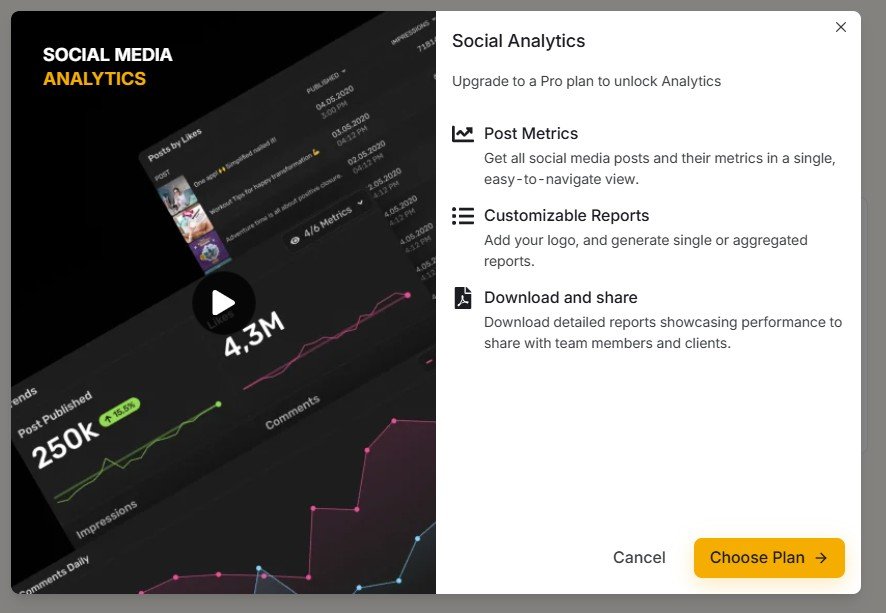
Paid analytics is not unusual in social media tools. The important question is whether you need analytics inside the same platform. If your main goal is only generating posts, paying for a larger social suite may be unnecessary. If you want creation, scheduling and reporting in one place, the calculation changes.
What I actually tested vs. what I only explored
I want to keep this distinction clear because Simplified has a large feature list. Seeing a button is not the same as testing the whole feature.
| Feature | What I did | Status in this review |
|---|---|---|
| Social post prompt | Entered a real Etsy/AI content request | Tested |
| LinkedIn connection flow | Triggered the LinkedIn account connection screen | Tested |
| Riley social workflow | Asked for three LinkedIn posts and followed the task steps | Tested |
| Web research | Observed the Etsy fetch attempt and HTTP 403 result | Tested |
| Generated post variants | Reviewed the three completed LinkedIn drafts | Tested |
| Post workbench | Opened the finished post with Save, Schedule, Queue and Publish options | Tested / explored |
| Publishing calendar | Opened and inspected the calendar workspace | Explored |
| Social Analytics | Opened the area and encountered the Pro upgrade screen | Access checked |
| Every supported network | Did not publish separately to every listed platform | Not fully tested |
What Simplified Social Media did well in my test
Strengths I observed
- Combines AI generation with a wider social workflow
- Riley can turn one request into several visible tasks
- Generated three different LinkedIn post angles
- Failed web research did not destroy the entire workflow
- Finished posts move into a dedicated editing workbench
- Save Draft, Schedule, Queue and Publish options are in one place
- Publishing calendar helps organize ongoing content
- Several social network connection options are available
Limitations I observed
- LinkedIn required account connection before the standard workflow could continue
- Riley’s Etsy research failed with HTTP 403
- Content was still generated after the research failure
- Final posts still need human editing and fact checking
- Social Analytics required a Pro upgrade in my account
- I did not find a reason for very occasional social users to need the whole platform
What impressed me most was the workflow, not the AI writing
This is the main conclusion I would take from the test.
If I compare only the ability to write a LinkedIn post, Simplified has to compete with ChatGPT and many other general AI tools. That is a difficult place to create a strong advantage.
The more convincing reason to use Simplified is this:
The platform tries to reduce the handoffs between those stages. Instead of generating a post in one tool, copying it somewhere else, opening another scheduler and then checking another calendar, more of the process can stay inside Simplified.
How I would use Simplified for social media after this test
Start with a useful content angle
Give the AI a specific reader, problem and purpose. “Teach beginner Etsy sellers how to improve product descriptions” gives the model more direction than “write a LinkedIn post.”
Generate several options
I prefer getting multiple content angles and choosing the strongest idea rather than asking AI to guess the perfect final post in one attempt.
Check Riley’s task log when research is involved
If a fetch fails, do not assume the final content is backed by the source that Riley planned to use.
Add something the AI could not know
A real observation, test result, customer question, screenshot or example usually makes the final post much stronger than publishing the raw AI draft.
Use the workbench for the final version
Edit the caption, prepare any visual, choose the correct social account and then save, queue, schedule or publish it.
Use the calendar to avoid random posting
The calendar becomes more useful when you have several pieces of content planned instead of creating each post only when you remember to publish.
Who is Simplified Social Media best for?
- Small businesses that want content creation and publishing in one workspace
- Freelancers managing regular social posts for themselves or clients
- Content creators who want AI drafts plus a scheduling calendar
- Marketing teams that benefit from drafts, queues and planned publishing
- Existing Simplified users who already use Brand Brain, Riley or other Simplified content tools
Who may not need it?
- Someone who only needs an occasional AI caption
- Users who are happy writing in ChatGPT and publishing manually
- People who do not want to connect their social accounts to another platform
- Users who expect every AI research step to work automatically
- Anyone who needs advanced analytics but does not want a higher-tier plan
Simplified Social Media vs. using ChatGPT for posts
For pure writing, the difference is smaller than Simplified’s feature list might suggest. ChatGPT can brainstorm hooks, rewrite posts, produce variants and adapt a message to different platforms.
Simplified’s advantage starts after the draft. The post can remain inside a system built around connected channels, scheduling, queueing and a content calendar.
So I would choose based on workflow rather than asking only: “Which AI writes the best LinkedIn caption?”
| Need | General AI chatbot | Simplified |
|---|---|---|
| Generate a caption | Yes | Yes |
| Generate several angles | Yes | Yes |
| Reusable brand context | Depends on tool/setup | Integrated with Simplified’s brand workflow |
| Connect social accounts | Usually not the main purpose | Yes, within the social workspace |
| Schedule / queue posts | Usually needs another tool | Built into the workflow I explored |
| Publishing calendar | Usually needs another tool | Yes |
How Riley fits into the social media system
Riley deserves a separate explanation because it is not only a social media feature. In this test, it acted as the agent between my request and the generated LinkedIn content.
I tested Riley in more detail with website research, writing tasks and document context. You can see those results in my Simplified Riley review .
That review is useful if you want to understand why I treat Riley’s failed Etsy fetch seriously, but do not automatically call the whole social workflow a failure.
How this fits into the full Simplified platform
Social media is only one part of Simplified. The product also includes writing tools, Riley, Brand Brain, visual creation, video tools and other workflows.
If you are deciding whether the whole platform makes sense for you rather than only the social module, see the main Simplified review .
Try your own social media workflow
My test found a useful creation-to-publishing workflow, but also a failed web research step and a Pro limitation around Social Analytics. Your needs may be different, especially if you manage several social accounts or already use another scheduler.
Try SimplifiedAffiliate disclosure: this is an affiliate link. If you sign up through it, AIContent-Tools may earn a commission at no extra cost to you. This does not affect the test results or verdict in this review.
My final verdict on Simplified Social Media
A stronger social workflow than a simple AI post generator
My test changed what I think the main selling point of Simplified Social Media should be. It is not simply “AI can write your posts.” That is no longer unusual.
The stronger value is that Simplified connects several parts of the social process. I could start with an AI content request, use Riley to create several LinkedIn drafts, review the results and move a post into a workspace with Save Draft, Schedule, Queue and Publish options. A publishing calendar sits around that workflow as well.
There were real limitations. LinkedIn needed an account connection. Riley’s attempt to fetch the Etsy Seller Handbook returned HTTP 403 Forbidden. The workflow still generated posts after that failure, so I would never assume a finished post is properly researched without checking the task history. Social Analytics was also shown behind a Pro upgrade in my test account.
Still, I found the end-to-end workflow more useful than a standalone social caption generator. If you regularly create, organize and schedule social posts, Simplified has a clearer reason to exist.
If you only need an occasional AI-written caption, I would probably use a simpler tool. If you want AI creation + editing + scheduling + publishing + calendar management in one place, Simplified Social Media is much more interesting — as long as you keep a human check on the AI-generated content and any research steps.
Frequently asked questions
Can Simplified generate social media posts?
Yes. I tested it with a request for practical content aimed at beginner Etsy sellers. I also used Riley to generate three LinkedIn post variants from the same general topic.
Can Simplified schedule social media posts?
The finished post workbench I tested included options for Save Draft, Schedule, Queue and Publish. Simplified also had a separate publishing calendar for organizing social content.
Does Simplified connect to LinkedIn?
In my test, selecting LinkedIn opened a connection screen where Simplified asked me to connect either a LinkedIn Profile or Company account.
Which social networks does Simplified support?
The connection screen I saw included Instagram, Facebook, LinkedIn, Bluesky, Threads, Mastodon and Telegram. I did not personally test publishing to every listed network for this review.
Can Riley research topics before writing social posts?
Riley attempted research during my LinkedIn test. However, its request to an Etsy Seller Handbook page returned HTTP 403 Forbidden. Riley then continued the workflow and generated the posts anyway.
Does Simplified include social media analytics?
I found a Social Analytics area, but in the account I tested it displayed a Pro upgrade screen. The screen mentioned features including Post Metrics and customizable reports.
Is Simplified good for LinkedIn content?
I found it useful for generating several LinkedIn draft angles and moving a selected post into a publishing workflow. I would still edit the AI text manually and verify any claims that depend on external research.
Is Simplified worth it only for social media post generation?
Probably not for everyone. If you only need occasional captions, many simpler AI tools can generate them. Simplified becomes more useful when you also want connected accounts, scheduling, queues and a publishing calendar.
Testing note: This review is based on my hands-on Simplified testing in August 2026. AI behavior, available channels, plan limits and product features can change. The screenshots above document what appeared in the account during my tests.