
Scalenut includes an AI detector and Humanizer inside the same tool. The idea is simple: paste AI-written text, check how it scores, and then let Scalenut rewrite it to sound more human.
I wanted to test whether the Humanizer actually changed the result.
In my first test, Scalenut detected the original text as 81% AI. After I used its Humanize feature, the new version scored 15% AI.
That is a big change. But an AI detection score is only one part of the story, so I also looked at how the feature works and what this result really tells us.
Quick verdict: Scalenut’s Humanizer clearly changed the result in its own detector during my test. The drop from 81% to 15% was substantial. I would still not treat that number as proof that text is “human” or undetectable. AI detectors can disagree, and good writing matters more than getting a specific detection score.
What Is Scalenut Detect and Humanize?
Scalenut combines two related features in one workspace.
The first checks pasted content and estimates whether it looks AI-generated. The second rewrites that content with the goal of making it sound more natural.
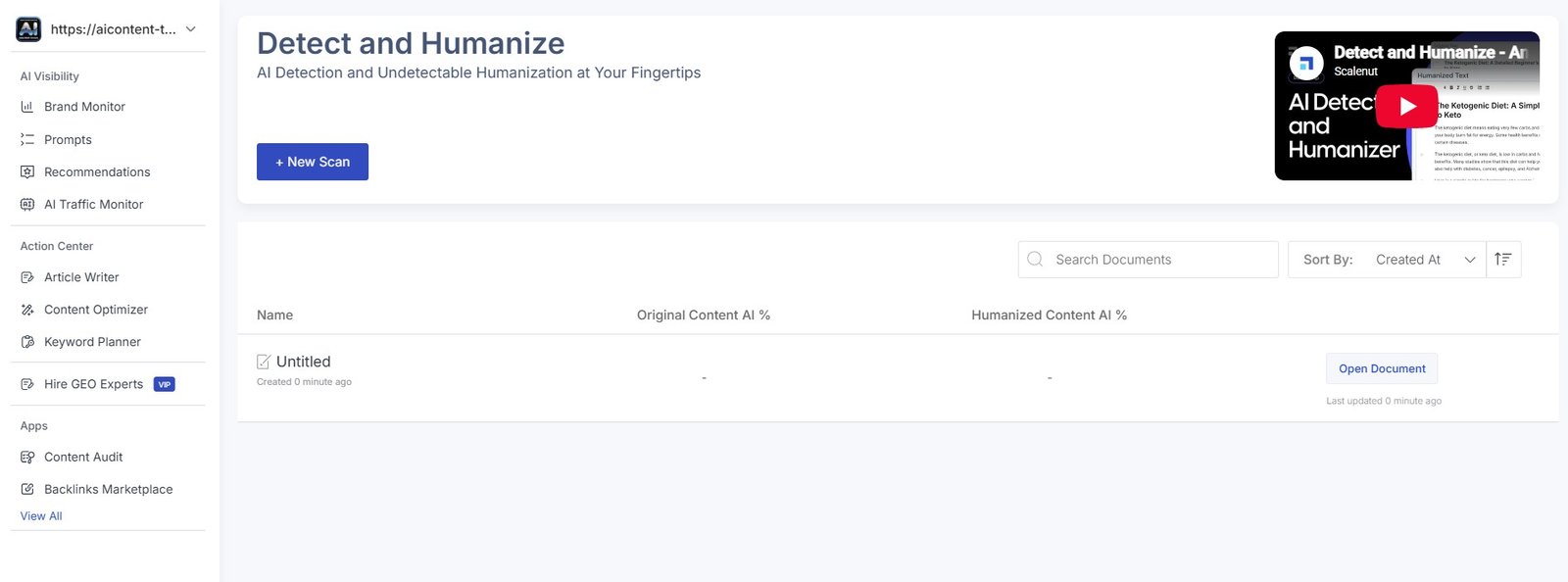
The interface is much simpler than some of Scalenut’s SEO and GEO dashboards.
This was actually something I noticed during my wider Scalenut testing. Some parts of the platform contain a lot of statistics, rankings, competitor data, and visibility metrics. Detect and Humanize is much easier to understand: add text, check it, and decide whether to humanize it.
How I Tested the Scalenut AI Humanizer
I wanted a clear before-and-after result, so I used the same piece of text for both stages.
Result #1: The Original Text Scored 81% AI
First, I tested the original sample without using the Humanizer.
Scalenut classified it as 81% AI.
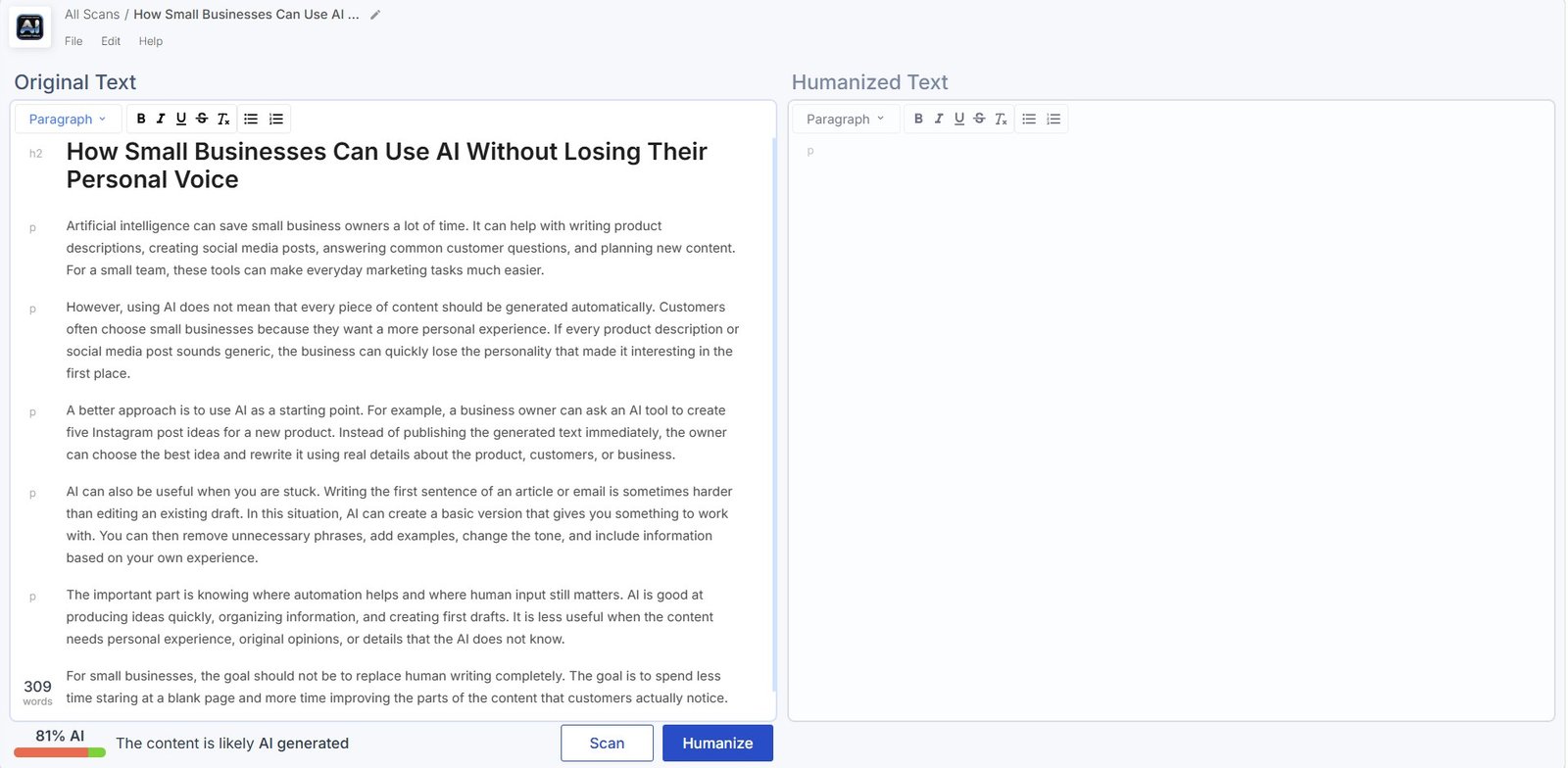
My observation: this gave me a useful baseline. Instead of simply humanizing some text and saying the result “felt better,” I had a number from before the rewrite that I could compare with the result afterward.
Result #2: Humanized Text Scored 15% AI
Next, I used Scalenut’s Humanize feature on the same content.
When I checked the rewritten version, the AI score had dropped to 15%.
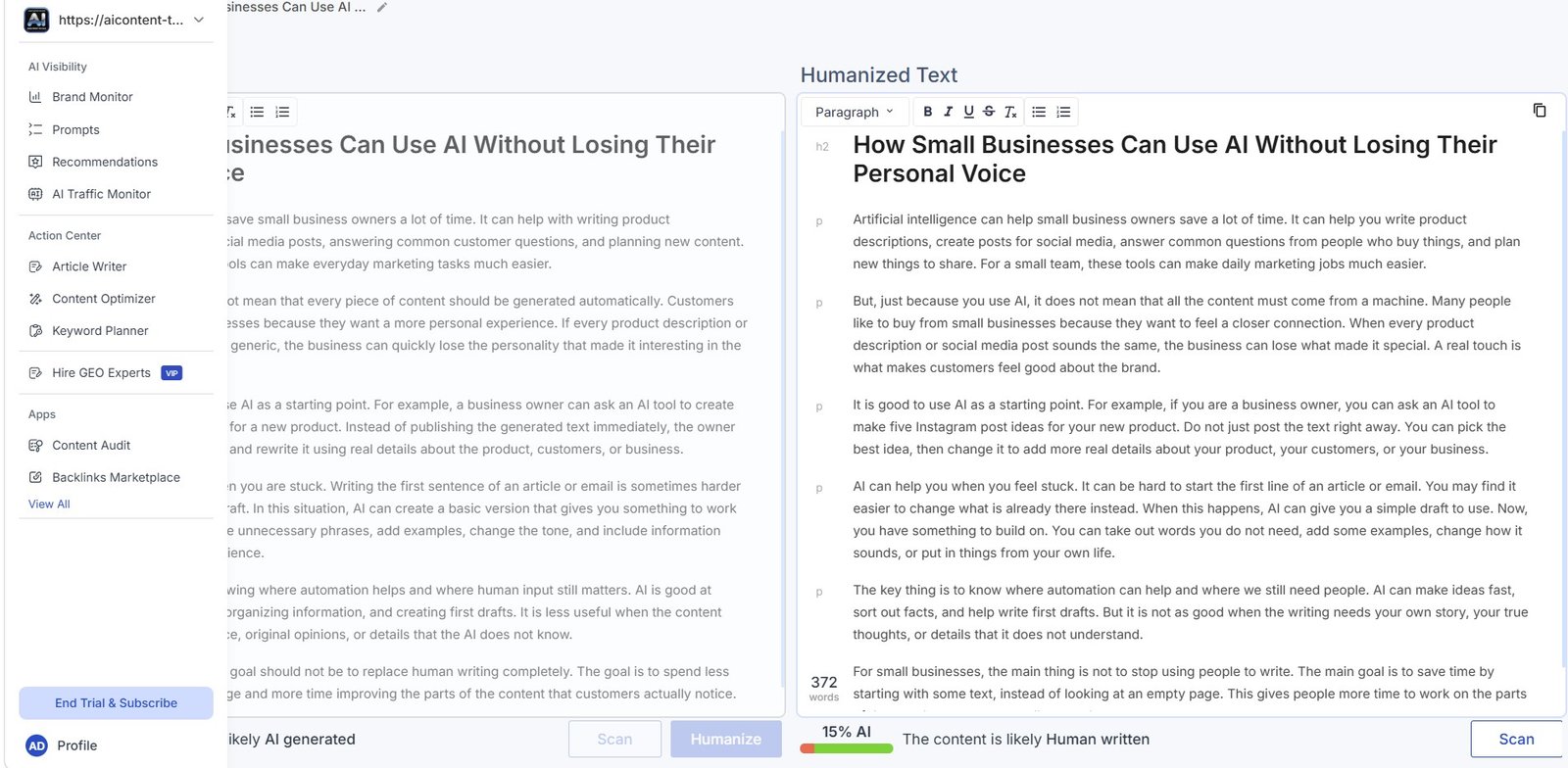
Test result: in this example, Scalenut’s Humanizer reduced the score in Scalenut’s own detector by 66 percentage points.
That is a large difference, and it shows that the Humanizer made changes significant enough to affect Scalenut’s detection result.
But there is an important limitation here.
Does 15% AI Mean the Text Is Really Human?
No. I would not interpret the result that way.
An AI detector gives an estimate. It does not know with certainty whether a human or an AI wrote a piece of text.
Different detectors can also produce different results for the same text.
Important: my test shows that Scalenut changed its own detection result from 81% AI to 15% AI. It does not prove that every other AI detector would give the same score.
This distinction matters because it is easy to turn a good before-and-after result into a much stronger claim than the test supports.
What I can say is simple:
The Humanizer worked well against Scalenut’s own detector in this test.
I Also Checked a Full Scalenut-Generated Article
I did not only use Detect and Humanize on a short sample.
During my separate Scalenut AI Article Writer test, I generated a complete beginner article about Etsy product descriptions.
After creating that article, I also ran the full generated content through Scalenut’s Detect and Humanize workflow.
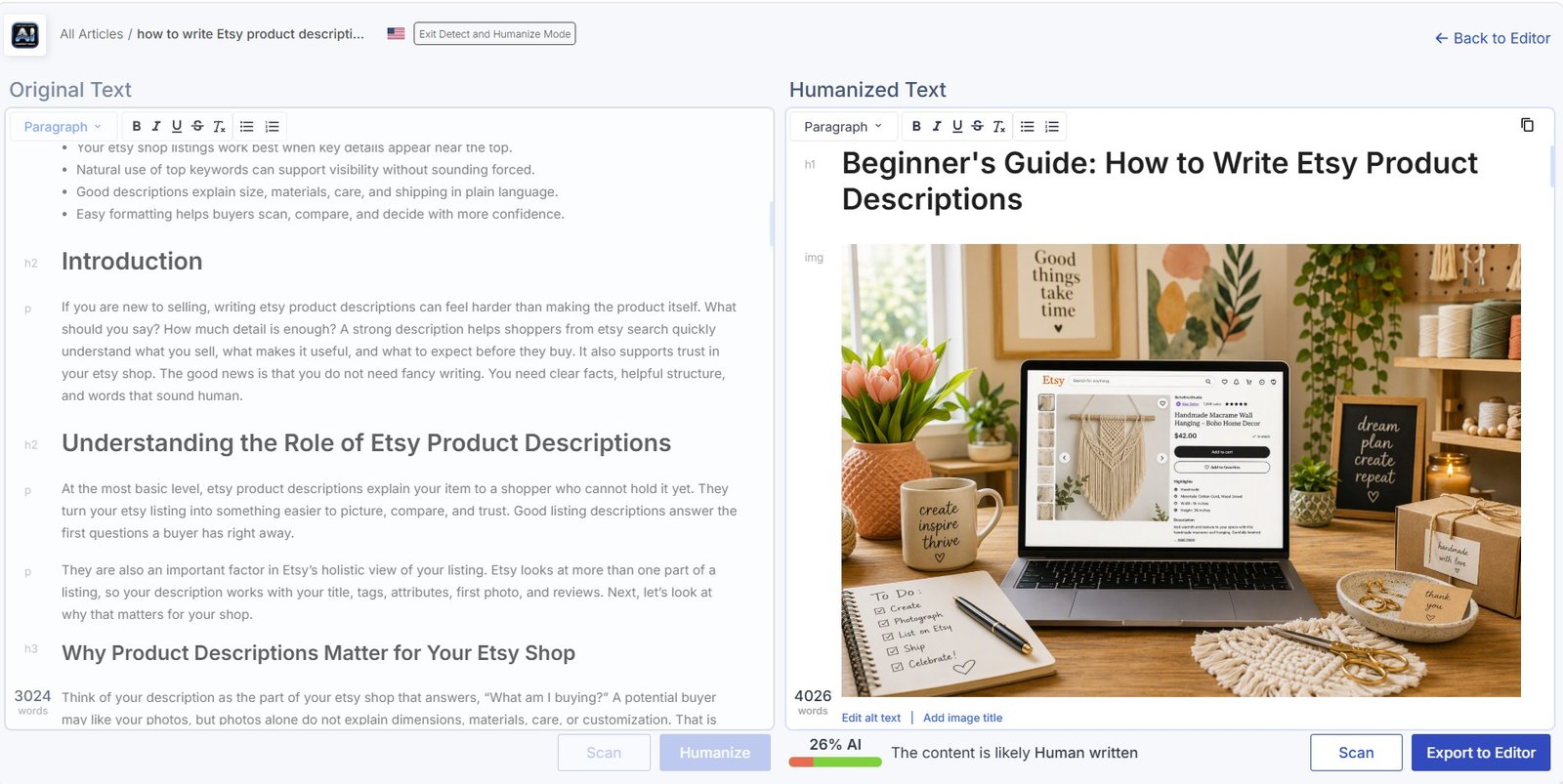
I like this second test because it is closer to a real use case.
A blogger is more likely to care about a complete article than a short artificial sample.
Why I tested both: short samples are useful for a controlled before-and-after comparison. A full article tells us more about how the feature fits into an actual content workflow.
Is the Humanizer Easy to Use?
Yes. This was one of the easier Scalenut features I tested.
You do not need to understand SEO metrics, citation shares, visibility scores, competitor rankings, or NLP data.
The basic workflow is clear:
- paste your text;
- check the AI score;
- humanize the text;
- review the rewritten version;
- check the result again.
That simplicity is a nice contrast with the more advanced areas of Scalenut.
When I first explored the platform, I felt overloaded by the amount of data and analysis in some dashboards. Those tools may be useful for more advanced SEO and GEO work, but Detect and Humanize felt much more direct.
What Should You Check After Humanizing Text?
I would not stop when the AI percentage goes down.
The more important question is whether the rewritten text is actually better.
After using any AI humanizer, I would check:
- whether the meaning stayed the same;
- whether important details disappeared;
- whether sentences sound natural;
- whether the tool added unnecessary words;
- whether the tone still fits your audience;
- whether factual claims remain correct;
- whether the text still sounds like your brand.
A lower AI score is not automatically an improvement. If a humanizer makes clear writing awkward just to change sentence patterns, I would rather keep the clearer version.
Can Scalenut Humanizer Replace Editing?
I do not think so.
The Humanizer can give you another version of a text, but it cannot decide whether the content contains enough experience, useful examples, original research, or accurate information.
This is especially important for blog content.
For AIContent-Tools, for example, I would still want to add real screenshots, test results, observations, comparisons, and limitations. A Humanizer cannot create that evidence for us.
It changes the wording. It does not make generic content original.
Scalenut Humanizer vs Manual Editing
| Scalenut Humanizer | Manual editing |
|---|---|
| Can rewrite a large amount of text quickly | Takes more time |
| Can change sentence structure automatically | You decide exactly what should change |
| Reduced Scalenut’s AI score in my test | Does not give you an automatic score change |
| May change wording you already liked | You can protect your own voice more carefully |
| Useful as an extra editing pass | Better for facts, meaning, tone, and original insight |
For me, the best approach is not really Humanizer versus editing.
It is Humanizer plus editing.
What I Liked and Didn’t Like
What I liked
- The workflow is very simple.
- I could test text before and after humanization.
- The AI score changed significantly in my test.
- The 81% → 15% result was easy to compare.
- The tool sits inside the same platform as Scalenut’s Article Writer.
- It can be useful as an additional editing step.
What I would be careful about
- The result came from Scalenut’s own detector.
- Other AI detectors may disagree.
- A low AI score does not prove human authorship.
- Humanization does not add original experience.
- The rewritten version still needs review.
- Optimizing only for an AI detector can distract from writing quality.
Who Is Scalenut AI Humanizer For?
I think this feature makes the most sense for people who already use AI during their writing process and want a quick extra editing step.
That could include:
- bloggers;
- freelance writers;
- content teams;
- small business owners;
- people using Scalenut’s AI Article Writer;
- writers who want to compare text before and after rewriting.
I would not use it simply because I believe every piece of AI-assisted content needs to “beat” an AI detector.
The better reason to use a Humanizer is to see whether it can make stiff or repetitive AI writing more natural.
What I Would Like to Test Next
The 81% to 15% result is interesting, but there are a few extra tests that could make the picture stronger.
I would like to compare the same original and humanized text in several independent AI detectors.
That would answer a different question:
Does Scalenut’s Humanizer only reduce the score in Scalenut, or does the change also appear in other detection tools?
I would also compare the actual writing before and after humanization sentence by sentence. That would help show what Scalenut changes to produce the lower score.
For now, I would not invent that conclusion. The evidence from this test supports the 81% → 15% result inside Scalenut. A cross-detector comparison would need a separate test.
My Verdict
The result was impressive, but the number needs context
Scalenut’s AI Humanizer produced a clear result in my test.
The original sample scored 81% AI. After humanization, the rewritten version scored 15% AI.
That is enough for me to say that the Humanizer made a meaningful difference to Scalenut’s own AI detection result.
What I would not say is that the text became “undetectable” or that 15% proves it was human-written. The test does not support those claims.
I see the Humanizer as a useful extra editing tool, especially if you already use Scalenut for long-form content. But I would still judge the final text by clarity, accuracy, usefulness, and how natural it sounds — not only by the detector percentage.