ChatGPT Memory used to sound like a small feature. But in 2026, it is one of the most important parts of how ChatGPT becomes more personal.
It can help ChatGPT remember your writing style, your projects, your preferences, and useful details from previous chats. This means you do not need to explain the same thing again and again.
But memory can also be confusing. Is it the same as Custom Instructions? Does ChatGPT remember everything? Can you delete it? Is it private?
This guide explains ChatGPT Memory in simple English, with real examples.
Table of Contents
Quick Answer
ChatGPT Memory is OpenAI’s personalization layer for ChatGPT.
In plain English, it helps ChatGPT remember useful things about you and use them in future chats.
For example, if you often write blog posts for beginners, ChatGPT can remember that and answer in a simpler, more helpful style next time.
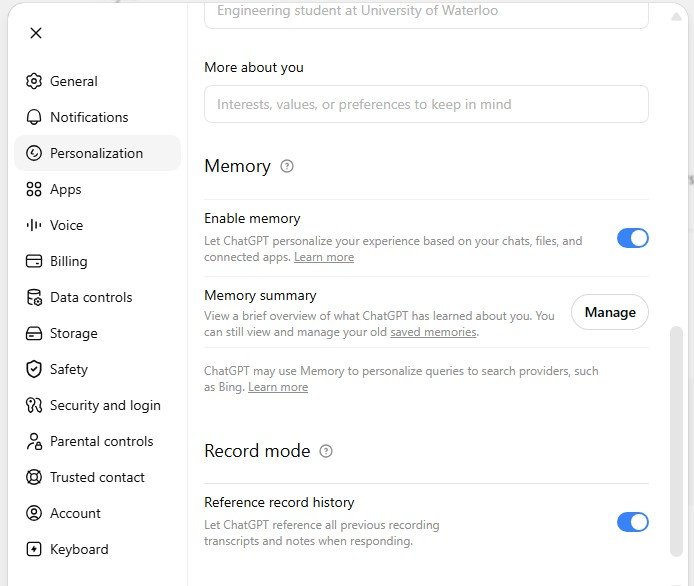
What ChatGPT Memory Actually Is
ChatGPT used to feel a little forgetful.
You would explain your writing style on Monday, your project on Tuesday, and your audience again on Friday.
Memory is OpenAI’s answer to that problem.
When memory is enabled, ChatGPT can remember useful context from your chats, files, and connected apps. Future replies can feel more relevant and less repetitive.
One of my favorite moments with ChatGPT Memory happened completely by accident. When I first started using ChatGPT, every writing prompt included the same instructions: use simple English, write short paragraphs, avoid difficult words, and explain things with practical examples. I repeated those rules almost every day. Then, one day, I opened a new chat and realized ChatGPT was already writing that way without me asking. It remembered the style I liked. Since then, writing prompts has become much faster because I can focus on the topic instead of repeating the same instructions every time. For me, that is one of the biggest benefits of ChatGPT Memory.
The easiest way to understand it
- The context window is ChatGPT’s desk. It holds what is in front of the model right now.
- Custom Instructions are your standing house rules.
- Saved memories are sticky notes you or ChatGPT keep for later.
- Reference chat history is the broader layer that helps ChatGPT use useful details from past chats.
- The memory summary is your review panel. It is not a full raw dump of everything.
This distinction matters because each layer has a different job.
If something must always matter, put it in Custom Instructions or ask ChatGPT to remember it. If something is temporary, like a trip plan or one short project, normal chat history may be enough.
| Layer | What it does | Best use |
|---|---|---|
| Context window | Temporary working memory for the current chat. | Ongoing conversation flow. |
| Custom Instructions | Explicit rules you write yourself. | Tone, format, recurring preferences. |
| Saved memories | Durable facts you want ChatGPT to keep until deleted. | Role, diet, writing style, long-term preferences. |
| Reference chat history | Uses relevant past chats to personalize future answers. | Ongoing projects, recurring interests, evolving goals. |
Simple memory flow
Caption: Simple model of how personalization layers feed future ChatGPT replies.
How ChatGPT Memory Works in 2026
Memory has changed a lot since the first version.
At first, many users thought memory meant only one thing: “ChatGPT saves facts about me.”
In 2026, it is broader than that. ChatGPT can use saved memories, chat history, files, connected apps, and memory sources depending on your settings and plan.
Saved memories launch.
Reference chat history expands memory beyond explicit saves.
Better retrieval of details from past chats, with sources.
New memory architecture focused on freshness and continuity.
Business, Enterprise, and Edu memory improvements roll out.
Caption: High-level timeline of ChatGPT Memory’s evolution.
My simple explanation
Old memory felt more like a list of notes.
New memory feels more like a profile that updates over time.
That is helpful, but it also means you should review it from time to time.
Saved Memories vs Chat History vs Custom Instructions
This is where many people get confused.
ChatGPT Memory is not the same thing as Custom Instructions. It is also not the same thing as the current chat.
Best for things you want ChatGPT to remember for a long time.
Example: “I write for beginner readers.”
Best for ongoing context from previous chats.
Example: ChatGPT remembers you are working on a website project.
Best for direct rules.
Example: “Use short paragraphs and simple English.”
Best for the current conversation only.
Example: The article draft you pasted today.
Best practical rule
If it is a permanent preference, save it as memory or put it in Custom Instructions.
If it is only useful for this one task, keep it in the current chat.
Real Use Cases and Best Prompts
The biggest benefit of memory is convenience.
You can get better answers without repeating your full background every time.
Use case 1: Writing style
If you always want short paragraphs, beginner-friendly language, and real examples, memory can help keep that style across chats.
Use case 2: Checking what ChatGPT remembers
This is one of the best habits. Ask ChatGPT what it remembers, then correct anything outdated.
Use case 3: Updating old preferences
Sometimes your preferences change. Tell ChatGPT clearly what to replace.
Use case 4: Better product recommendations
Important note
These are not magic prompts.
They work because they are clear. They tell ChatGPT what to remember, what to forget, or what to check.
A Quick Note for Developers
If you build with the OpenAI API, do not assume ChatGPT’s consumer memory feature exists automatically inside your app.
In the API, conversation state is something you usually manage yourself. You may use conversation objects, previous response IDs, or your own long-term memory store.
from openai import OpenAI
import json

client = OpenAI()

# Your app's durable user profile, stored on your side
user_profile = {
    "role": "content marketer",
    "audience": "beginners",
    "style_preferences": ["simple English", "practical examples", "short paragraphs"]
}

conversation = client.conversations.create()

def ask_chatgpt(user_input: str) -> str:
    system_note = (
        "Use this user profile as long-term context when relevant: "
        + json.dumps(user_profile)
    )

    response = client.responses.create(
        model="gpt-5.5",
        conversation=conversation.id,
        input=[
            {"role": "system", "content": system_note},
            {"role": "user", "content": user_input}
        ]
    )

    return response.output_text

print(ask_chatgpt("Draft an intro for a beginner SEO article."))
This is not ChatGPT’s built-in memory feature.
It is an app-level memory pattern. You keep durable user notes yourself, then inject them into a stateful API conversation when helpful.
What ChatGPT Memory Cannot Do
Memory is useful, but it is not perfect.
Common misunderstandings
- Memory does not mean ChatGPT remembers everything.
- The memory summary is not always a full list of every detail.
- Reference chat history can change over time.
- Deleting a chat does not always delete saved memory.
- Turning memory off does not automatically remove old memories.
This is why “I turned memory off” and “ChatGPT forgot everything about me” are not the same sentence.
They sound similar. They are not.
How to fully remove something
If you want to remove something from memory, check all the places where that information may exist:
- Saved memories
- Original chats
- Uploaded files
- Connected apps
- Custom Instructions
My opinion
Memory is powerful, but users need to treat it like a profile.
You would not ignore your public bio, your resume, or your account settings for years. Memory deserves the same kind of review.
Privacy and Security Considerations
Privacy is the part many people care about most. And they should.
If you share sensitive information with ChatGPT, some of it may become part of the personalization context, depending on your settings and the product version you use.
Safe habit
Do not put highly sensitive data into ordinary chats unless you truly need it there.
If you want a session that does not use existing memory and does not create new memory, use Temporary Chat.
Temporary Chat
Temporary Chat is useful when you want a cleaner session.
It is especially helpful for one-time questions, sensitive topics, or experiments you do not want mixed into future personalization.
Training controls
Training settings also matter.
On personal accounts, users should check Data Controls and memory settings. For business products, data handling may be different from personal plans.
Security risk: connected apps
Memory becomes more powerful when it can work with files and connected apps.
But that also means users should be careful with what they connect, what they upload, and what they allow ChatGPT to reference.
Future Outlook for 2026
The direction is clear.
ChatGPT Memory is not only becoming “bigger.” It is becoming more layered, more source-aware, and more connected to long-term work.
What I expect next
The future of memory will probably not be one giant memory box.
It will likely be a layered system:
- Account memory
- Project memory
- App memory
- File memory
- Safety and privacy controls
This matters for normal users, but also for businesses.
A student, a creator, a developer, and a company team do not need the same kind of memory. They need different boundaries.
FAQ
No. ChatGPT Memory does not mean every detail from every chat is permanently remembered.
No. Custom Instructions are direct rules you write. Memory carries forward relevant details from conversations and related context.
Not always. Saved memories can be stored separately from chat history, so deleting a chat may not remove the saved memory.
Often, yes. Memory sources may show which memories, chats, files, instructions, or connected apps helped personalize the answer.
You may need to delete it from saved memories, original chats, files, connected apps, and Custom Instructions.
Yes, if you want more personalized answers and you are comfortable reviewing your settings. No, if you prefer every chat to stay separate.
Suggested Internal Reading
Learn hidden tricks, better prompts, and advanced ways to use ChatGPT.
Understand how to organize long-term work inside ChatGPT Projects.
A practical guide to writing better prompts for useful AI answers.
Learn how to use AI without making your writing sound robotic.
Useful External Sources
| Source | Why it is useful |
|---|---|
| OpenAI Memory FAQ | Best official source for memory settings, deletion rules, and privacy controls. |
| OpenAI Memory and New Controls | Original product announcement about memory and user controls. |
| OpenAI Dreaming Research Post | Explains the newer memory architecture and why memory is becoming more dynamic. |
| OpenAI Data Controls FAQ | Helpful for understanding training controls and Temporary Chat. |
| OpenAI API Conversation State Docs | Useful for developers who want to understand API state vs ChatGPT product memory. |
Final Thought
ChatGPT Memory is useful when you control it.
Use it for your style, projects, and long-term preferences. Review it regularly. Delete what is outdated. And use Temporary Chat when you want a clean, one-time conversation.
That is the simple way to get the benefits of memory without losing control.