ChatGPT models can feel confusing. There are Instant models, Thinking models, Pro models, mini models, nano models, API models, and older legacy models.
The easiest answer is this: most people should start with GPT-5.5. Use GPT-5.5 Instant for simple daily help. Use GPT-5.5 Thinking for deeper work. Use GPT-5.5 Pro only when the task is very hard and accuracy matters more than speed.
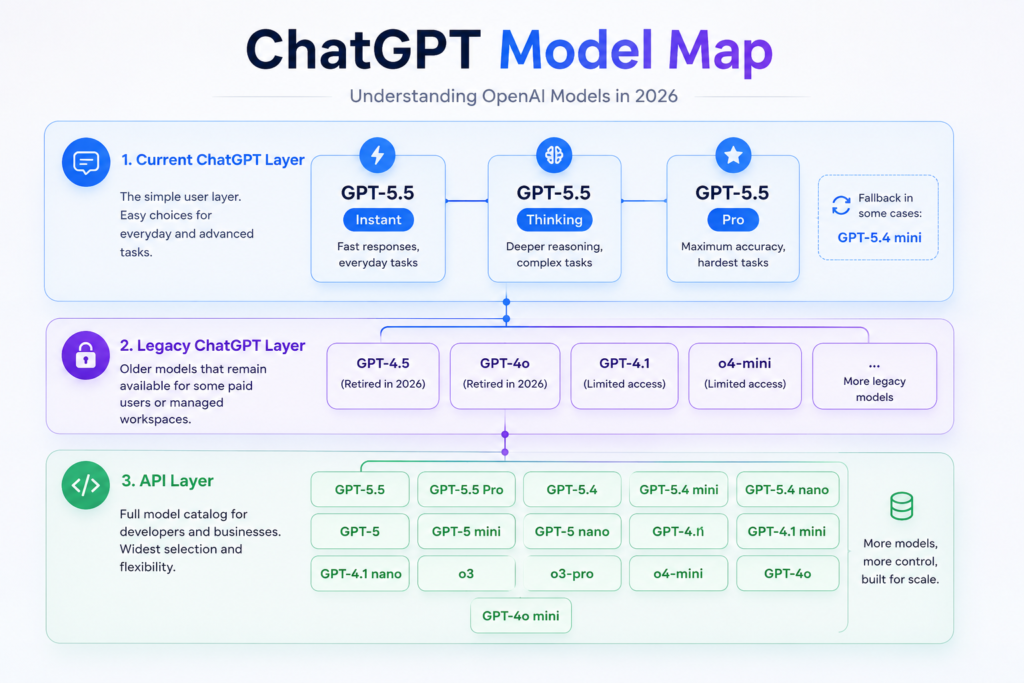
ChatGPT Model Map
OpenAI’s 2026 model story has three layers.
This is the simple user layer. It is led by GPT-5.5 Instant, GPT-5.5 Thinking, and GPT-5.5 Pro.
Some older models may still appear for some paid users or managed workspaces, depending on plan and settings.
This layer is much larger. It includes model families that may no longer be normal choices inside ChatGPT.
For most ChatGPT users, the main choice is simple: Instant for fast daily work, Thinking for serious work, and Pro for the hardest work.
OpenAI Model Timeline
This simple timeline shows the biggest model changes from 2024 to mid-2026.
Model Comparison Table
This table gives a simple practical view. It mixes ChatGPT context limits and API context limits because not every model is available in the same place.
| Model | Best for | Cost tier | Speed | Simple note |
|---|---|---|---|---|
| GPT-5.5 Instant | Daily chat, quick drafts, simple help | Low to medium | Fast | Best default model for normal ChatGPT users. |
| GPT-5.5 Thinking | Research, coding, math, harder writing | Medium | Medium to slow | The best serious-work choice for most paid users. |
| GPT-5.5 Pro | Very hard work, long professional tasks | Very high | Slowest | Powerful, but too much for simple tasks. |
| GPT-5.4 mini | Fast coding, subagents, cheaper API work | Medium | Fast | A strong value model when speed and cost matter. |
| GPT-5.4 nano | Classification, extraction, ranking | Very low | Very fast | Good for utility tasks, not deep reasoning. |
| GPT-4.1 | Long documents, tool use, instruction following | High | Medium | Useful when you want long context without reasoning delay. |
| o3 | Deep reasoning, science, math, visual work | Medium | Slow | Strong older reasoning model, but not the simple default. |
| GPT-4o mini | Cheap multimodal utility work | Very low | Fast | Still useful in API workflows, but older than GPT-5 mini paths. |
Quick Pros and Cons
Pros: Fast, clean answers, strong default.
Cons: Less deep than Thinking or Pro.
Pros: Better for hard tasks and complex thinking.
Cons: Slower than Instant.
Pros: Best for difficult, high-value work.
Cons: Expensive, slow, and often overkill.
How to Choose the Right Model
Choose GPT-5.5 Instant. It is great for simple questions, emails, outlines, summaries, and quick drafts.
Choose GPT-5.5 Thinking. It is better for research, coding, planning, hard writing, and problem solving.
Choose GPT-5.5 Pro. Use it when mistakes are expensive or the task is very complex.
Try GPT-5.4 mini or GPT-5.4 nano. These are better for fast, high-volume workflows.
What Really Changes Between Models?
1. Thinking power
The first big difference is how deeply the model thinks. GPT-5.5 Thinking and Pro are better for multi-step work. Instant is better when you want speed.
2. Context window
The second difference is how much information the model can hold at once. This matters when you upload long documents, codebases, research notes, or policy files.
3. Speed and cost
The third difference is speed and budget. Stronger models usually cost more and can be slower. Smaller models are better when you need many quick tasks.
4. Tools and access
ChatGPT access and API access are not the same. A model can exist in the API but not appear in your ChatGPT picker. Your plan, workspace settings, and legacy access can change what you see.
5. Safety rules
Newer and stronger models may also have stricter guardrails in sensitive areas. This is normal. More powerful models need stronger safety controls.
Which Model Should You Choose?
Use GPT-5.5 Instant first. It is fast and good enough for most daily tasks.
Use GPT-5.5 Thinking for explanations, research, math, coding, and longer study help.
Start with GPT-5.5 for hard coding. Test GPT-5.4 mini when cost and speed matter.
Use GPT-5.5 Instant for simple team work and GPT-5.5 Thinking for reports, analysis, and proposals.
Use GPT-5.5 Thinking as the main serious-work model. Save GPT-5.5 Pro for the hardest tasks.
Start strong, test quality, then move down to cheaper models only when results are still good.
FAQ
What is the best ChatGPT model for most people in 2026?
For most people, the best choice is GPT-5.5 Instant for daily work and GPT-5.5 Thinking for harder work.
Is GPT-5.5 Pro worth it?
Yes, but only for difficult, high-value tasks. It is powerful, but it is slower and more expensive than normal models.
Which model is best for coding?
Start with GPT-5.5 if quality matters most. Try GPT-5.4 mini if you need a cheaper and faster coding model.
Are older models still available?
Some older models may still be available in the API or in legacy settings, but they are not the simple default choice for most ChatGPT users.
Is ChatGPT access the same as API access?
No. ChatGPT plans and API access are different. The API has a wider model catalog, different prices, and different technical limits.
Suggested Internal Links
- ChatGPT vs Claude vs Gemini for content teams
- Best AI tools for long-form blog writing
- How to prompt ChatGPT for SEO articles
- AI content workflow for agencies and freelancers
- ChatGPT API pricing explained for beginners
Bottom Line
If you are writing a 2026 buying guide, the advice should be simple: choose GPT-5.5 unless you have a clear reason not to.
Move down to GPT-5.4 mini or GPT-4.1 mini for cheaper and faster work. Move up to GPT-5.5 Pro only when the task is difficult enough to justify slower speed and higher cost.