
Scalenut Brand Monitor was one of the most interesting — and initially one of the most overwhelming — parts of my Scalenut test.
Instead of helping you write an article, it tries to show how visible your brand is inside AI-generated answers.
I tested it using AIContent-Tools as the brand.
The result was not flattering. In the initial report, AIContent-Tools showed 0% visibility and appeared at rank #46.
That actually made the test more useful. Rather than giving me another dashboard full of positive-looking numbers, Scalenut showed that our site had very little visibility for the prompts it was tracking.
Scalenut Brand Monitor gives you much more than a simple “your brand was mentioned” report. I could inspect competitors, prompts, citations, individual AI responses, query fanouts, sentiment, and citation data.
The downside is that the amount of information can feel overwhelming. I see this feature as more useful for someone doing advanced SEO/GEO work than for a beginner who simply wants to know whether ChatGPT mentions their website.
What I Tested
I used Scalenut’s Brand Monitor with AIContent-Tools rather than testing it with a large brand that was already likely to appear everywhere.
I think this was a better test than using a company that already dominates search results and AI answers. A smaller site makes it easier to see what the tool does when there is not much visibility to report.
Scalenut First Generated Themes and Prompts
During setup, Scalenut suggested themes and prompts related to AIContent-Tools.
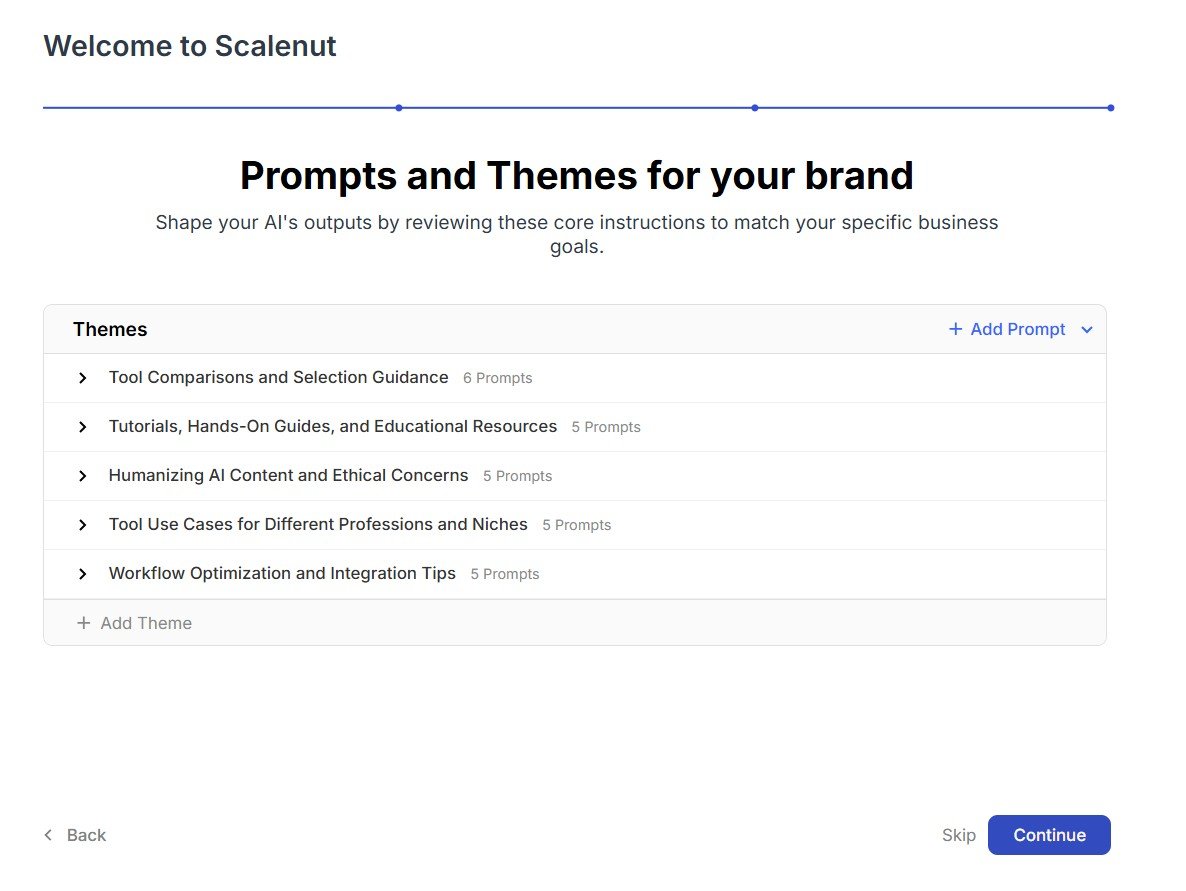
This is an important part of the feature because Brand Monitor needs questions to track.
In our case, Scalenut created topics related to areas such as AI tool comparisons, tutorials, AI humanization, use cases, and workflow optimization.
My observation: I would review these themes carefully. If the prompts are not relevant to the type of searches where you actually want your brand to appear, the final visibility score becomes much less useful.
Then Scalenut Scanned AI Platforms
After setup, Brand Monitor started scanning AI engines for mentions.
This is where the feature moves beyond normal SEO rank tracking.
Instead of asking only where your page ranks in Google, the idea is to ask whether AI systems include your brand in their answers and which sources they cite.
My Initial Result: 0% Visibility and Rank #46
The first main dashboard gave me a very clear result.
AIContent-Tools had 0% visibility and appeared at rank #46.
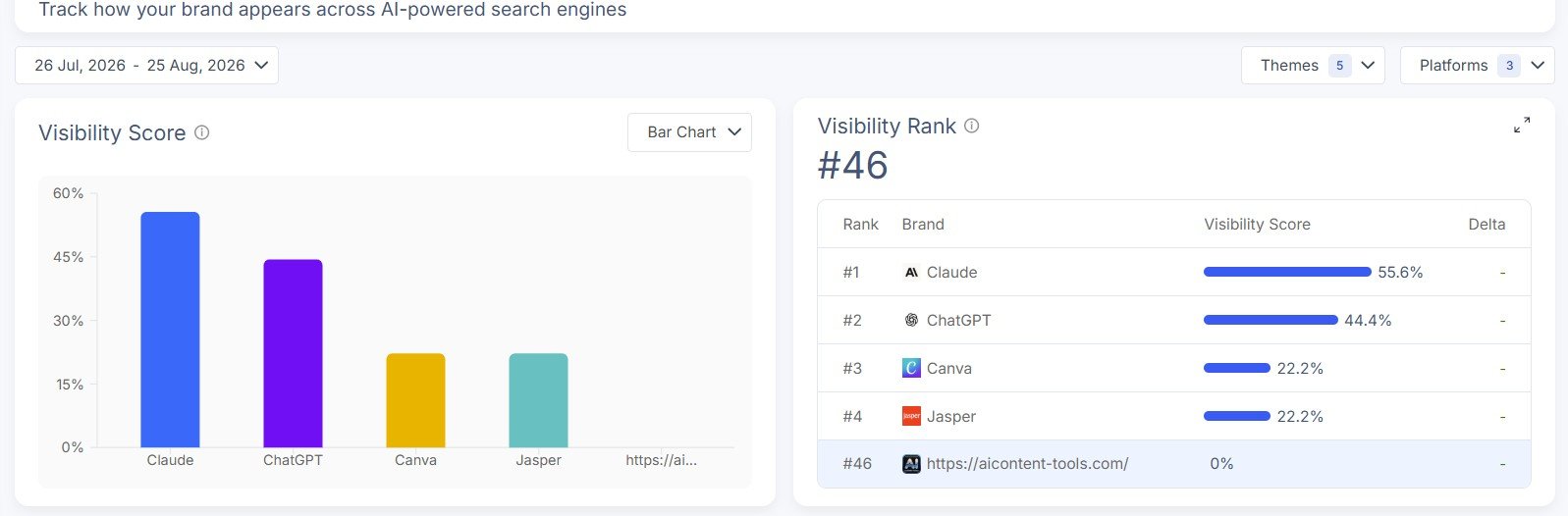
Test result: Scalenut did not tell us our brand was performing well. It showed the opposite.
I actually like this result from a review perspective because it gives us something useful to measure later.
If we improve AIContent-Tools and repeat the same test in the future, we can see whether visibility changes.
But I would not treat one visibility score as a complete measure of a website’s success. It depends on the prompts being tracked, the AI platforms included, the timing of the scans, and how the tool calculates visibility.
The Visibility Heatmap Makes Competitors Easy to Compare
Scalenut also showed a visibility heatmap comparing multiple brands.
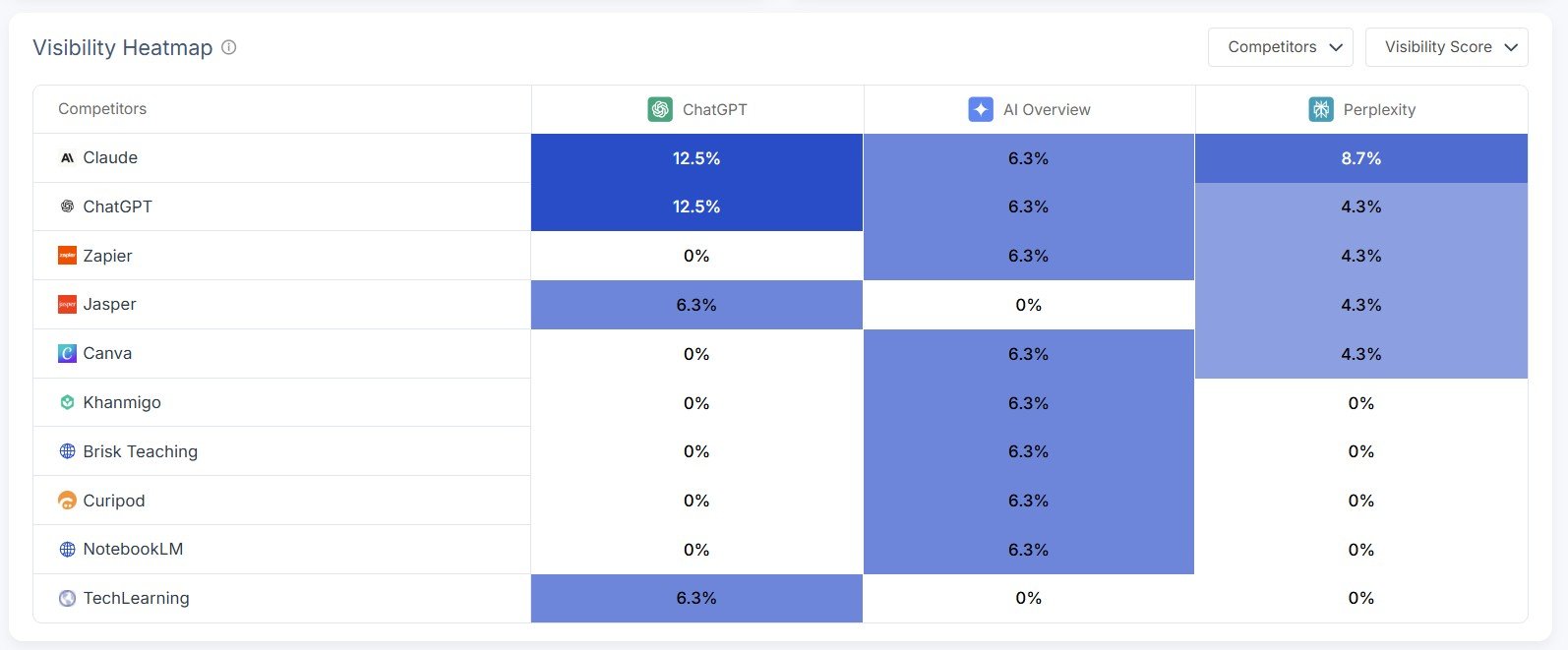
This was easier for me to understand than some of the more detailed reports.
You can quickly see that some brands appear much more often than others across the monitored AI platforms.
For competitive research, this could be useful because it gives you a starting point for asking:
- Which competitors appear regularly?
- Which platforms mention them?
- Where is my brand missing?
- Which companies seem strongest for a particular topic?
You Can Also See Rankings by Theme
Scalenut breaks visibility down further by theme.
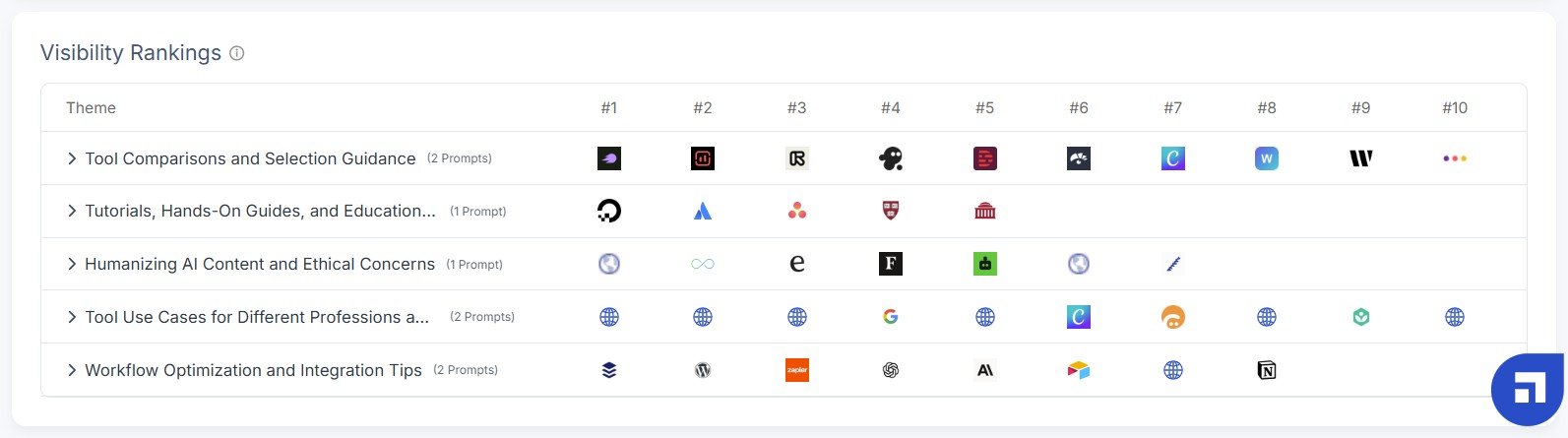
I think this is more useful than having one overall score.
A site can be weak overall but still appear for one specific topic. Likewise, a well-known company may dominate some themes and be almost absent from others.
This is where Brand Monitor starts to become more useful for advanced content strategy. Instead of only asking “Are we visible?”, you can start asking “For which topics are we visible?”
Prompts Insights Shows the Questions Being Tracked
The Prompts Insights dashboard goes deeper into individual questions.
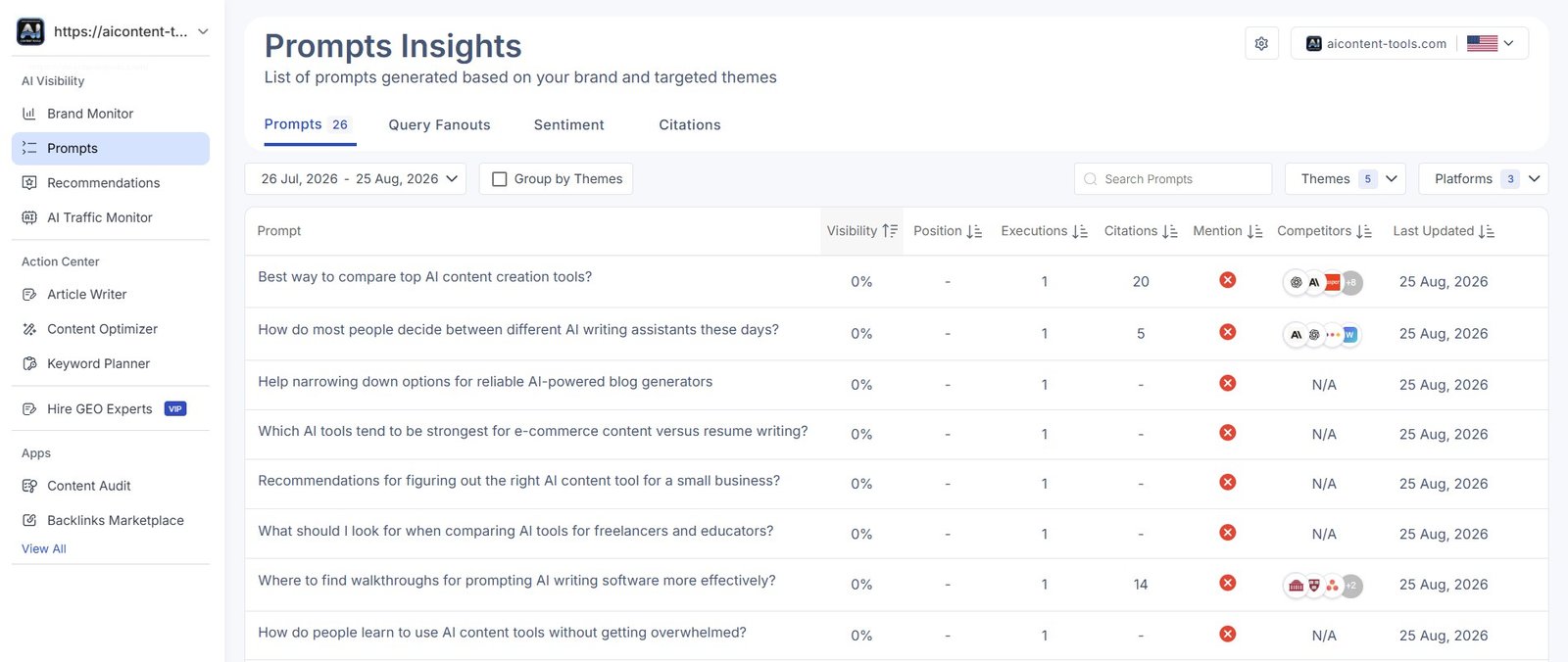
This is one of the sections where I started to feel overloaded by the amount of information.
There are many columns and metrics, including visibility, position, executions, citations, brand mentions, competitors, and update dates.
For someone who manages AI visibility professionally, that level of detail may be useful.
For a beginner, it can be difficult to know which number deserves attention first.
You Can Open a Single Prompt and Inspect the Response
Scalenut does not stop at summary metrics.
I could open an individual prompt and inspect its visibility result, AI responses, mentions, and citations.
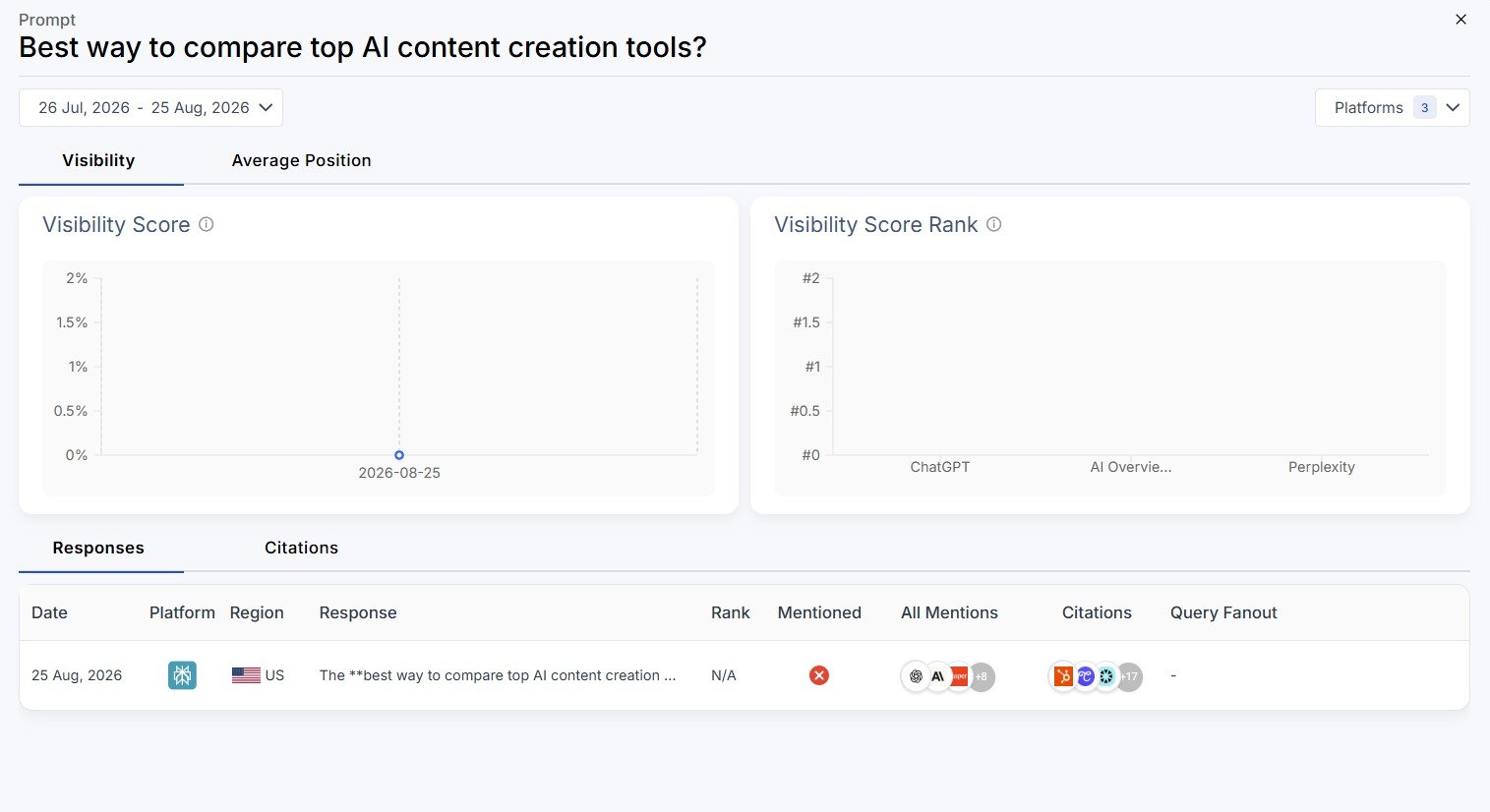
This part is much more actionable than a single percentage.
If your brand is missing, you can inspect what the AI actually answered and which competitors or sources appeared instead.
I Checked a Perplexity Response Where We Were Not Mentioned
One of the detailed executions showed a Perplexity response for a prompt about AI writing prompt tutorials.
AIContent-Tools was not mentioned.
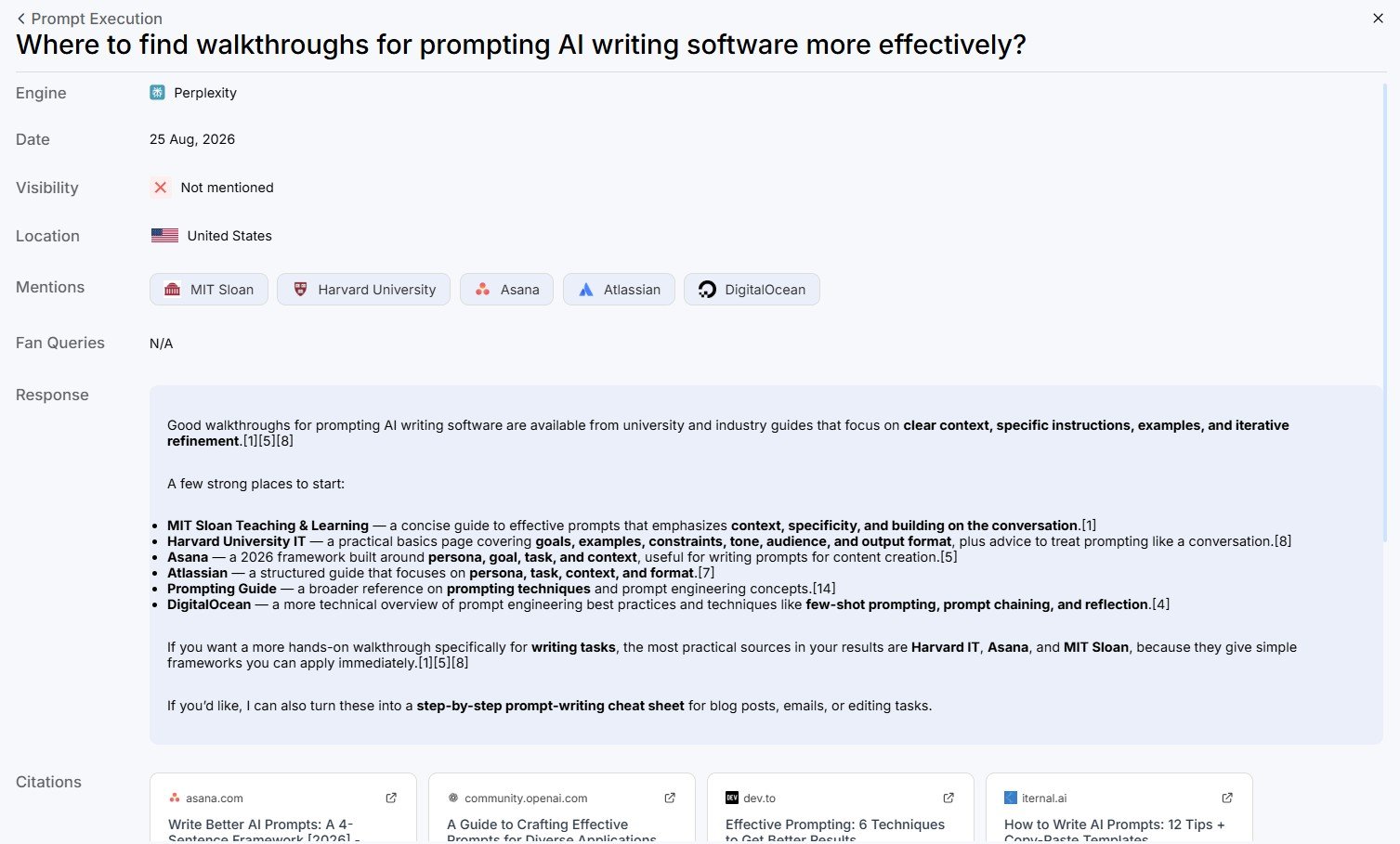
This is more useful than simply seeing “0%.” I can see what type of answer Perplexity produced and which sources or brands appeared instead of us.
That gives us ideas for further content research.
It does not automatically tell us how to get included, but it helps identify where the gap exists.
Query Fanouts Show Related AI Searches
Another section showed what Scalenut calls Query Fanouts.
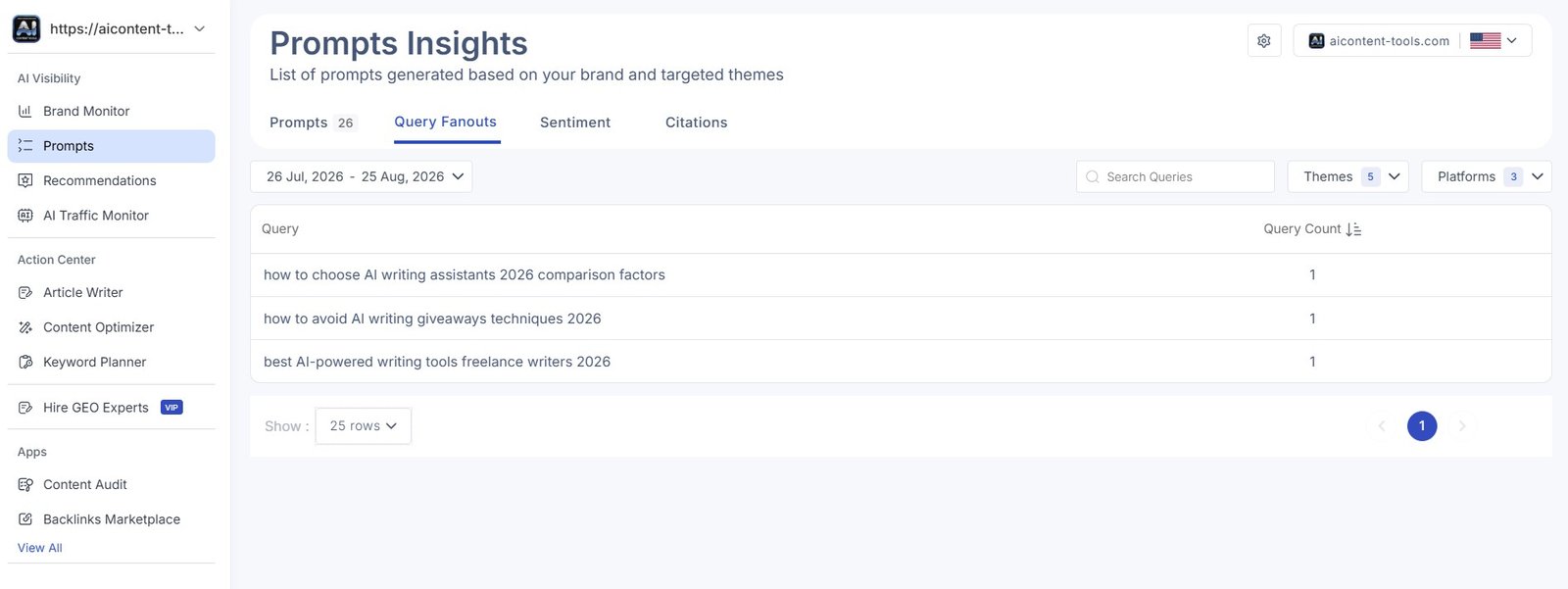
This included related searches around AI writing assistants, tools for freelance writers, and similar topics.
I can see potential value here for content planning.
Instead of treating one prompt as one isolated question, you can see related questions that may represent the same wider topic.
I would still avoid turning every query into a new article. Several related questions may belong on one strong page rather than five thin posts.
Scalenut Also Includes Sentiment Analysis
The Sentiment tab was another surprising part of the tool.
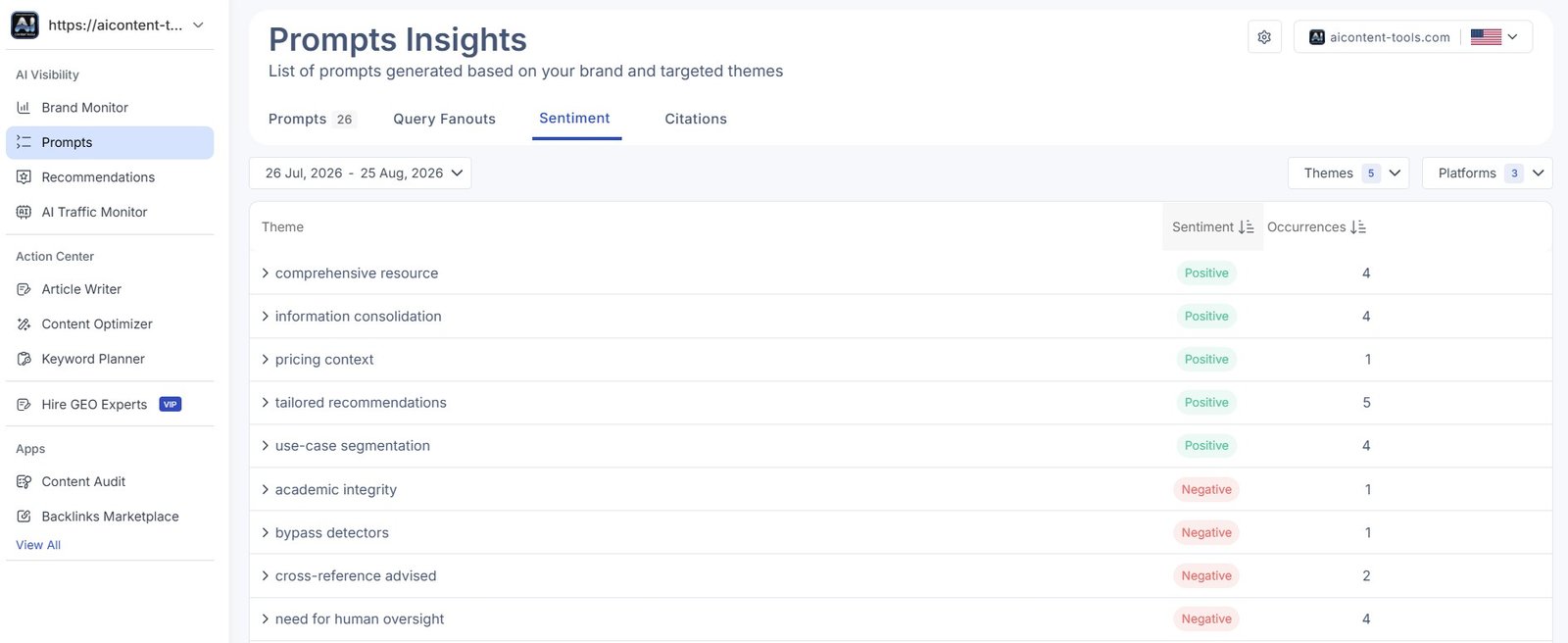
Instead of only tracking whether brands appear, Scalenut also tries to show the themes associated with AI responses.
For a business with many mentions, this could help answer a more interesting question:
When AI systems mention our category or brand, what are they actually saying?
For our small-site test, I found this less immediately useful than the basic visibility and citation information, but I can see why larger brands may care about it.
Citation Tracking Shows Which Sources AI Uses
The Citations dashboard adds another layer.
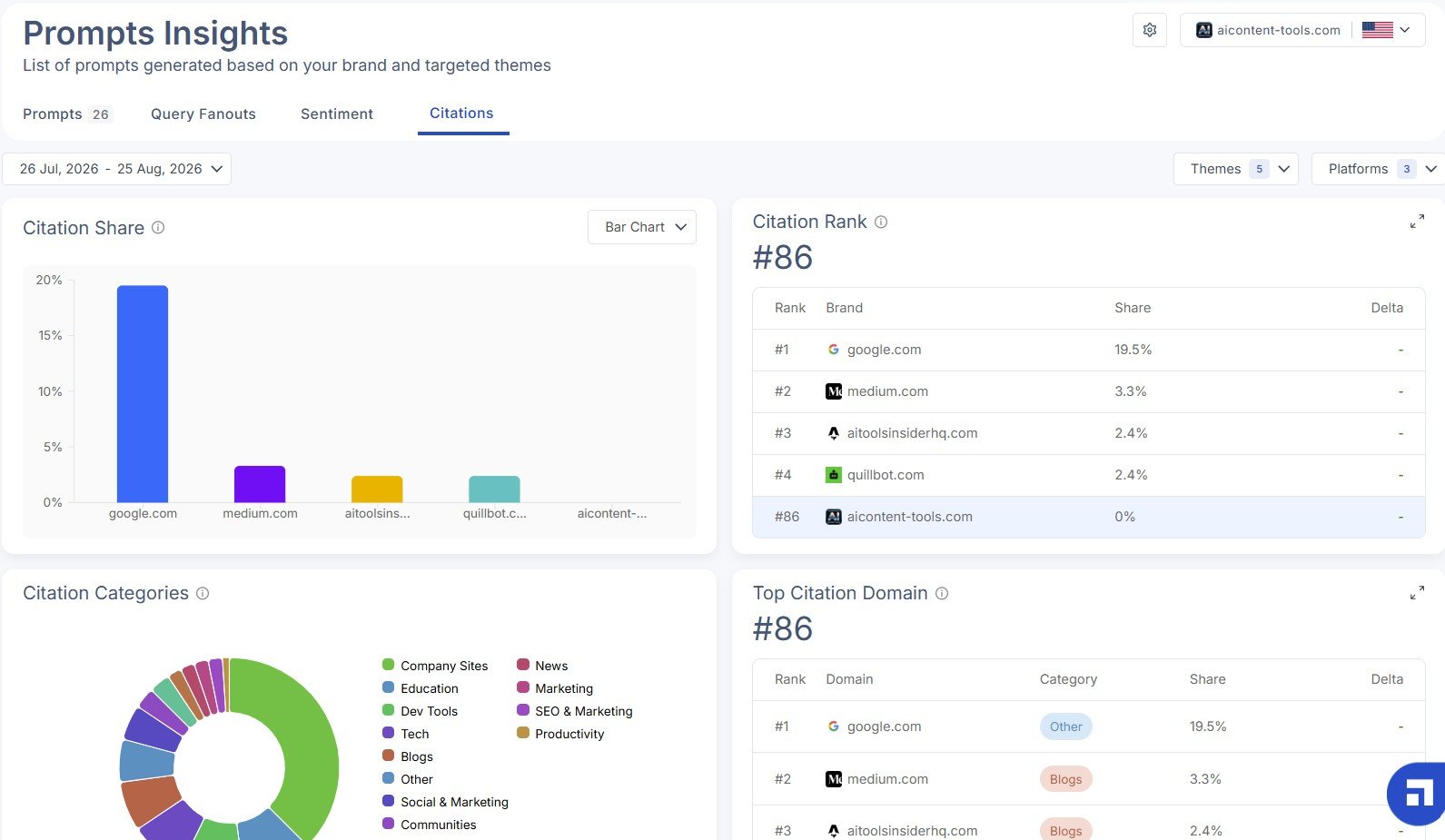
In this part of my test, AIContent-Tools showed 0% citation share and was ranked #86 in the citation report.
Again, this was not a positive result for our site, but it was useful information.
Brand mentions and citations are also not exactly the same thing.
An AI answer may mention a company without linking to its website. Or it may use a website as a source without making the brand a major part of the answer.
I like that Scalenut separates these ideas. “Are we mentioned?” and “Are we being used as a source?” are two different questions.
What Scalenut Brand Monitor Actually Tracks
Is All This Data Actually Useful?
This was the biggest question I had while testing Brand Monitor.
My first reaction to Scalenut in general was that there were a lot of statistics and analyses.
Brand Monitor is probably the clearest example.
You can move from:
visibility → rankings → themes → prompts → executions → citations → competitors → fanouts → sentiment → citation share.
That is powerful, but it is also easy to lose track of what you are trying to learn.
| If you are… | My view |
|---|---|
| AI/SEO beginner | The amount of data may feel overwhelming. Start with visibility, prompts, and citations. |
| Blogger or small site owner | Useful for occasional research, but you may not need every report. |
| SEO/content strategist | The competitor, prompt, and citation data becomes much more useful. |
| Large brand or agency | Tracking many themes, competitors, and AI responses may justify the deeper dashboards. |
I would not optimize for every metric. The goal is not to make every dashboard green. The useful question is whether the data helps you discover content gaps, stronger sources, missing brand visibility, or topics where competitors consistently appear.
What Could I Actually Do With These Results?
Our result was poor, so the useful next step is not to celebrate a score. It is to decide what we can learn from it.
For AIContent-Tools, I would use this data to:
- identify prompts where relevant competitors are mentioned but we are missing;
- inspect which pages and domains AI systems cite;
- look for topics where we already have relevant content but are not being surfaced;
- compare our topical coverage with frequently mentioned sites;
- improve existing pages where the search intent clearly matches;
- add original tests, screenshots, examples, and evidence that make our content worth citing;
- repeat the same monitoring later and see whether anything changes.
I would not automatically create a new article for every prompt or Query Fanout.
That would risk turning useful research into duplicate or weak content.
Scalenut Brand Monitor vs Traditional Rank Tracking
| Traditional SEO rank tracking | Scalenut Brand Monitor |
|---|---|
| Tracks positions in search results | Tracks visibility inside AI-generated responses |
| Usually focuses on keywords | Focuses heavily on prompts and themes |
| Shows competing ranking pages | Shows competing brands inside AI answers |
| Measures search ranking position | Includes visibility, mentions, citations, and AI response data |
| Useful for Google SEO | Designed more around AI search / GEO monitoring |
I would not see these as replacements for each other.
Traditional SEO data still tells you something different. Brand Monitor adds another layer for people who care about how AI-generated answers surface brands and sources.
What I Liked and Didn’t Like
What I liked
- It showed a real negative result instead of vague marketing data.
- The visibility heatmap makes competitor differences easy to see.
- You can inspect individual AI answers.
- Citation sources are visible.
- Prompts can be analyzed separately.
- Query Fanouts can reveal related questions.
- Mentions and citations are treated as different metrics.
- The data could be useful for advanced content strategy.
What I didn’t like
- There is a lot of information to process.
- Beginners may not know which metric matters.
- One overall visibility score needs context.
- Not every prompt or related query deserves action.
- Some reports felt more advanced than I personally needed for basic site management.
- The tool can encourage you to focus on dashboards instead of content quality.
Who Is Scalenut Brand Monitor Best For?
After testing it, I would not call Brand Monitor an essential feature for every blogger.
I think it makes more sense for:
- SEO professionals;
- content strategists;
- agencies managing multiple brands;
- larger websites with strong topical coverage;
- companies actively tracking competitors;
- brands that care about visibility in ChatGPT, Perplexity, AI search, and similar environments.
A smaller blogger may still find it interesting, especially for competitor and citation research.
But if you are new to SEO, I would first focus on creating useful content, building topical coverage, improving existing pages, and publishing real evidence. The advanced visibility dashboards can come later.
Is Scalenut Brand Monitor Beginner-Friendly?
The interface itself is not impossible to use.
The harder part is understanding what to do with all the information.
This matches my wider experience with Scalenut.
When I first entered the platform, I felt overloaded by the number of statistics, analyses, rankings, and dashboards. Later, when I moved to the Scalenut AI Article Writer, the workflow felt much more comfortable and straightforward.
Brand Monitor sits on the more advanced side of that spectrum.
For beginners, I would simplify it: start with the prompts being tracked, check whether your brand appears, inspect who appears instead, and look at the sources being cited. Ignore the rest until you have a reason to use it.
My Verdict
Useful advanced data, but probably more than many beginners need
Scalenut Brand Monitor gave me a much deeper view of AI visibility than I expected.
I could see visibility scores, competitor rankings, themes, prompts, full AI responses, citation sources, Query Fanouts, sentiment, and citation data.
Our own result was poor: AIContent-Tools showed 0% visibility and rank #46 in the initial visibility report, while the citation dashboard later showed 0% citation share and rank #86.
I do not see that as a problem with the test. It gave us a baseline and showed where competitors currently appear instead.
My main hesitation is complexity.
For advanced SEO, GEO, agencies, or brands actively measuring AI visibility, I can see real value here. For a beginner running a small website, much of the dashboard may be more information than you need.
I would use Brand Monitor as a research and monitoring tool — not as a reason to chase every score or create content for every prompt it discovers.