You find a job that looks perfect.
You open your resume. You look at the job post. Then you feel that stress.
Should you change your summary? Add different skills? Rewrite your bullet points? Start again?
Many people stop here. Not because they are lazy. Because tailoring a resume for every job takes time, and when you are already tired from job searching, that extra work feels heavy.
I know this feeling well. When I was testing AI tools for career content, I saw the same problem again and again. People had a decent resume, but they kept sending the same version everywhere. Then they wondered why there were no interviews. In many cases, the problem was not experience. The problem was matching the resume to the job.
That is where AI can really help.
In this guide, I will show you how to tailor your resume with AI for each job step by step. You will learn how to save time, match the right keywords, and create a resume that feels stronger and more focused. Not fake. Not overdone. Just better for the job you want.
If you are building your full career toolkit now, also read Best AI Resume Builders in 2026. It will help you choose the right tools before you start.
Why tailoring your resume matters in 2026
Today, many companies use ATS. ATS means Applicant Tracking System. It is software that scans resumes before a human reads them.
This does not mean you need to trick the system. It means your resume should clearly show that you fit the job.
A generic resume often says too much about everything and not enough about the role in front of you.
A tailored resume does something better:
- it matches the job title more closely
- it uses the same important skill words
- it shows the most relevant wins first
- it makes life easier for the recruiter
I have seen this in practice many times. A person can have good experience, but if their resume says “general marketing tasks” while the job ad says “email campaigns, A/B testing, reporting, and automation,” the fit looks weaker than it really is.
AI helps you close that gap faster.
What AI can do when you tailor a resume
AI is very useful for:
- pulling out keywords from a job post
- helping rewrite bullet points
- adjusting your summary for a specific role
- finding skills you forgot to mention
- turning messy experience into cleaner resume language
But AI should not invent things. It should improve what is already true.
That is the rule I always follow:
Use AI to clarify, not to lie.
Before you start: what you need
Before tailoring your resume with AI, prepare these 3 things:
1. Your base resume
This is your main resume with your real experience, education, skills, and projects.
2. The job description
Copy the full job post into a document. Do not use only the title.
3. One AI tool
You can do this with ChatGPT, but career tools can make it easier too. For example, Rezi AI is useful for resume building, and Teal can help you organize jobs and track changes across applications.
Step 1: Read the job post like a recruiter
Do not start rewriting your resume right away.
First, read the job ad slowly and ask:
- What is the main goal of this role?
- Which skills are repeated?
- Which tools are mentioned more than once?
- What kind of results does this company want?
For example, imagine the job says:
“Looking for a marketing coordinator with experience in email campaigns, analytics, campaign reporting, and cross-functional teamwork.”
The repeated ideas are:
- email campaigns
- analytics
- reporting
- teamwork
These are not random words. They are signals. They show what matters most.
TIP:
Paste the job description into AI and ask:
“List the most important skills, tasks, and keywords from this job description. Group them by hard skills, soft skills, and responsibilities.”
This gives you a cleaner view before you change anything.
Step 2: Find the keywords that matter most
Keywords are important words and phrases from the job post. They often include:
- job title
- software names
- technical skills
- industry terms
- action words like manage, analyze, create, support, lead
You do not need to copy every word. You need to notice which ones truly match your background.
Let’s say you are applying for a customer support role. The ad mentions:
- ticketing systems
- customer satisfaction
- issue resolution
- CRM
- communication
If your resume only says “helped customers,” that is too weak. It is true, but too broad.
AI can help turn that into something stronger, like:
“Resolved customer issues through CRM and ticketing tools while maintaining strong satisfaction scores.”
That sounds more specific and closer to the job.
TIP:
Ask AI:
“Which 10 keywords from this job description should appear naturally in my resume if they are true for my experience?”
The phrase “if they are true” is very important. It keeps the result honest.
Step 3: Match your resume summary to the job
Your resume summary is one of the first things a recruiter sees. It should not stay the same for every application.
A weak summary:
“Motivated professional with strong skills and experience in many areas.”
This says almost nothing.
A tailored summary:
“Detail-oriented marketing assistant with experience in email campaigns, campaign reporting, and content support. Comfortable working with cross-team projects and fast deadlines.”
This version is clearer. It sounds closer to the role.
When I tested resume prompts, this was one of the fastest wins. A better summary often changed the whole tone of the resume.
Example
Let’s say you are applying to 2 different jobs:
Job 1: Social media coordinator
Job 2: Content writer
You may have the same background, but the summary should shift.
For social media:
“Creative marketing professional with experience planning social content, tracking engagement, and supporting brand campaigns.”
For content writing:
“Content-focused writer with experience creating blog posts, editing website copy, and writing clear reader-friendly content.”
Same person. Different focus.
TIP:
Ask AI:
“Rewrite my resume summary for this job. Keep it simple, natural, and based only on the experience below.”
Then paste your real experience under it.
Step 4: Rewrite bullet points to fit the role
This is where AI saves the most time.
Most people have bullet points that are too general. They say things like:
- helped with projects
- worked with team members
- supported daily tasks
These lines are not wrong, but they are weak.
A better bullet point shows:
- what you did
- how you did it
- what result happened
For example:
Before:
“Helped with social media posts.”
After:
“Created and scheduled social media posts for weekly campaigns, helping improve consistency and audience engagement.”
Another one:
Before:
“Answered customer questions.”
After:
“Responded to customer questions by email and chat, solved common issues quickly, and supported a positive customer experience.”
These are much better because they sound real and useful.
A mistake I often see
Some people let AI rewrite everything into corporate language that sounds too big and unnatural.
For example:
“Spearheaded dynamic cross-functional initiatives to optimize operational excellence.”
This sounds impressive, but many recruiters are tired of this style. It feels inflated. Inflated means made to sound bigger than it really is.
Simple and clear is usually stronger.
TIP:
Ask AI:
“Rewrite these bullet points for this job. Use simple language, keep them truthful, and focus on relevance, action, and results.”
Step 5: Change the order of your experience
You do not always need to rewrite everything. Sometimes you just need to move things.
If the job cares most about reporting, analytics, and dashboards, those bullet points should appear first in your most relevant role.
If the job cares most about customer communication, then client-facing wins should come first.
This small change helps the recruiter see your fit faster.
I have seen resumes improve a lot just from changing order. Same person. Same experience. Better presentation.
Example
For a project coordinator job, put these first:
- tracked deadlines
- organized tasks
- updated reports
- worked with teams
For a writing job, put these first:
- wrote blog posts
- edited website pages
- followed SEO briefs
- improved readability
TIP:
Ask AI:
“Based on this job description, which bullet points from my experience should come first, second, and third?”
Step 6: Add missing skills you really have
Sometimes the job ad includes skills you do have, but they are hidden in your experience and not listed clearly.
This happens a lot.
Maybe you used Google Sheets every day, but never added it to your skills section.
Maybe you worked with clients, but never wrote “client communication.”
Maybe you tracked performance, but never said “reporting” or “analytics.”
AI is very good at spotting these missing but real skills.
Real example
A person applying for an admin role had experience with:
- scheduling
- email support
- calendar management
- document updates
But the resume did not clearly say:
- administrative support
- coordination
- time management
- communication
Those words were true. They were just hidden.
After adding them naturally, the resume looked much stronger.
TIP:
Ask AI:
“What relevant skills from this job description already appear in my experience, even if I did not name them clearly?”
Step 7: Adjust your skills section for the role
Your skills section should not be random.
It should reflect the role you want now.
If you are applying for a data-focused role, move Excel, reporting, dashboards, and analysis higher.
If you are applying for a content role, move writing, editing, SEO, CMS, and research higher.
This part is simple, but important. Recruiters scan fast.
Good rule:
Put the most relevant skills first. Do not hide them at the bottom.
TIP:
Ask AI:
“Reorganize my skills section for this job. Put the most relevant skills first and remove anything not useful.”
Step 8: Check for ATS match without stuffing keywords
Keyword stuffing means forcing too many keywords into the resume in an unnatural way.
That is not the goal.
You want clear matching, not awkward repetition.
Bad example:
“Experienced in communication, customer communication, team communication, written communication, verbal communication.”
This feels spammy and weak.
Better example:
“Handled customer questions by email and chat, worked with team members on issue resolution, and maintained clear communication across support tasks.”
Same theme. Much more natural.
TIP:
Ask AI:
“Check if my resume matches this job description well for ATS, but keep the wording natural and not repetitive.”
Step 9: Create one tailored version for each job type
You do not need to build every resume from zero.
This is one of the biggest mistakes job seekers make.
Instead, create 2–4 master versions based on job type.
For example:
- Content Writer Resume
- Marketing Resume
- Customer Support Resume
- Project Coordinator Resume
Then tailor each version a little more for specific jobs.
This saves a lot of time.
When I look at resume workflows, this is usually the best balance between speed and quality. You stay organized, and you do not feel like every application is a full rewrite.
Tools like Teal are helpful here because they let you manage different job applications in one place.
TIP:
Ask AI:
“Help me create a master resume version for this job type that I can reuse later.”
Step 10: Review everything like a human
This final step matters more than people think.
AI can help a lot, but you still need to read the result and check:
- Does this sound like me?
- Is everything true?
- Is the wording clear?
- Are there any weird phrases?
- Does it feel too robotic?
I always recommend reading the final version out loud. If something sounds strange when you say it, fix it.
Also check for overuse of words like:
- led
- managed
- responsible for
- results-driven
- dynamic
These words are not always bad, but too many make the resume feel generic.
TIP:
Use this final prompt:
“Review this resume for clarity, honesty, job match, and natural tone. Point out anything that sounds vague, repetitive, or unnatural.”
Simple step-by-step resume tailoring workflow with AI
Here is the full process in a short version:
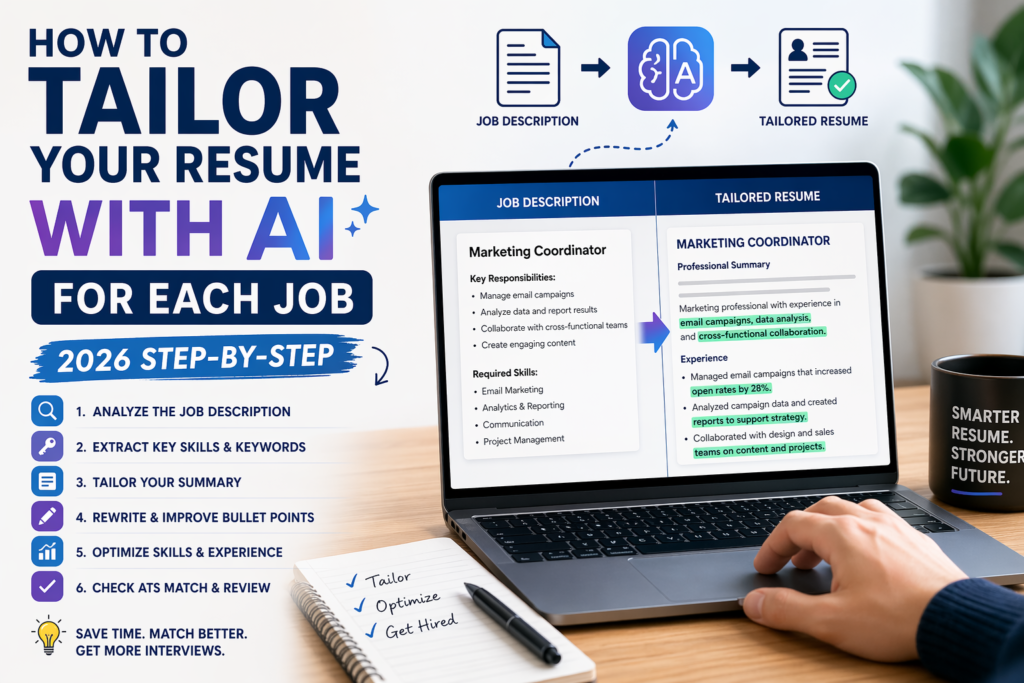
| Step | What to do | What AI helps with |
|---|---|---|
| 1 | Read the job post | Find main skills and keywords |
| 2 | Pull key terms | Show what matters most |
| 3 | Rewrite summary | Match the role better |
| 4 | Improve bullet points | Make experience clearer |
| 5 | Reorder experience | Put relevant wins first |
| 6 | Add real missing skills | Spot hidden strengths |
| 7 | Adjust skills section | Make fit easier to see |
| 8 | Check ATS match | Keep language natural |
| 9 | Save master versions | Apply faster next time |
| 10 | Human review | Remove robotic wording |
Best prompts to tailor your resume with AI
Here are some prompts you can copy and use.
Prompt 1: Extract the main job needs
“Read this job description and list the most important skills, tasks, and keywords. Show me what the employer seems to care about most.”
Prompt 2: Rewrite my summary
“Rewrite my resume summary for this job. Use simple language. Keep it natural. Only use true information from my background.”
Prompt 3: Improve bullet points
“Rewrite these resume bullet points for this job. Make them more specific and relevant, but do not invent experience.”
Prompt 4: Find missing skills
“Compare my resume with this job description and show me which important skills I have but do not mention clearly.”
Prompt 5: Final review
“Review my tailored resume for ATS match, clarity, natural tone, and truthfulness. Show me what to improve.”
If you want more career-focused help, you can also explore our career content here: Best AI Tools by Profession in 2026.
What not to do when tailoring your resume with AI
Let’s keep this practical.
Do not:
- copy the job post word for word
- let AI invent fake results
- make every line sound too formal
- send the same resume to 50 jobs
- trust AI without checking the final text
One bad habit I see often is adding big numbers that are not real just because AI suggested them. For example:
“Improved performance by 45%”
If you cannot support that number, do not use it.
It is better to say:
“Helped improve response speed and workflow organization.”
That is honest. And honesty matters.
Is AI resume tailoring worth it?
Yes, if you use it the right way.
AI will not get the job for you by itself. But it can help you:
- work faster
- notice what employers want
- say your experience more clearly
- build stronger versions of your resume
- stay more consistent across applications
For many people, that means better applications with less stress.
And when job searching already feels exhausting, that is a big win.
Final thoughts
Tailoring your resume used to feel like a slow and annoying task.
Now it can be much easier.
With AI, you do not need to rewrite everything from the beginning every time. You just need a smart process. Start with the job post. Pull the right keywords. Rewrite your summary. Improve your bullet points. Reorder what matters. Then review it like a real person.
That is the part that works.
If you want help choosing resume tools before you start, read Best AI Resume Builders in 2026. If you want a tool-specific walkthrough, my guide on how to use Rezi AI is a good next step.