People may already be finding your brand in AI search. But here is the problem: you may not see it clearly in your normal SEO reports.
A reader can ask ChatGPT for the best AI writing tools. Another person can ask Perplexity which websites explain AI Overviews tracking. Someone else can see your article inside Google AI Overviews.
If you only check classic Google rankings, you may miss a big part of the picture. That is why AI search visibility is becoming important in 2026.
I started thinking about this problem as a small website owner. I could see impressions in Google Search Console. I could see some pages moving up or down. But the bigger question was different:
Is my brand showing up where people now ask questions?
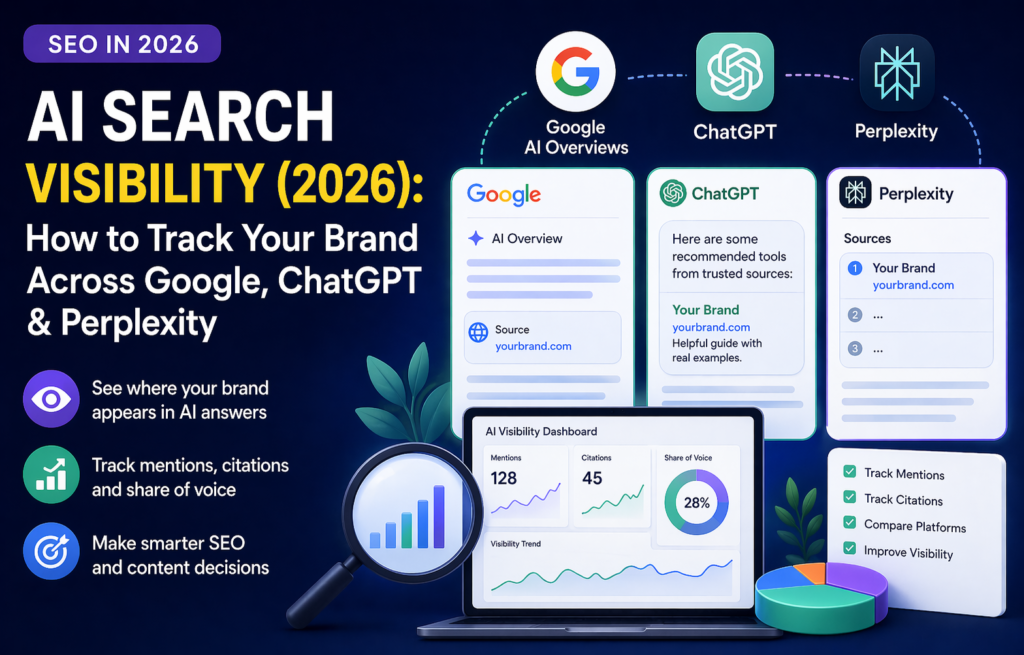
That is what AI search visibility means. It is not only about ranking number 3 or number 8 in Google. It is about whether your brand, your website, or your content appears inside AI answers.
In this guide, I will show you a simple system to track your brand across Google, ChatGPT, and Perplexity. You do not need a big company or expensive tools on day one. You need a clean process.
Simple idea: classic SEO tracks rankings and clicks. AI search visibility tracks mentions, citations, competitors, and prompts.
What Is AI Search Visibility?
AI search visibility means how often your brand, website, article, product, or content appears inside AI-generated answers.
This can happen in a few different ways:
- Google AI Overviews may cite your page.
- ChatGPT may mention your brand.
- ChatGPT search may link to your article.
- Perplexity may use your page as a source.
- Another website may mention your brand, and AI tools may use that third-party page.
This is different from classic SEO.
A prompt is the question a person asks an AI tool. For example, instead of searching only for “best AI writing tools,” a person may ask:
What are the best AI writing tools for bloggers in 2026?
That small change matters. AI tools answer questions, compare options, and summarize sources. So your tracking system must follow real questions, not only keywords.
Mention vs Citation: The Difference Matters
When you track AI search, separate mentions from citations.
Mention
A mention is when AI names your brand, but does not link to your website.
Citation
A citation is when AI links to your page or uses your article as a visible source.
Both are useful. But citations are usually stronger because they can send traffic and show that your page is being used as a source.
My rule: a mention is visibility. A citation is stronger proof. Track both separately.
Why AI Search Visibility Matters in 2026
Search behavior is changing. People still use Google, but they also ask ChatGPT, Perplexity, Gemini, Copilot, and other AI tools for answers.
Before, a user might search Google, open five articles, and compare information manually. Now, that same user may ask one AI tool and read one summarized answer.
If your brand is not part of that answer, you may lose visibility before the person even reaches a normal search result.
This matters for:
- affiliate websites
- review websites
- SaaS tools
- blogs
- local businesses
- ecommerce brands
- personal brands
For a small site, this is not only a threat. It is also an opportunity. Big sites may still dominate many results, but AI answers often need clear, useful, specific content. A smaller website can win if the page gives a better answer.
Step 1: Choose the Brand Terms You Want to Track
Start with the simple names that matter to your business.
Write down:
- your website name
- your domain name
- your tool name
- your product name
- your author name
- your main category names
For my own site, examples could be:
- AI Content Tools
- aicontent-tools.com
- AI writing tools
- AI Overviews tracking
- AI humanizer tools
- AI tools for Etsy sellers
You are not only tracking your exact brand name. You are also tracking your topic space.
If your site is about AI writing tools, you want to know if AI search includes you when users ask about that topic.
Step 2: Build a Simple Prompt List
A prompt list is the most important part of AI search tracking.
People do not always use AI search like Google. They ask longer, more natural questions.
| Google Keyword | AI Prompt |
|---|---|
| best AI writing tools | What are the best AI writing tools for bloggers in 2026? |
| AI Overviews tracking | How can I track if my website appears in Google AI Overviews? |
| AI humanizer | What is the best AI humanizer tool for SEO content? |
Start with 20 to 30 prompts. That is enough to see patterns without making the work too heavy.
Prompt groups to include
Informational
What is AI search visibility?
Commercial
Best AI tools for Etsy sellers
Comparison
ChatGPT vs Perplexity for search
Problem-based
Why did my CTR drop after AI Overviews?
Tip: use prompts that sound like a real person. Do not only copy phrases from a keyword tool.
Step 3: Track Google AI Overviews First
Google is still the biggest search channel for most websites. So I would always start with Google AI Overviews.
Search your most important prompts in Google and check:
- Does an AI Overview appear?
- Is your page cited?
- Are your competitors cited?
- What type of content is cited?
- Does the answer include blogs, official docs, forums, or large publishers?
- Is the AI Overview short or detailed?
Then write your result into a simple tracker.
Prompt: How to track AI Overviews in Search Console
Platform: Google
AI Overview: Yes
My site cited: No
Competitors cited: Yes
Action: improve article intro, add clearer tracking table, add examples.
Google Search Console still matters. But Search Console alone may not show you everything you want to know about citations inside AI answers. That is why manual checks are still useful.
Step 4: Track ChatGPT Visibility
ChatGPT can answer questions using web sources, depending on the mode and result. That makes it important for brand discovery.
To track ChatGPT manually, run your prompt and check:
- Is your brand mentioned?
- Is your website linked?
- Which competitors appear?
- What source links are used?
- Does ChatGPT prefer review pages, official pages, forums, or guides?
- Is the answer positive, neutral, or negative?
Example prompt:
What are the best websites to learn about AI content tools?
If your site is not mentioned, do not panic. Look at what is mentioned instead.
Maybe you need:
- clearer category pages
- stronger review articles
- more original testing
- better internal links
- more brand mentions outside your own site
Important: save notes or screenshots when you test AI answers. AI results can change, so you need proof of what you saw.
Step 5: Track Perplexity Citations
Perplexity is useful for AI visibility tracking because it often shows sources clearly.
Run the same prompts you used in Google and ChatGPT. Then check:
- Is your domain cited?
- Which exact URL is cited?
- Does Perplexity cite newer pages?
- Does it cite articles with tables?
- Does it cite pages with clear definitions?
- Does it cite your competitors?
If Perplexity cites competitor reviews but not your page, study the cited pages. Do they have a better intro? Better structure? More examples? Better comparison tables? More original testing?
This is not copying competitors. This is learning what AI systems and users may find useful.
Step 6: Track Competitors Next to Your Brand
AI search visibility is not only about your own brand. You also need to know who appears instead of you.
For every prompt, write down:
- your brand result
- competitor mentions
- competitor citations
- source URLs
- notes about why that page may have been selected
This gives you a simple AI share of voice.
Share of voice means how much visibility you have compared with competitors in the same topic.
Prompt: Best AI writing tools for SEO blogs
Your brand: not cited
Competitor 1: cited
Competitor 2: mentioned
Action: build a stronger comparison section and add a clearer verdict.
If competitors appear in 15 out of 20 prompts and your brand appears in 2, you know the gap.
Step 7: Use GA4 to Find AI Referral Traffic
Some AI tools can send referral traffic to your site. In Google Analytics 4, you may see traffic from sources like:
- chatgpt.com
- perplexity.ai
- copilot.microsoft.com
- gemini.google.com
This data is not perfect. Some visits may appear as direct traffic or normal organic traffic. But it is still useful.
Check:
- which AI tools send visits
- which pages get AI referral traffic
- whether those visitors stay on the page
- whether they click affiliate links
- whether they sign up or convert
My view: AI referral traffic may be small at the beginning, but it can be high-quality traffic because the user already asked a specific question.
Step 8: Create a Simple AI Visibility Tracker
You do not need fancy software at the start. A spreadsheet is enough.
Use these columns:
| Column | What to Track |
|---|---|
| Prompt | The question you tested |
| Platform | Google, ChatGPT, Perplexity |
| AI answer appears? | Yes or no |
| Brand mentioned? | Yes or no |
| Brand cited? | Yes or no |
| URL cited | Exact page used as source |
| Competitors cited | Who appears instead of you |
| Action | What you will improve |
Start with 20 prompts and 3 platforms. That gives you 60 checks.
For a small site, do this once per month. If a topic is very important, check your top 10 prompts weekly.
Step 9: Turn Missing Citations Into Content Tasks
Tracking is only useful if it leads to action.
If your brand is not showing up, ask why.
Common reasons:
- your content is too generic
- your article has no clear answer near the top
- your page is old
- your headings are weak
- your examples are too thin
- your site lacks a strong pillar page
- competitors have better comparison tables
- your brand is not mentioned enough outside your own site
Then create small tasks:
- add a clearer definition near the top
- add a comparison table
- add real examples
- add screenshots if useful
- add internal links
- update the article with better structure
- create a missing article around that prompt
Good rule: every “not cited” result should become one clear improvement task.
Step 10: Make Your Pages Easier for AI to Understand
AI tools often prefer pages that are easy to summarize. That does not mean your content should be boring. It means your page should be clear.
Use:
- clear H2 headings
- short paragraphs
- direct answers
- step-by-step sections
- tables
- FAQs
- real examples
- updated information
- simple definitions
Weak heading
Important Things You Must Consider
Better heading
How to Track ChatGPT Mentions
The second heading is more specific. It helps both readers and AI systems understand what the section is about.
Step 11: Build Brand Authority Outside Your Website
This is the part many small websites forget.
AI tools may use third-party sources when they answer brand or product questions. That means your own website matters, but outside mentions also matter.
Good brand signals can come from:
- guest posts
- podcast mentions
- directories
- tool lists
- review pages
- interviews
- social profiles
- LinkedIn posts
- trusted communities
This does not mean spam links. It means real mentions in places that make sense.
Search your brand name in Google. If almost nothing appears outside your own website, that is a signal. You may need more real brand presence.
Step 12: Check If AI Bots and Search Crawlers Can Access Your Content
Before you blame content quality, check the technical basics.
Some websites block bots by mistake. Some pages have indexing issues. Some pages are hidden behind popups, scripts, or protection systems.
Check:
- Is your robots.txt blocking important pages?
- Are your pages indexable?
- Are canonical tags correct?
- Is your sitemap working?
- Are important pages returning 200 status?
- Are security plugins or CDN rules blocking crawlers?
- Can Google render the page correctly in URL Inspection?
Important: if a page is blocked, challenged, or returns an error, improving the text alone may not help indexing. Fix access first.
Step 13: Measure Business Value, Not Only Visibility
A brand mention feels good. But you also need to know if AI visibility helps your business.
Track:
- AI referral visits
- affiliate clicks
- email signups
- tool signups
- contact form submissions
- sales
- time on page
- pages per visit
Small traffic can still be strong traffic. For example, ChatGPT may send only a small number of visitors, but those visitors may already know what they want.
My Simple Monthly AI Search Visibility Workflow
Here is the simple workflow I would use for a small website:
- Pick 20 important prompts.
- Test each prompt in Google, ChatGPT, and Perplexity.
- Record mentions and citations.
- Record competitors.
- Check GA4 for AI referral traffic.
- Check Search Console for related impressions and CTR.
- Choose 3 pages to improve.
- Add clearer answers, examples, tables, and internal links.
- Recheck after 2 to 4 weeks.
This is simple, but it gives you control. You stop guessing. You start seeing where your brand appears, where competitors appear, and what content needs improvement.
AI Search Visibility Checklist
Before you finish, check this list:
- Do you know your top 20 AI prompts?
- Do you track Google, ChatGPT, and Perplexity?
- Do you separate mentions from citations?
- Do you track competitors?
- Do you check GA4 AI referral traffic?
- Do you use Search Console for Google signals?
- Do your pages have clear answers near the top?
- Do your pages include examples and tables?
- Do you update old content when needed?
- Do you turn tracking into monthly tasks?
If you can answer yes to most of these questions, your AI search system is already stronger than many small websites.
Internal Links to Build a Stronger AI Search Cluster
AI search visibility works better when your site has a clear topic structure. One article alone is usually not enough. You need a cluster.
If you want to go deeper, read these related guides:
Final Thoughts
AI search visibility is not about replacing SEO. It is about expanding SEO.
In 2026, people still search on Google. But they also ask ChatGPT, Perplexity, Gemini, Copilot, and other tools.
Your brand needs to be visible in more than one place.
Start simple. Track 20 prompts. Check Google, ChatGPT, and Perplexity. Write down who gets mentioned and cited. Then improve the pages that should be winning but are not.
The goal is simple: stop guessing and build a real AI search visibility system.
FAQ
What is AI search visibility?
AI search visibility means how often your brand, website, or content appears in AI-generated answers across tools like Google AI Overviews, ChatGPT, and Perplexity.
What is the difference between a mention and a citation?
A mention is when AI names your brand. A citation is when AI links to your website or uses your page as a visible source. Citations are usually stronger because they can send traffic.
Can I track AI search visibility for free?
Yes. You can manually test prompts in Google, ChatGPT, and Perplexity. You can also use GA4 and Search Console. Paid tools can make tracking faster, but you do not need them on day one.
How many prompts should I track?
Start with 20 to 30 prompts. That is enough to see patterns without making the process too hard.
How often should I check AI visibility?
For a small site, monthly is enough. For important pages or fast-moving topics, check your top prompts weekly.
Does Google Search Console show AI Overview data?
Search Console can show visits and performance from Google Search, but it may not give the detailed AI citation view that site owners want. That is why manual checks and separate AI visibility tracking can help.
What should I do if competitors are cited and I am not?
Compare their cited pages with yours. Look at structure, freshness, examples, tables, definitions, and depth. Then improve your page or create a better page for that prompt.