A few months ago, I started noticing something strange on my own website.
Some articles were getting more impressions in Google Search Console. Google was clearly showing them for more searches. But the clicks were not growing the same way.
In some cases, CTR was dropping. At first, I thought it was only a title problem. Then I started checking the search results manually, and I kept seeing the same thing: AI Overviews.
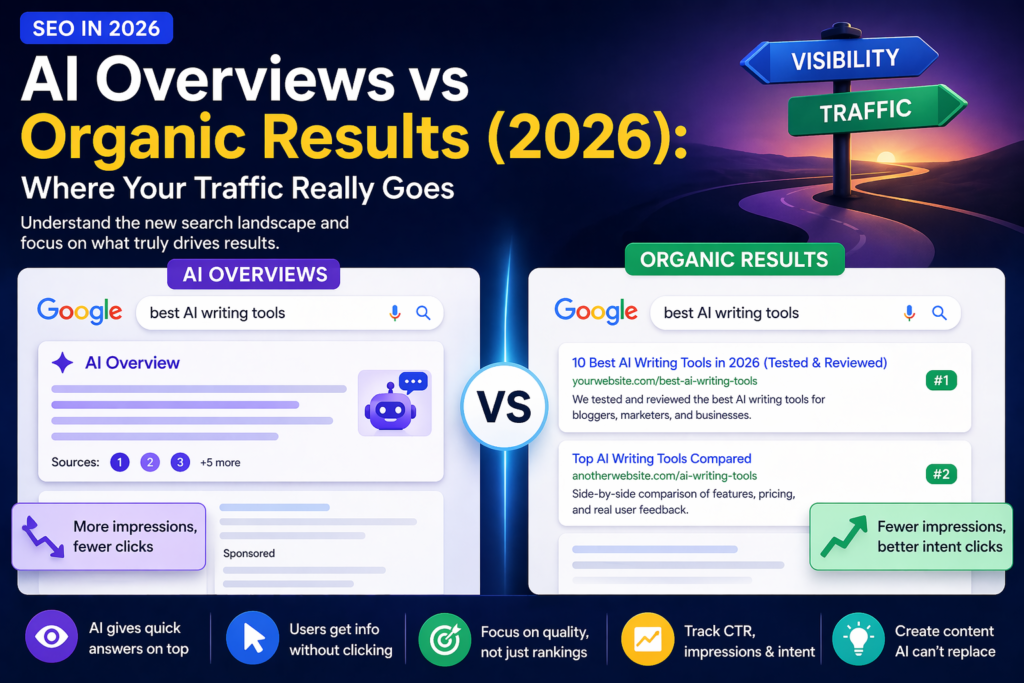
This is one of the biggest changes for SEO in 2026. Your page can be indexed. Your impressions can grow. Your average position can look okay. But if an AI Overview appears above normal organic results, the user may get the answer before clicking anything.
That does not mean SEO is dead. It means the path from search to click is different.
My simple view: AI Overviews do not remove SEO. They change where attention goes first.
In this guide, I will explain the difference between AI Overviews and organic results, why impressions can rise while clicks fall, and what small websites can do to keep earning useful traffic.
What Are AI Overviews?
AI Overviews are AI-generated answers that Google shows at the top of some search results.
They summarize information from different sources and may include links for users who want to explore more.
Simple example:
“Why did my Google clicks drop but impressions went up?”
Before AI Overviews, the user might click an article to find the answer. Now, Google may show a quick AI answer first. The user may read that answer and stop there.
Tip: do not only ask “What position am I ranking in?” Ask “What appears above my result?”
What Are Organic Results?
Organic results are the normal Google search results. They are the classic blue links that appear because Google thinks a page is useful for the search.
For years, SEO was mostly about organic ranking:
- Position 1 usually got the most clicks.
- Positions 2 and 3 were still strong.
- Page 2 usually meant weak traffic.
But AI Overviews changed the layout of the search page. Now your page can rank well and still get fewer clicks because the AI answer sits above it.
Important: a good organic position is still useful, but it does not always mean the same click potential as before.
AI Overviews vs Organic Results: Simple Comparison
What Happened on My Own Website
When I started working more seriously on AI Content Tools, I expected the normal SEO pattern:
More pages indexed. More impressions. Then slowly more clicks.
But the data was not always that simple.
Some pages started getting impressions, but the clicks stayed low. Some articles looked like they were being tested by Google, but CTR was weak. That made me check the actual search results manually.
That is when I started seeing AI Overviews more often for informational queries.
My real lesson: Search Console shows numbers, but it does not show the full search page. You need to look at the live result too.
A page may have impressions because Google shows it somewhere on the result page. But if an AI answer, ads, People Also Ask, videos, or forums appear above it, the user may never reach your link.
Why Impressions Can Rise While Clicks Drop
This is one of the most confusing parts of SEO in 2026.
Your impressions can rise because Google is showing your page for more searches. That sounds good.
But clicks may not rise at the same speed because users get more information directly on the search page.
In Search Console, that can look like this:
- Impressions go up.
- Average position looks stable.
- Clicks stay flat or drop.
- CTR goes down.
CTR means click-through rate. It shows what percentage of impressions turned into clicks.
Example 1
1,000 impressions and 20 clicks = 2% CTR
Example 2
1,000 impressions and 5 clicks = 0.5% CTR
The second result may still mean Google is showing your page. But users are not clicking as much.
The New Search Page Is More Crowded
In 2026, a Google search page may include many things before the classic organic result.
You may see:
- AI Overview
- ads
- featured snippets
- People Also Ask
- videos
- forums
- shopping blocks
- images
- normal organic results
So your article is not only competing with other websites. It is competing with the whole search page.
Tip: search your main keyword manually. Do not only trust the average position number in Search Console.
Visibility Is Not the Same as Traffic
This is very important.
Visibility means your page, brand, or website can be seen somewhere in Google.
Traffic means a person actually clicks and visits your website.
AI Overviews can increase visibility but reduce traffic.
For example, your article may be cited in an AI Overview. That is visibility. But if the user reads the AI answer and does not click the source, you may not get the visit.
New SEO goal: get seen, get trusted, and give the user a reason to click.
Why Small Websites Feel the Change Faster
Large websites often have thousands of pages, strong brand recognition, email lists, direct traffic, and many backlinks.
Small websites feel AI Overview changes faster because every click matters more.
If a big site loses 500 clicks, it may barely notice.
If a small site gets 50, 100, or 200 clicks per month, even a small drop can feel huge.
That is why small website owners should not only ask:
“How do I get more impressions?”
They should also ask:
“Why would someone still click my page after reading the quick AI answer?”
The New SEO Funnel in 2026
The old SEO funnel was simple:
Rank high → get clicks → get traffic → convert
The new SEO funnel is more layered:
Get seen → get cited → build trust → earn the click → convert
| Old SEO | New SEO |
|---|---|
| Rank | Get seen |
| Get click | Get cited or trusted |
| Visit | Give deeper value |
| Convert | Convert with trust, tools, examples, or email signup |
Where Your Traffic Really Goes
When AI Overviews appear, traffic can split into different places.
| Search Page Element | What May Happen |
|---|---|
| AI Overview answer | User reads and leaves without clicking. |
| AI Overview source link | User clicks if they want more detail. |
| Organic result below | User clicks if the AI answer is not enough. |
| Ads | User clicks if the search has buying intent. |
| Forums or videos | User clicks for real opinions, examples, or visuals. |
This is why your article needs to offer something that a short AI summary cannot fully replace.
What Makes a User Click After an AI Overview?
A user clicks when the quick answer is not enough.
Good click reasons include:
- real examples
- screenshots
- templates
- step-by-step workflows
- comparison tables
- personal tests
- tool lists
- downloadable checklists
- deeper explanations
- case studies
Weak click reasons include:
- generic intro
- repeated definitions
- vague advice
- no examples
- no next step
- no opinion or experience
Best move: add something to the article that cannot be fully answered in one short AI paragraph.
Which Keywords Are Most at Risk?
Not every keyword is affected the same way.
High-risk keywords are often simple informational searches.
Higher Risk
- simple definitions
- quick facts
- basic “what is” questions
- short how-to answers
- simple comparisons
Stronger Opportunity
- deep tutorials
- tool comparisons
- templates
- personal tests
- buying decisions
- examples with context
Example high-risk keyword:
What is AI Overview?
Example stronger keyword:
AI Overviews tracking template for Search Console
The second search has stronger intent because the user needs a process, not only a definition.
How to Track AI Overview Impact in Search Console
Google Search Console does not give a perfect AI Overview report. But you can still look for patterns.
Watch for:
- impressions rising while clicks fall
- CTR dropping on question keywords
- average position staying stable
- long-tail queries increasing
- traffic dropping on basic informational pages
My simple workflow:
- Open Google Search Console.
- Go to Performance.
- Choose the last 28 days.
- Compare with the previous 28 days.
- Sort by impressions.
- Find pages with falling CTR.
- Search the main queries manually in Google.
- Check if AI Overviews appear.
- Write down what appears above your result.
If you want a deeper tracking workflow, read: AI Overviews Tracking in 2026.
Do Not Delete Good Pages Too Fast
A common mistake is panic editing.
Someone sees clicks drop and changes everything at once:
- title
- intro
- headings
- meta description
- internal links
- structure
Then it becomes hard to know what helped and what hurt.
If a page already gets impressions, it has some value. Improve it carefully.
Safer improvements:
- make the intro more direct
- add a clearer answer near the top
- improve H2 headings
- add one comparison table
- add one real example
- add internal links to related articles
Build Content Clusters, Not Lonely Articles
AI Overviews and organic SEO both need topical depth.
One article about AI Overviews is useful. But a small cluster is stronger.
For example, this article belongs with:
A cluster helps users move from one question to the next. It also helps Google understand that your site covers the topic seriously.
Focus on Traffic Quality, Not Only Traffic Amount
Not all traffic is equal.
A visitor who only wanted a quick definition may not be valuable. A visitor who wants a template, tool, comparison, or deeper guide is much more useful.
Instead of only asking “How many clicks did I get?”, also track:
- email signups
- affiliate clicks
- tool usage
- repeat visitors
- time on page
- internal link clicks
- contact form submissions
My view: Google may take some quick-answer clicks, but it cannot replace a useful tool, a personal example, or a step-by-step workflow.
Add Assets That AI Cannot Fully Replace
AI Overviews can summarize text. But they cannot fully replace your own assets.
Useful assets include:
- your own screenshots
- your own data
- your own templates
- your own case study
- your own tool
- your own checklist
- your own opinion from experience
For this topic, a simple tracker table can be more useful than another generic paragraph about SEO.
| Keyword | Page URL | AI Overview? | CTR Change | Action |
|---|---|---|---|---|
| why CTR drops with AI Overviews | CTR article | Yes | Down | Add examples and stronger intro |
What I Would Do If I Started a New Website Today
If I started a new website today, I would not build only simple definition articles.
I would focus on pages that give the user something deeper than a short AI answer.
- Build topic clusters from the beginning.
- Target problems, not only definitions.
- Add real examples to every important article.
- Create tables, templates, or checklists.
- Track AI Overviews manually for important keywords.
- Update articles when Search Console shows new patterns.
- Create useful tools if possible.
- Build an email list so traffic does not depend only on Google.
This is slower than publishing hundreds of thin pages, but it builds a stronger website.
What This Means for Your Website
If your site is new or still growing, do not panic when CTR moves up and down.
AI Overviews can make traffic less predictable. But you can still build a strong SEO system by focusing on:
- helpful content
- real examples
- clear headings
- content clusters
- better internal links
- tools and templates
- search intent
- regular updates
The goal is not only to appear in Google. The goal is to become the page people choose when the short answer is not enough.
Final Thoughts
AI Overviews changed where traffic goes.
Some users stop at the AI answer. Some click the cited sources. Some scroll to organic results. Some choose videos, forums, tools, or templates.
Your job is to make your page worth the click.
Do not write only for the algorithm. Write for the person who is confused, busy, and looking for a clear next step.
SEO is not dead. But in 2026, the page that wins is the page that gives more than a quick answer.
FAQ
Do AI Overviews reduce organic traffic?
They can. AI Overviews can answer some informational searches directly, so users may not click normal organic results as often. The impact depends on the keyword, intent, and page type.
Can organic results still get clicks below AI Overviews?
Yes. Organic results can still get clicks when the user wants more detail, examples, tools, reviews, templates, or a full process.
Why do my impressions go up but clicks go down?
This can happen when Google shows your page for more searches, but users get enough information from the AI Overview and do not click through.
Can a page lose traffic and still be useful?
Yes. A page may still build brand visibility, support a topic cluster, or get cited in AI results even if clicks are lower than before. But you should still improve it to give users a stronger reason to click.
Should I target keywords that show AI Overviews?
Yes, but choose carefully. Avoid only basic definitions. Focus on keywords where users need examples, templates, comparisons, tools, or deeper explanations.
Are AI Overviews bad for affiliate sites?
They can reduce clicks on simple informational searches, but affiliate sites can still win with strong reviews, comparisons, personal tests, screenshots, and buying advice that a short AI answer cannot fully replace.
Can small websites still compete?
Yes. Small websites can compete by being more specific, more useful, and more experience-based. A small site may not win every broad keyword, but it can win focused problems and long-tail searches.
Is CTR still important in 2026?
Yes. CTR still helps you understand whether search visibility turns into visits. But you should also track citations, affiliate clicks, email signups, tool usage, and internal clicks.