
I created my own Rytr Brand Voice. Did it actually change the writing?
Brand Voice sounds useful on paper. You describe how you want the AI to write, give it an example, and the tool should use that style in future content.
But I wanted to know how useful Rytr’s MyVoice feature is in practice. So I created a voice based on the writing style I use on AIContent-Tools, added a real sample, defined the audience and content rules, and then used the voice to generate a short AI tool review.
What is Rytr MyVoice?
MyVoice is Rytr’s custom Brand Voice feature. Instead of choosing only a general tone such as Formal, Funny, or Convincing, you can describe your own writing style and give Rytr more context about how you want content to sound.
Style Description
You describe the basic tone and writing style you want Rytr to follow.
Sample Text
You can give Rytr an example of writing that represents the voice you want.
Target Audience
You can tell Rytr who the content should be written for.
Content Guidelines
This lets you add more specific rules about language, claims, structure, and things the AI should avoid.
One custom voice
During my Unlimited test, Rytr showed that I had used 1 of 1 available custom voice.
Reusable voice
After saving it, the custom voice appears with Rytr’s other tones and can be selected when generating content.
Test 1: Can you create a Brand Voice on Rytr Free?
I checked MyVoice before upgrading.
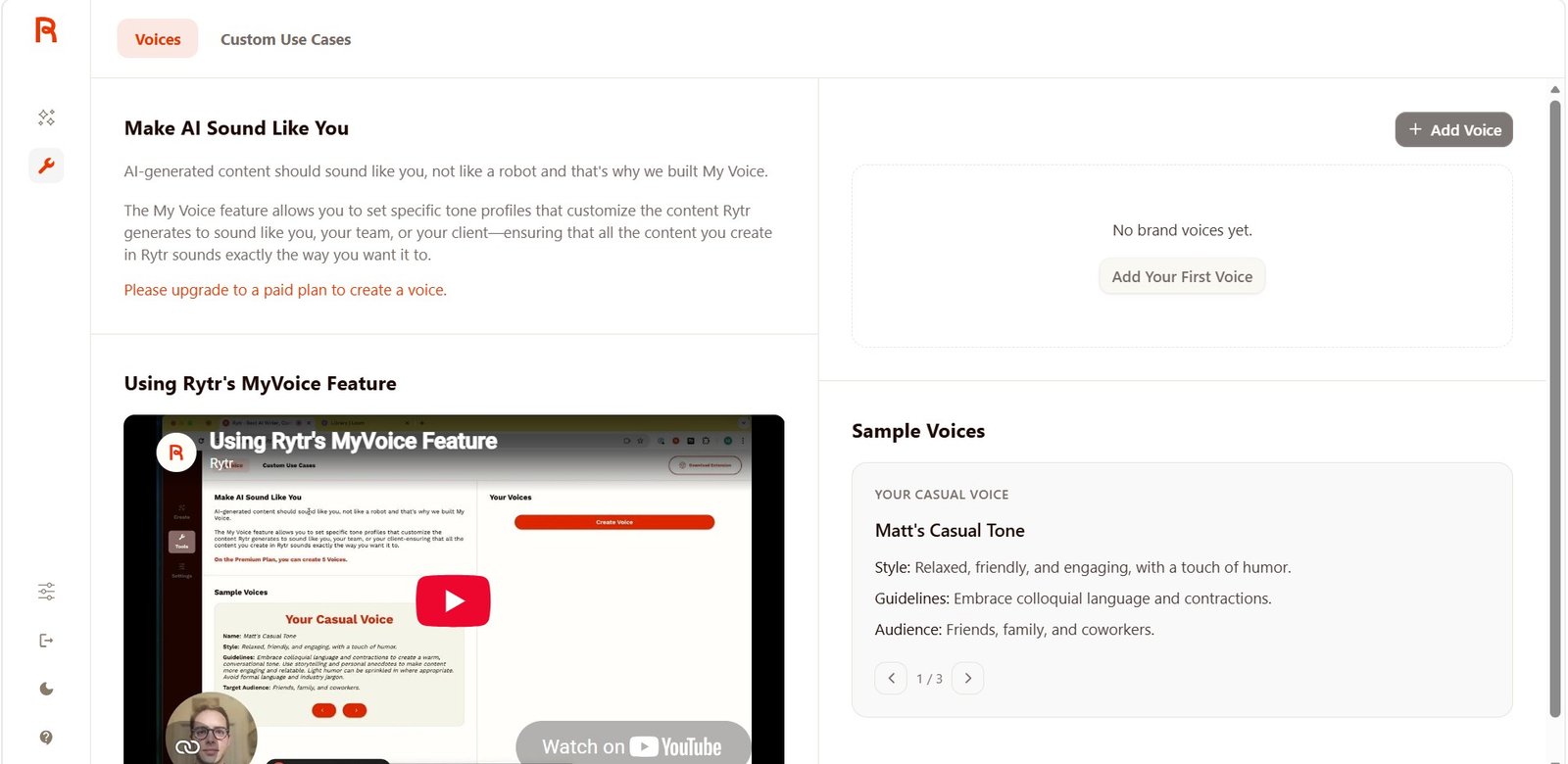
The message was clear:
“Please upgrade to a paid plan to create a voice.”
I could still see example voices, but I could not create my own profile.
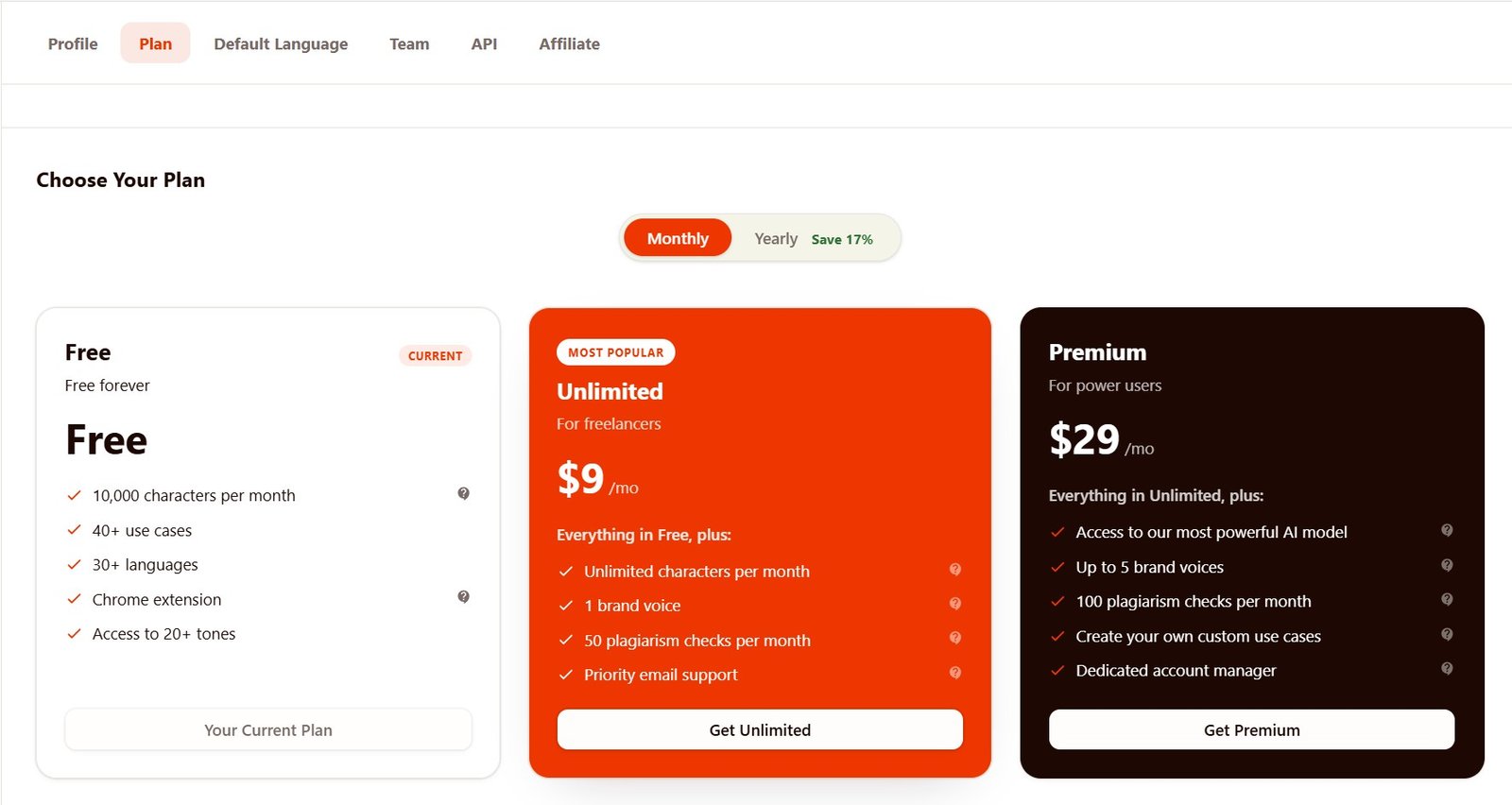
Which Rytr plan includes Brand Voice?
I upgraded to Unlimited for the second part of my tests. The pricing screen available inside my account showed one Brand Voice with Unlimited, while Premium offered more.
Test 2: Creating my AI Content Tools Brand Voice
I tried to recreate the style I actually use for practical AI tool reviews.
I did not create a fake brand just for this test. I based the voice on the style I want for AIContent-Tools: simple English, practical explanations, no hype, and clear separation between what a company says and what we actually tested.
The first problem: Style Description was too long
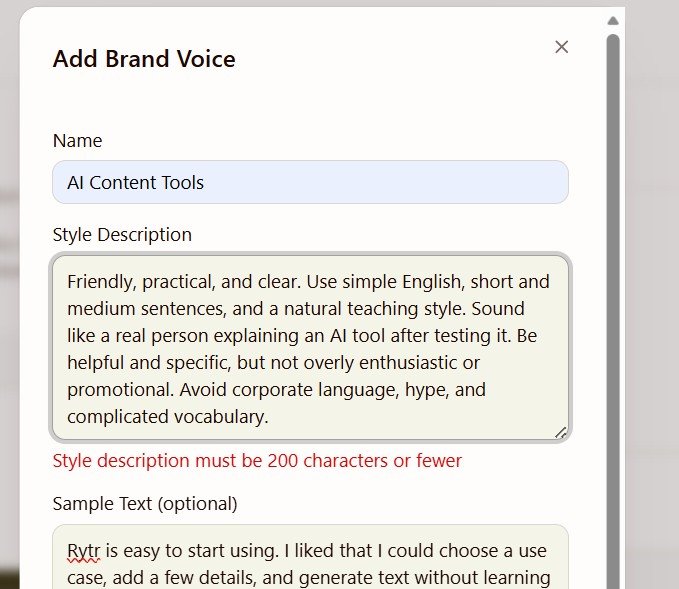
This was my first real limitation.
200 characters is not much when you want to explain a writing style properly. My first version did not fit, so I had to shorten it.
Test 3: Adding a sample, audience, and real content rules
The full setup was better than the short Style Description made it look.
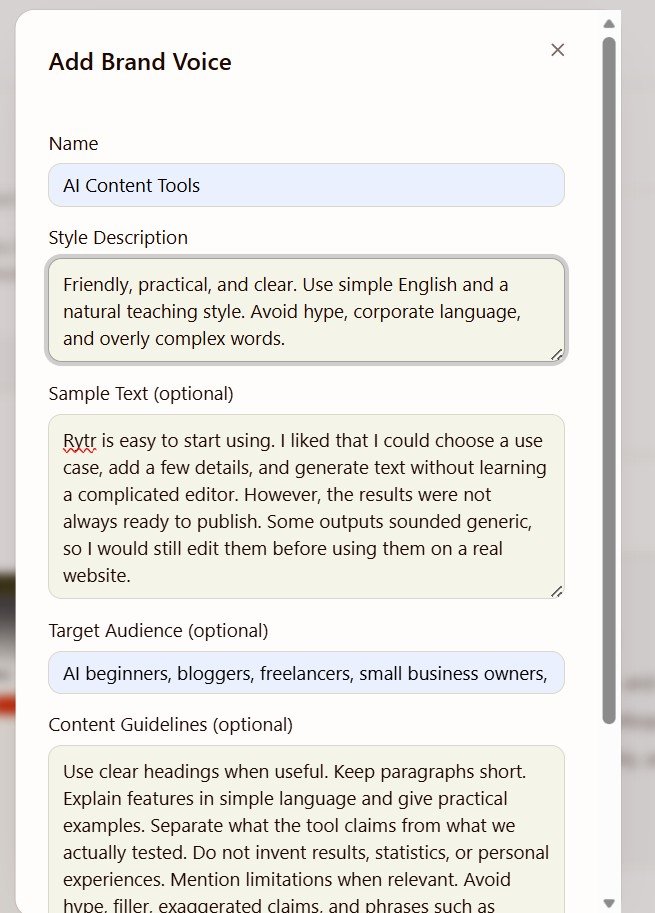
This changed my opinion of the setup.
The Style Description field is too short, but Rytr does not expect that one field to do everything. I could also give it a real writing sample, specify my audience, and add much more detailed content rules.
The sample I used
I deliberately used a sample that included both a positive observation and a limitation. I did not want the Brand Voice to learn that every tool review should sound positive.
My content rules
I also told Rytr to keep paragraphs short, explain features simply, give practical examples, separate claims from tests, avoid invented results, and avoid exaggerated phrases such as “game-changer” and “unlock your potential.”
Test 4: Saving the Brand Voice
After setup, the voice becomes reusable inside Rytr.
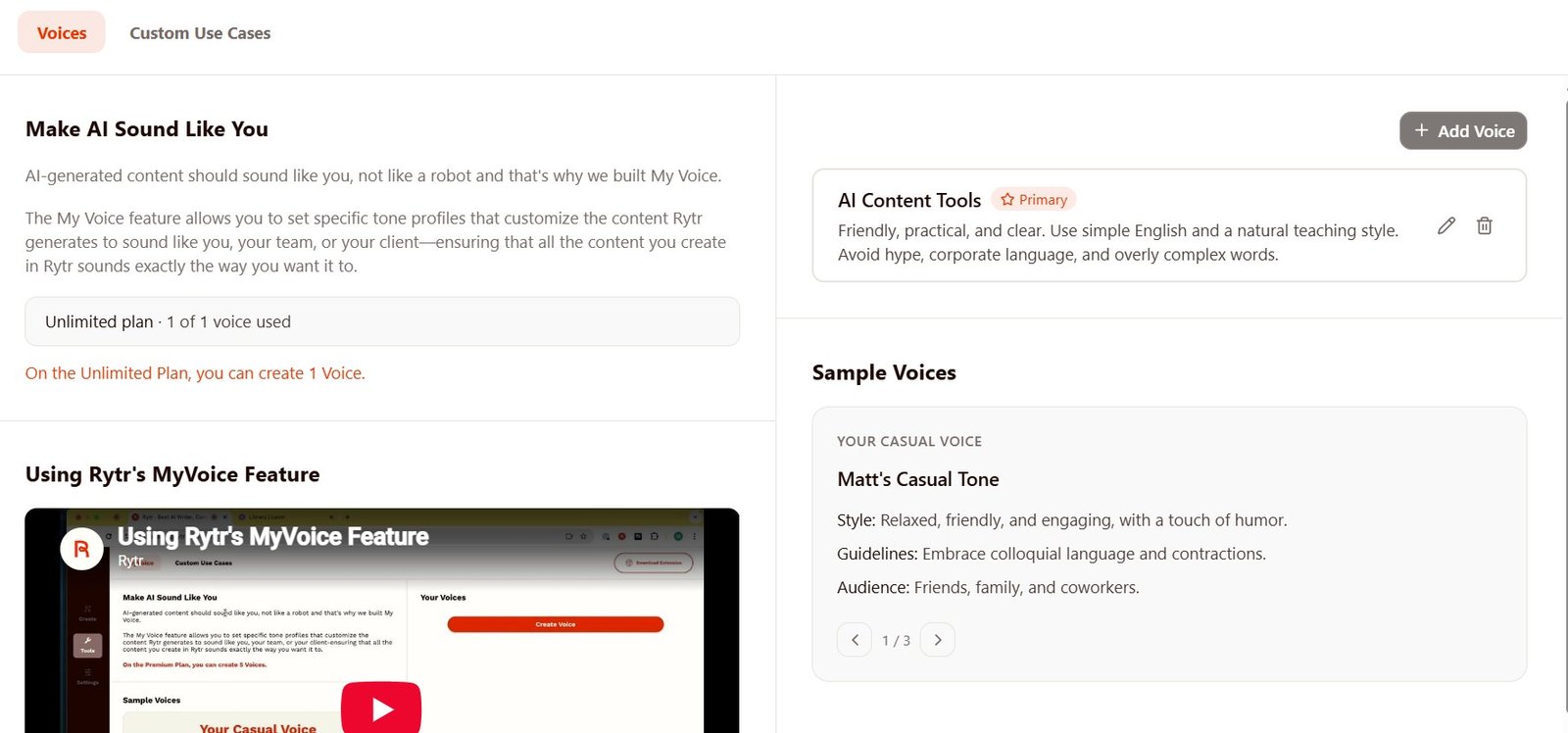
The setup was simple once I shortened the Style Description.
Rytr also clearly showed:
1 of 1 voice used.
That is worth knowing before choosing Unlimited. The plan name says “Unlimited”, but the custom Brand Voice allowance itself is not unlimited.
No custom Brand Voice
I could open the Voices section and see examples, but creating my own voice was locked.
1 custom Brand Voice
I could create, save, edit, delete, and set my AI Content Tools voice as Primary.
Test 5: I used my Brand Voice to write a short AI tool review
Creating a voice is easy. The real question is whether it produces useful text.
I selected AI Content Tools as the voice and used Magic Command.
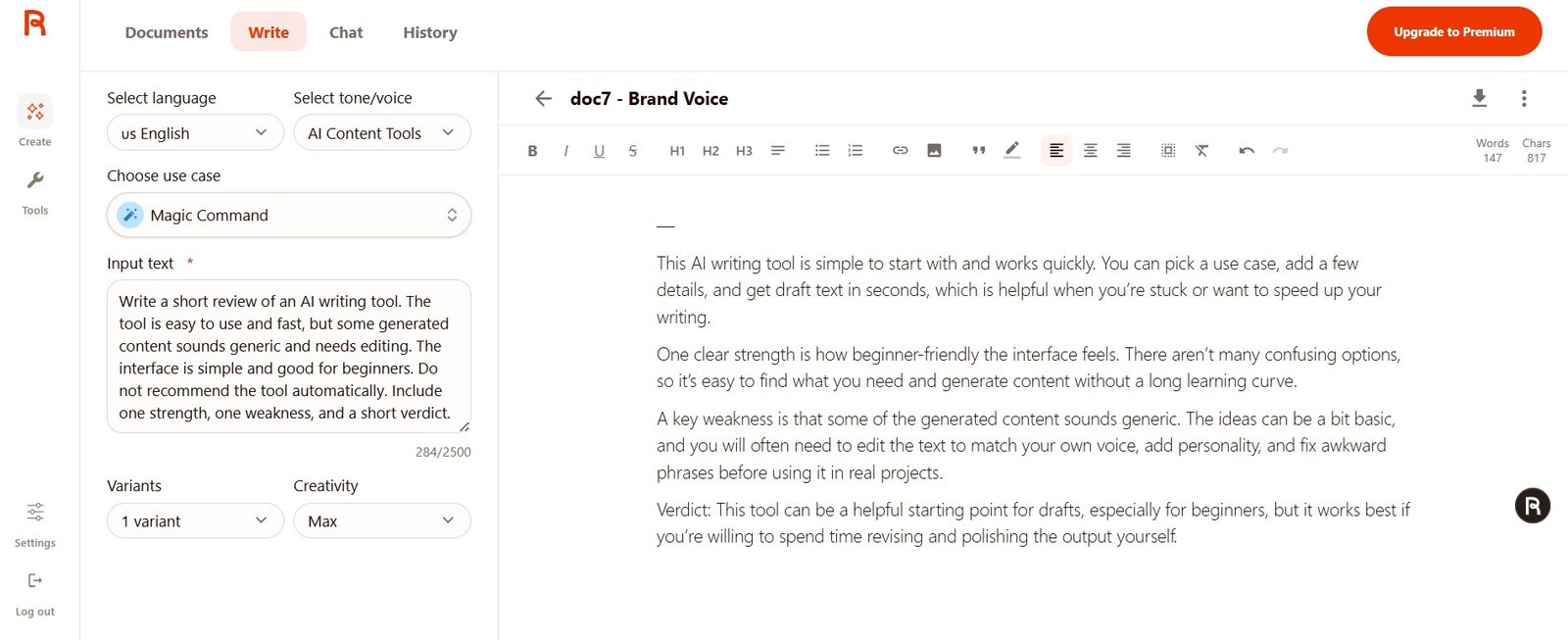
What did the Brand Voice output look like?
The result was clear and restrained. It did not turn the tool into a “revolutionary” product or automatically recommend it.
It included a clear strength, weakness, and verdict. It also used simple language and directly mentioned that some generated content can sound generic and still needs editing.
This distinction matters. It would be easy to generate one good paragraph and say “Brand Voice works perfectly.” Our test does not prove that.
So, does Rytr Brand Voice actually work?
Yes, in the basic sense. Rytr saved my style information and generated text that matched the general direction I wanted.
But I would describe MyVoice as a useful writing control, not a perfect clone of your real writing style.
More control than tones
“Funny” or “Formal” is very broad. MyVoice lets you describe a much more specific writing direction.
Real sample text
I liked being able to show Rytr an example instead of describing everything with adjectives.
Separate guidelines
The content rules are useful for things such as avoiding hype, invented claims, or complicated language.
200-character description
The main Style Description field is too short for a detailed brand style guide.
One Voice on Unlimited
This is enough for one website or brand, but less useful if you write for several clients.
Still needs editing
A saved voice does not mean every future output will suddenly sound exactly like you.
Brand Voice vs Rytr’s normal Tone setting
Before creating MyVoice, I had already tested Rytr’s normal tone selector. It works surprisingly well for obvious style changes.
For example, I generated the same Facebook post with Convincing and Funny tones. The Funny result changed much more than a few words.
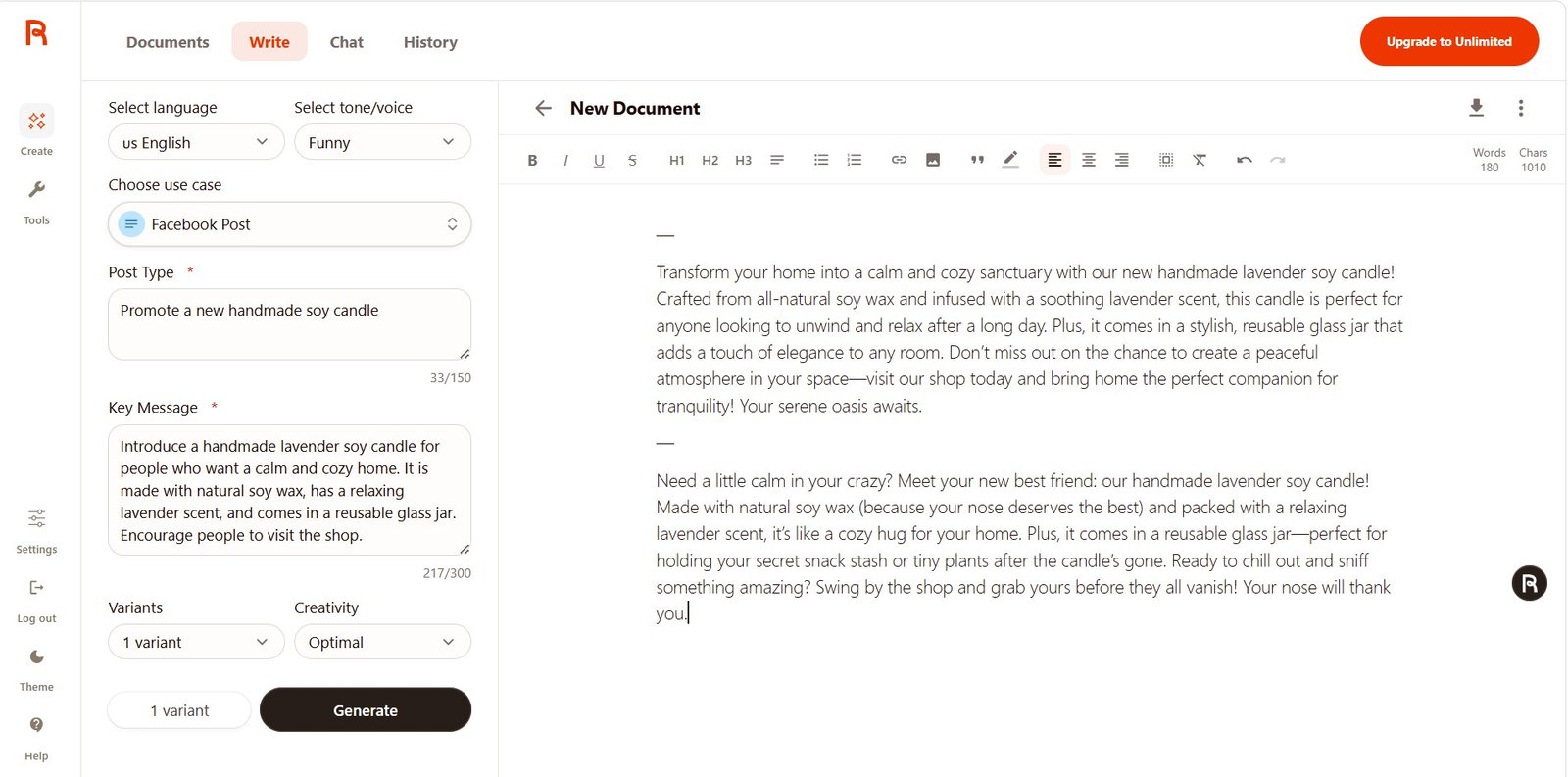
So when would I bother creating MyVoice?
| Feature | Normal Rytr Tone | Custom Brand Voice |
|---|---|---|
| Setup | Choose a tone and generate. | Needs initial setup. |
| Speed | Very fast. | Fast after the voice is saved. |
| Style control | Broad: Funny, Formal, Convincing, etc. | More specific to your own writing rules. |
| Writing sample | No. | Yes. |
| Target audience | Depends on the individual use case or prompt. | Can be saved inside the voice. |
| Content guidelines | Usually added manually to the prompt. | Can be stored with the Brand Voice. |
| Best for | Quick one-off content. | Repeated writing for the same brand. |
Who should use Rytr MyVoice?
Bloggers
Useful if you create many drafts for the same website and want basic writing rules saved in one place.
Small businesses
A simple way to make generated social and marketing content more consistent.
Solo creators
The one-voice limit is less of a problem if you mainly write for one personal brand.
Agencies
One custom voice on Unlimited is restrictive if you need separate voices for several clients.
Strict brand teams
If you need detailed style enforcement across a large team, MyVoice may feel too lightweight.
Anyone expecting automation
A custom voice reduces repeated prompting, but you should still read and edit the final content.
What I would improve in Rytr Brand Voice
The feature is useful, but three changes would make it much stronger.
A longer Style Description
200 characters feels unnecessarily restrictive. I would prefer enough space to describe tone, sentence style, vocabulary, and common mistakes to avoid.
More Voices on Unlimited
One voice works for a solo website, but freelancers and small agencies may need separate voices for different clients.
A clearer comparison mode
I would like a simple way to generate the same prompt with Standard Tone and Brand Voice side by side.
More of my Rytr tests
I tested Rytr beyond Brand Voice, including its writing quality, Free and Unlimited plans, Chat, and editor.
My verdict: is Rytr Brand Voice worth using?
Yes, if you already use Rytr regularly and write for the same brand.
I liked MyVoice more after I completed the full setup than I did when I first saw the 200-character Style Description limit.
The short description alone would be too restrictive. But the combination of Style Description + Sample Text + Target Audience + Content Guidelines gives you much more useful control.
My generated review followed the general direction I wanted. It used simple language, mentioned both strengths and weaknesses, avoided hype, and did not automatically recommend the tool.
However, I would not call MyVoice a perfect copy of a real human writing style. My prompt also contained useful instructions, and I would still edit the final output before publishing it.
The biggest limitation for me is the one custom voice on Unlimited. That is fine for one website or small business, but less attractive for a freelancer or agency working with several brands.
My final take: MyVoice is a useful upgrade over Rytr’s normal tone selector, especially when you repeatedly create content for one brand. It saves you from explaining the same basic writing rules in every prompt. Just do not expect it to remove the need for human editing.