
Frase has an Improve feature that reviews an existing draft and suggests changes. It sounds simple: give Frase your article, click Improve, and get a better version.
But does it really work? We tested Improve on real AI-generated content and compared the article before and after the changes. We also checked what happened to the Content Score, SEO, GEO, EEAT and word count.
The result was mixed in a useful way. Frase found real weaknesses, added some helpful content and improved the overall score. But it also predicted that one set of changes could reduce the GEO score.
Try FraseAffiliate disclosure: this is an affiliate link. I may earn a commission if you sign up through it, at no extra cost to you.
Frase Improve is useful as an AI editor. It can find missing sections, suggest stronger evidence and rewrite weak parts.
I would not use it as an automatic “make this article perfect” button. The best results came when we treated the suggestions as edits to review, not changes to accept blindly.
What Is Frase Improve Content?
Improve Content is designed to review an existing draft and find areas that may need work.
During our tests, Frase did not only give one general comment. It created different types of suggestions and looked at the article from several angles.
We saw feedback connected to:
- structure,
- SEO,
- copy editing,
- supporting evidence,
- GEO,
- EEAT,
- keyword placement.
Test 1: Frase Reviews the Draft Before Changing It
In our first test, we used Improve on an article about AI tools for Etsy sellers.
Frase first analyzed the current draft.

I like this step because the tool does not immediately replace the article.
It first tries to find weaknesses.
Frase Creates Different Editor Roles
After the review, Frase showed comments from different specialist-style roles.
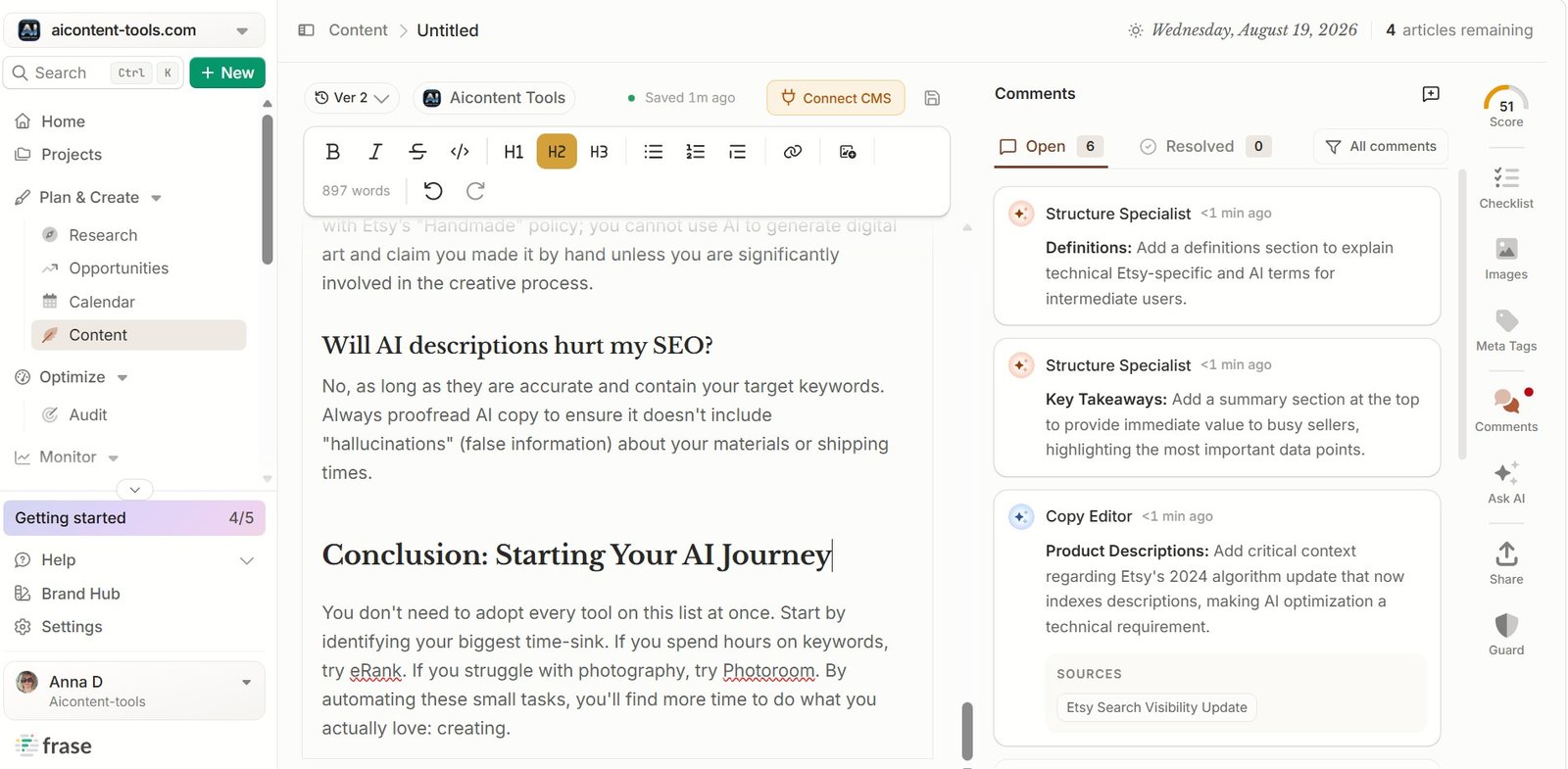
In our test, we saw suggestions from roles such as:
- Structure Specialist,
- SEO Specialist,
- Copy Editor.
This makes the review easier to understand. A structure problem is different from an SEO problem.
Example 1: Frase Suggested a Key Takeaways Section
One Structure Specialist recommendation was to add a Key Takeaways section.
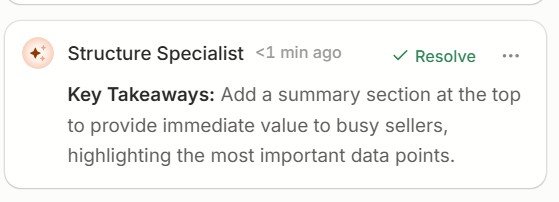
This was a practical suggestion.
A long article can be easier to scan when the reader gets a short summary near the beginning.
But this is also a good example of why you need judgment. Not every article needs a Key Takeaways box.
Example 2: Frase Suggested a More Detailed SEO Fix
The SEO Specialist went further.
For a section about eRank, Frase suggested a more specific improvement and showed a ready fix.
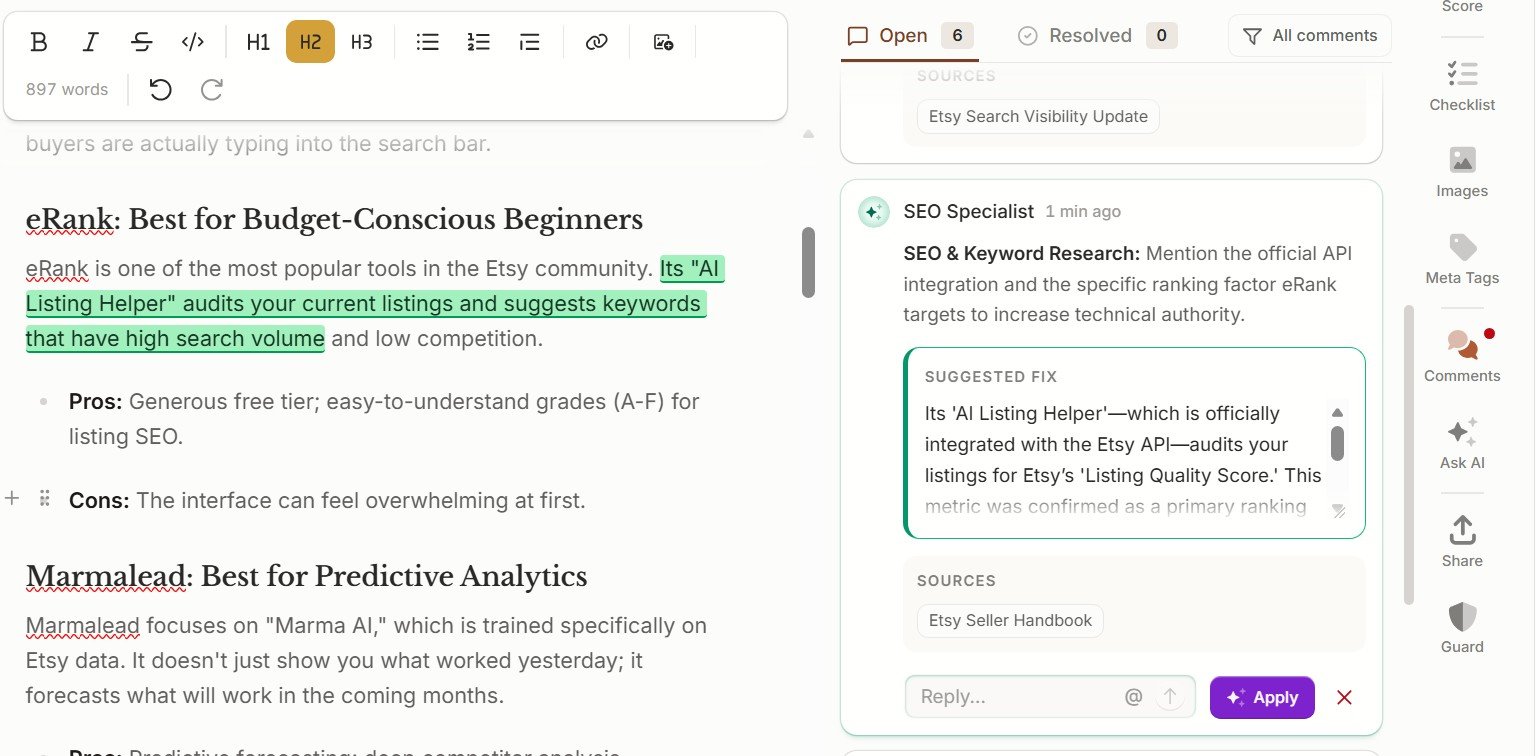
This is more useful than a general message like:
“Add more detail.”
Frase tried to show what detail might be missing.
Example 3: Frase Tried to Strengthen the Introduction
Another recommendation focused on supporting evidence.
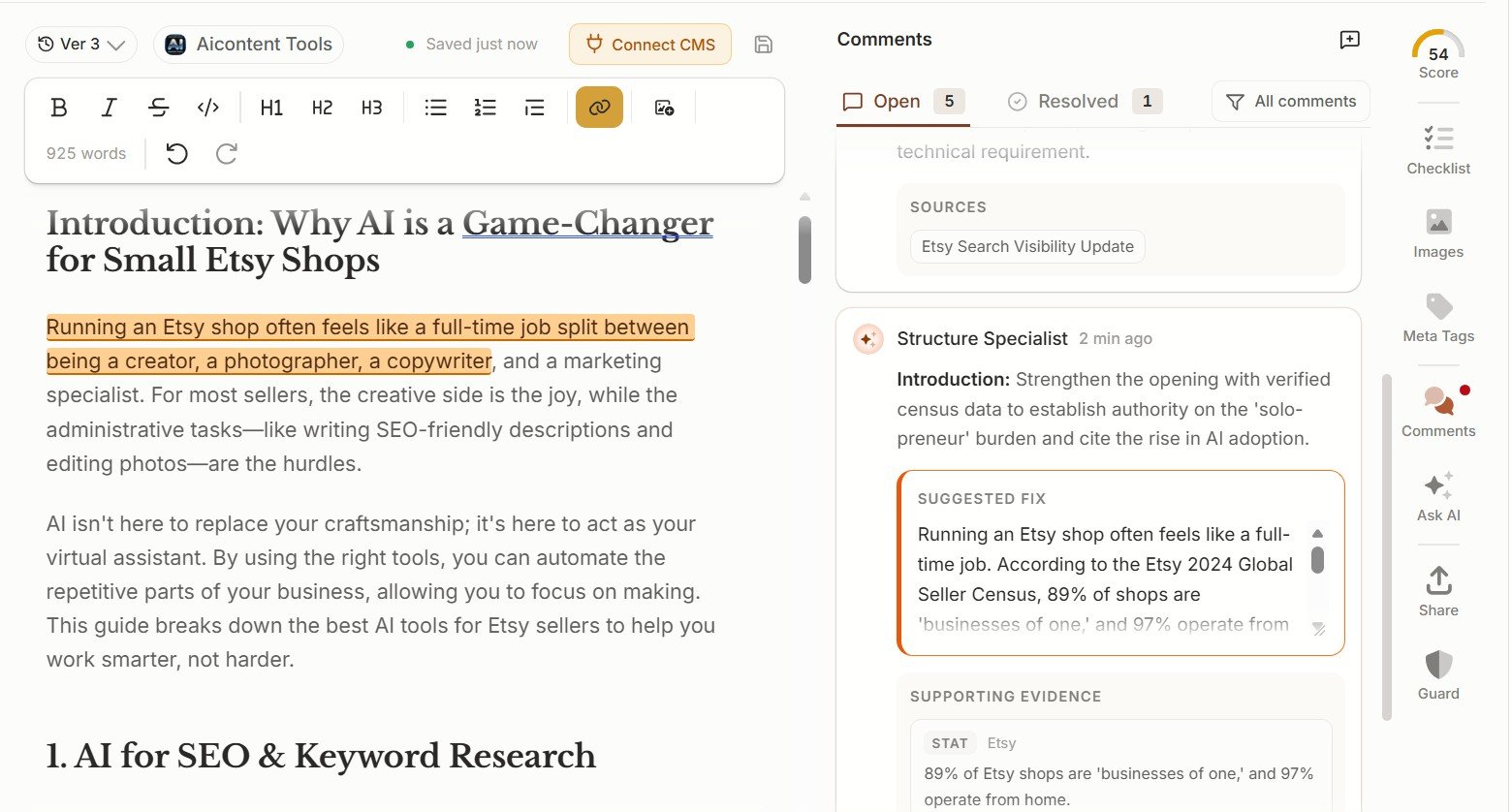
Frase proposed adding data from an Etsy seller census to make the introduction more credible.
This is a useful direction. But evidence is one area where I would always check the original source manually.
Frase Can Show the Rewrite Before You Apply It
In another test, we used Improve Draft and reviewed the proposed changes.
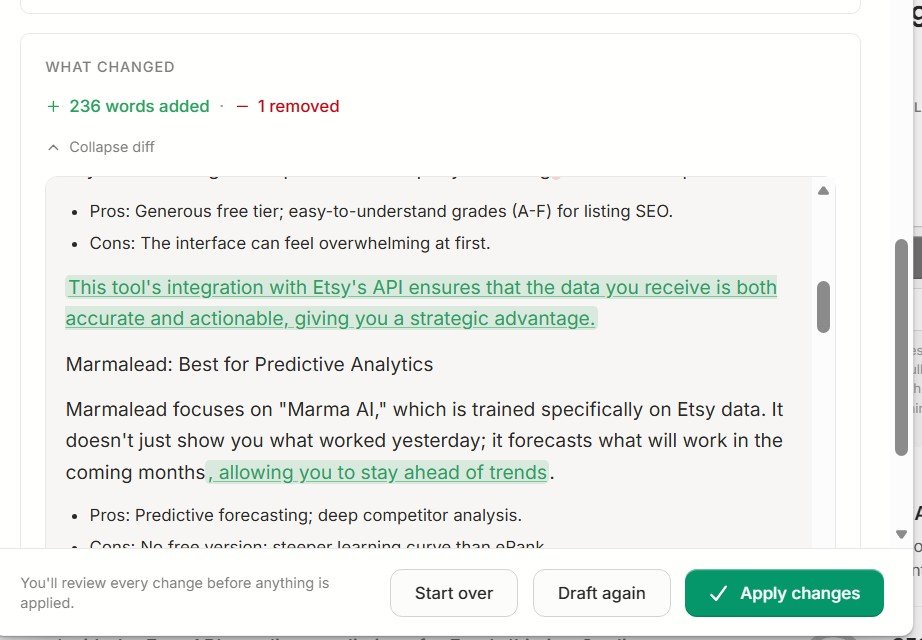
This is important because it keeps the user in control.
You can see what the AI wants to add or change instead of replacing the whole article blindly.
Test 2: A Stronger Before & After Experiment
Our second test was even more useful because we had clear scores before and after Improve.
The AI-generated article ended with:
- 2,275 words,
- 100% Topic Coverage,
- 7 of 7 sections,
- Content Score around 68–69.
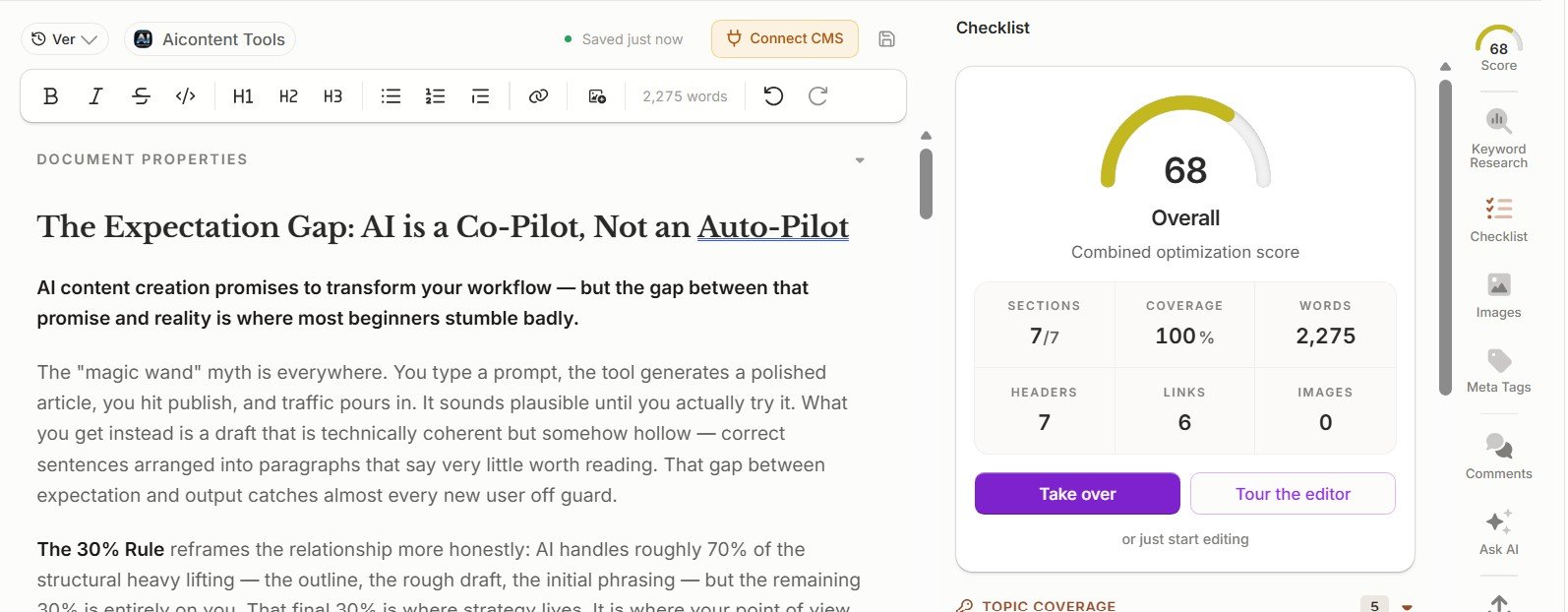
The article was not empty or broken. It already had full topic coverage.
That made it a better test. We were not asking Improve to repair a terrible draft. We wanted to see whether it could make a reasonably strong AI article better.
Before Improve: SEO and GEO Looked Strong, EEAT Did Not
The detailed score screen showed a very interesting split.
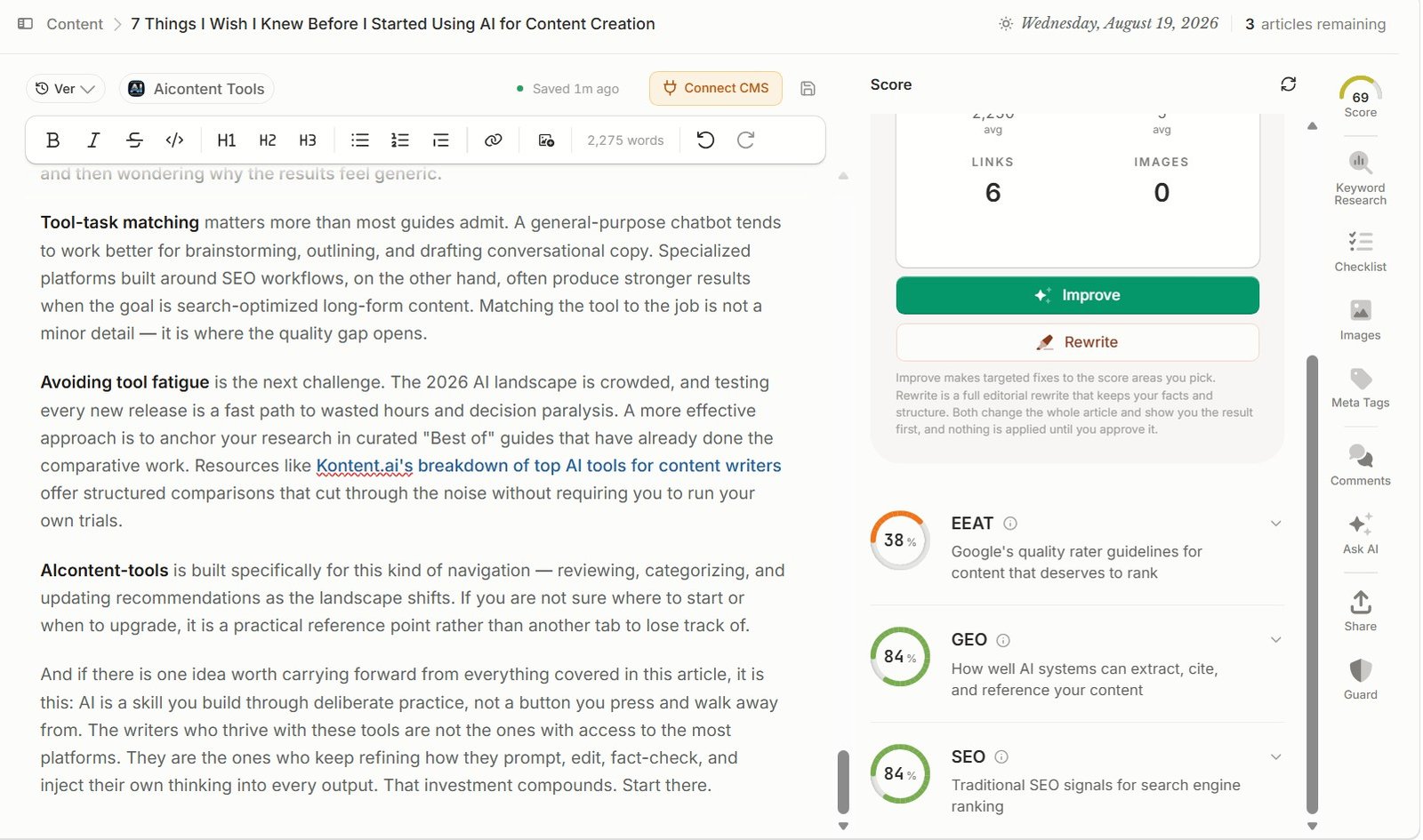
| Metric | Before Improve |
|---|---|
| Words | 2,275 |
| Overall | 68–69 |
| EEAT | 38% |
| GEO | 84% |
| SEO | 84% |
This told us something important.
The article looked strong for SEO and GEO, but the EEAT score was much weaker.
Frase Built a Detailed Improvement Plan
When we clicked Improve, Frase broke the article into different optimization areas.
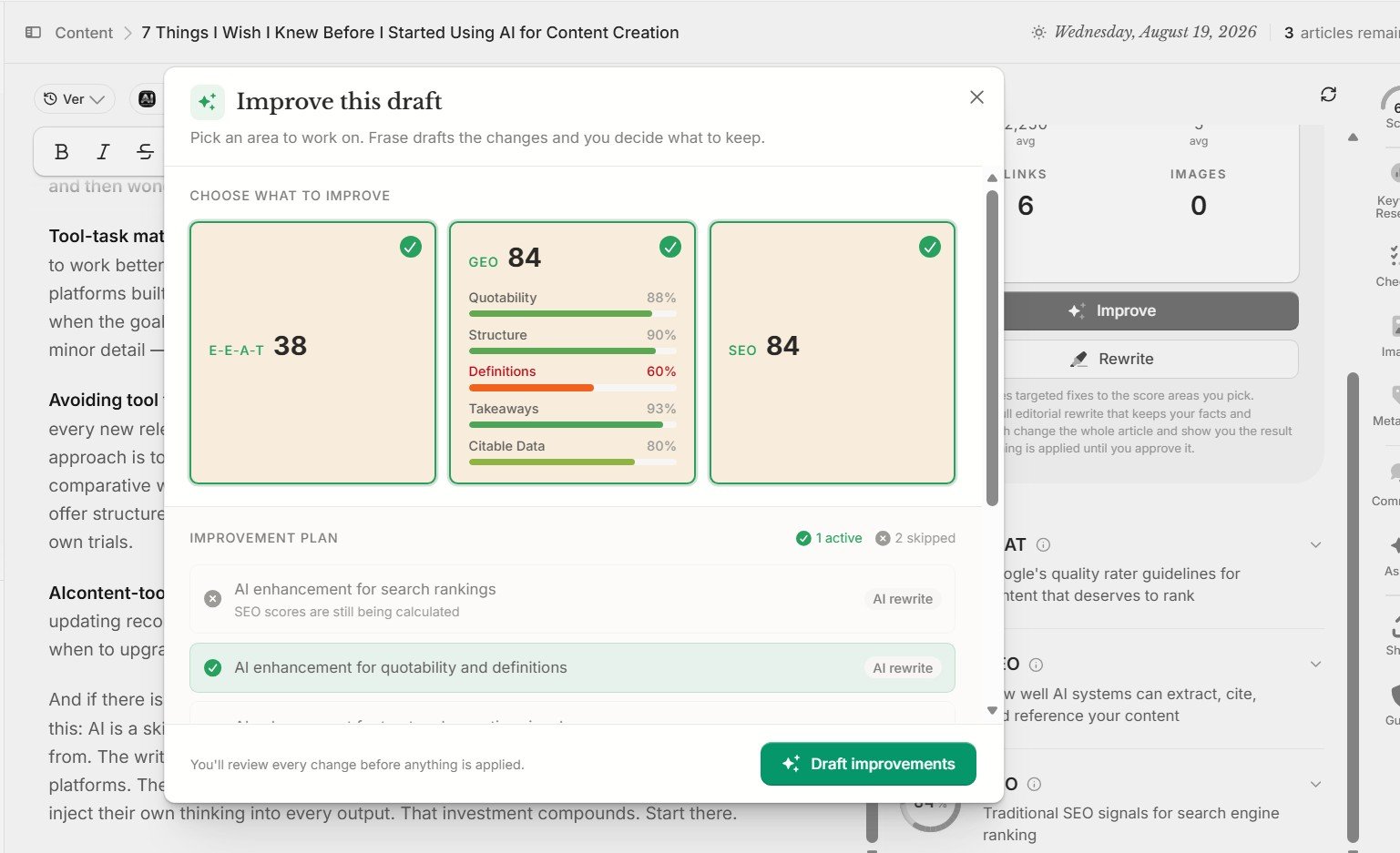
Frase also broke GEO into smaller parts.
| GEO area | Score in our test |
|---|---|
| Quotability | 88% |
| Structure | 90% |
| Definitions | 60% |
| Takeaways | 93% |
| Citable Data | 80% |
This is better than one simple message saying: “Your GEO score is 84.”
You can see which part may actually need work.
Then Frase Did Something Unexpected
We expected Improve to increase the scores.
But Frase skipped one GEO improvement and warned us that the final optimization score might go down.
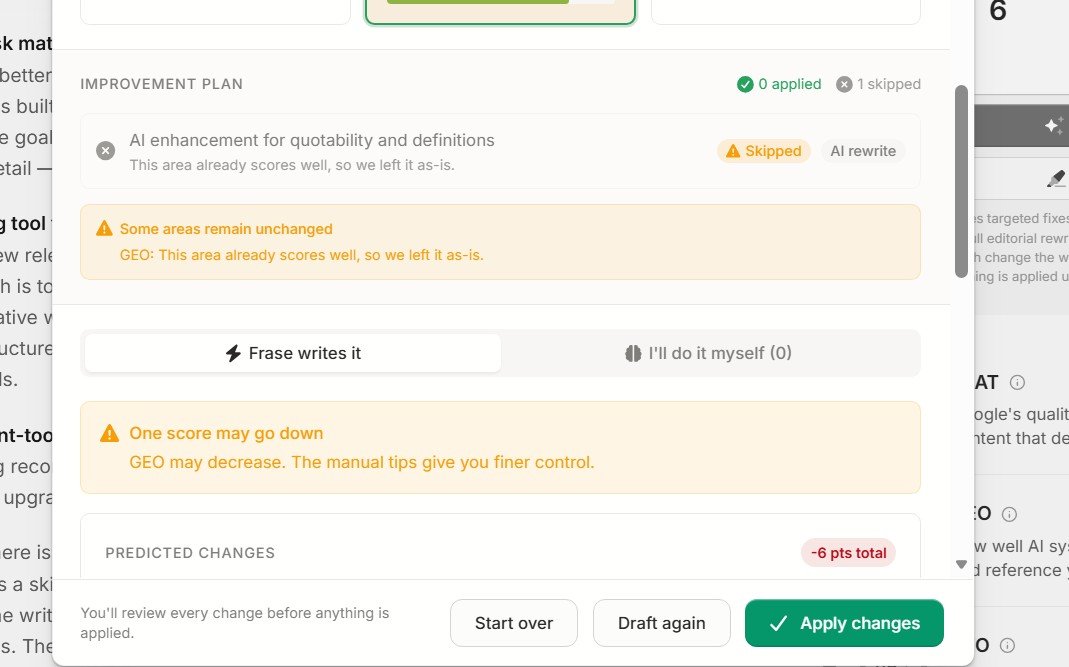
I actually liked this.
It is more trustworthy than pretending every AI edit makes every metric better.
The Predicted Result Was GEO 84 → 78
Before applying the changes, Frase gave us a clear preview.
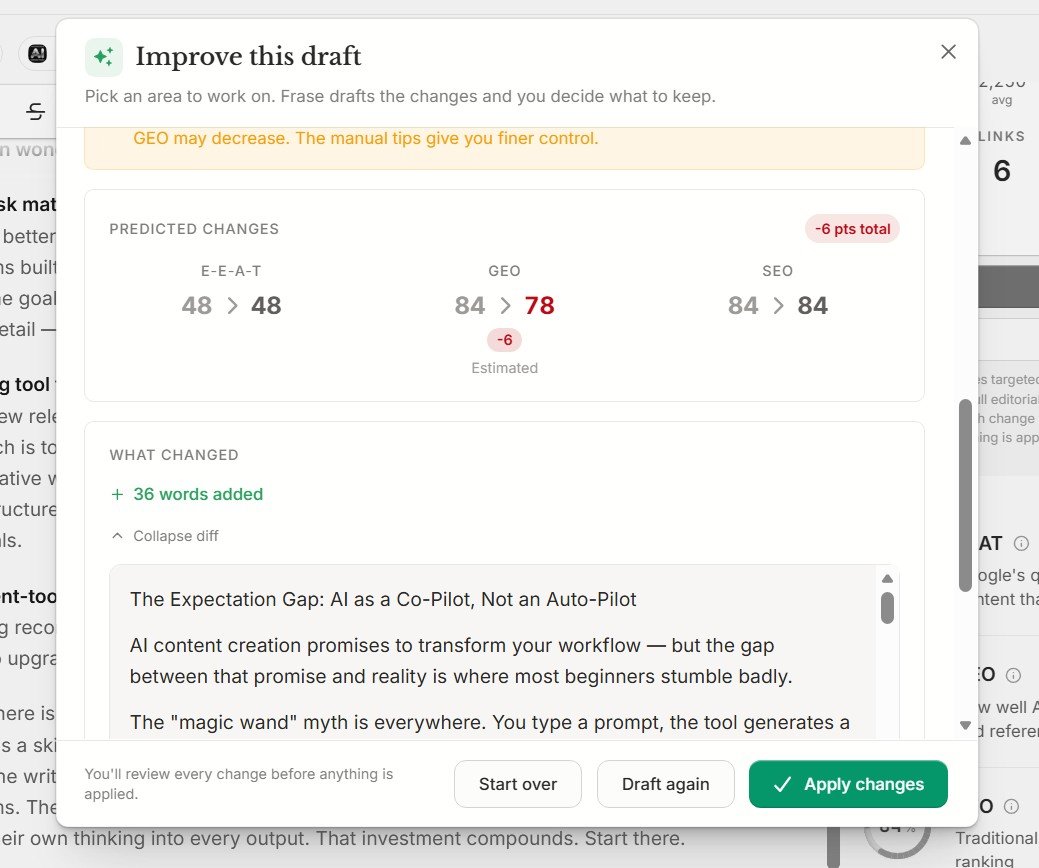
| Metric | Before | Predicted after Improve |
|---|---|---|
| Words added | — | +36 |
| EEAT | 48 | 48 |
| GEO | 84 | 78 |
| SEO | 84 | 84 |
This is one of the strongest reasons to review the preview before clicking Apply Changes.
After Improve: What Actually Changed?
After the changes, the article grew from 2,275 to 2,311 words.
That is exactly 36 additional words, matching the preview.
The overall Content Score reached 70.
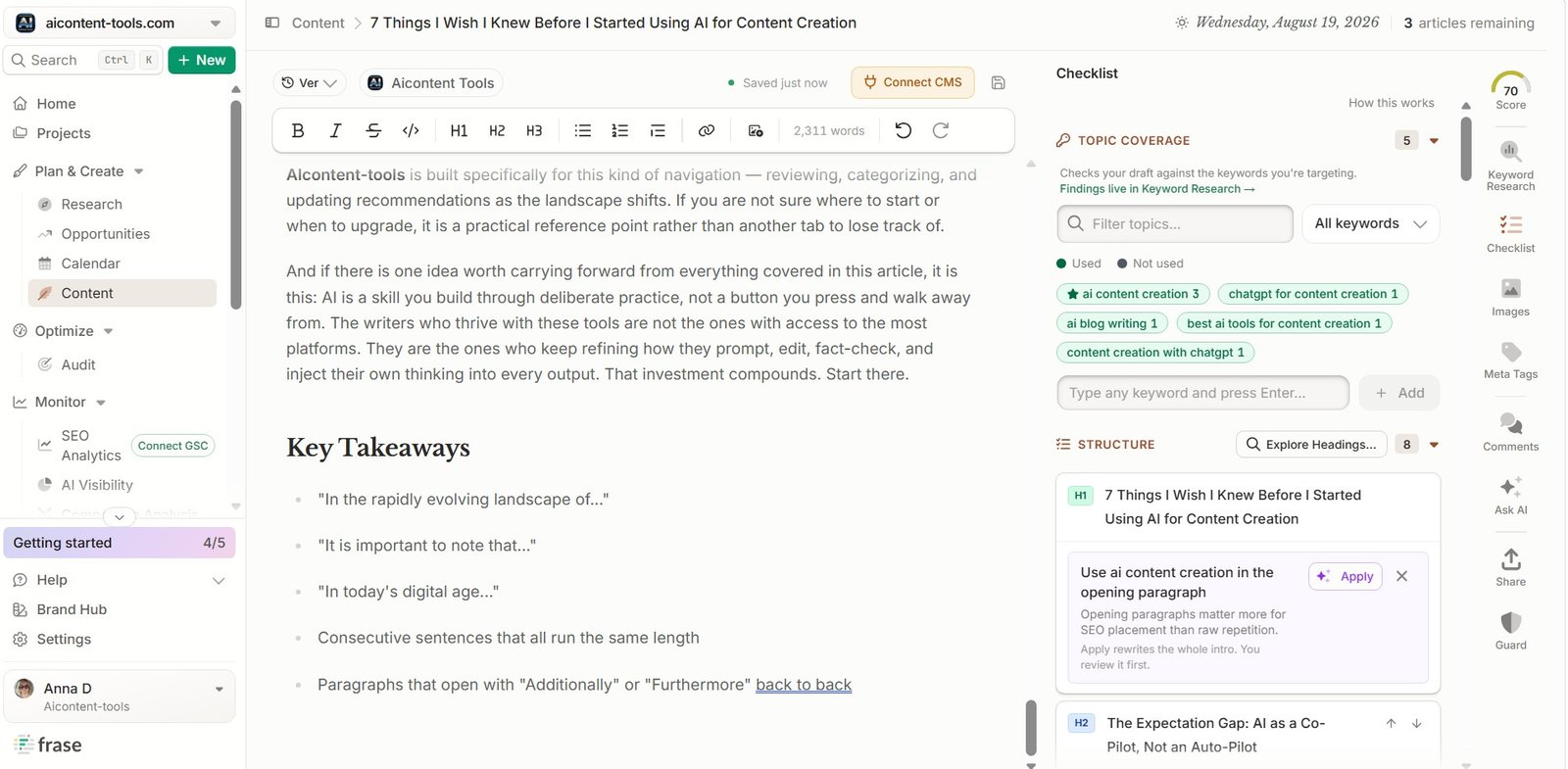
| Metric | Before | After |
|---|---|---|
| Word count | 2,275 | 2,311 |
| Change | — | +36 words |
| Content Score | 68–69 | 70 |
| New section | No | Key Takeaways added |
The final score improved, but not dramatically.
That is important.
Frase Improve did not transform a score of 68 into 95. It made a smaller set of targeted changes.
Did the Article Actually Become Better?
My answer is: partly, yes.
The article became more complete in a few areas. Frase added a Key Takeaways section and gave us useful structural and SEO suggestions.
But the test did not show a huge improvement across every quality signal.
The overall score moved only a little. Some proposed GEO changes were predicted to reduce the score.
Clearly useful
- finding missing sections,
- adding evidence ideas,
- showing concrete rewrites,
- reviewing structure,
- giving a before/after preview.
Still needs human judgment
- statistics and sources,
- tone,
- EEAT,
- GEO tradeoffs,
- whether a new section actually helps.
Why the Before/After Test Matters
A lot of AI editing tools are easy to judge badly.
You click Improve, see new words, and think: “It changed the article, so it must be better.”
That is not enough.
A useful test should ask:
- Did the structure improve?
- Did the score improve?
- Did the evidence become stronger?
- Did the article become clearer?
- Did another metric get worse?
- Did the new content actually help the reader?
Frase Improve vs Frase SEO Optimization
These features work together, but they are not the same.
| Improve | SEO Optimization | |
|---|---|---|
| Main purpose | Review and improve an existing draft | Optimize the article for SEO-related signals |
| Feedback style | AI improvement plan and rewrites | Scores, keywords, structure and metadata |
| Best use | Second editing pass | SEO review and optimization |
| Human review needed? | Yes | Yes |
Frase Improve vs AI Writer
AI Writer creates the draft. Improve reviews the draft after it exists.
I would use them in this order:
Research → Outline → Generate → Manual review → Improve → SEO/GEO check → Final edit
I would not generate an article and immediately click Improve without reading it first.
What I Like About Frase Improve
1. It Finds Specific Problems
Frase did not only say that the article needed work. It pointed to structure, evidence and SEO weaknesses.
2. Suggestions Are Actionable
We saw concrete fixes, not only general advice.
3. The Preview Gives You Control
You can review predicted changes before applying them.
4. It Can Admit a Score May Drop
I liked that Frase warned us about the possible GEO decrease instead of hiding it.
5. It Works Well as a Second Editing Layer
For an already decent draft, Improve can help expose weaknesses you may have missed.
What I Do Not Like
1. The Name “Improve” Sounds More Certain Than the Result
Some users may expect every metric to improve automatically. Our test showed that this is not always true.
2. Score Changes Can Be Small
Our Content Score moved from around 68–69 to 70. Useful, but not dramatic.
3. Evidence Suggestions Still Need Checking
Frase can suggest statistics or supporting evidence, but the source still needs human verification.
4. More Content Does Not Always Mean Better Content
Adding 36 words improved the article in some ways. But word count itself is not a quality metric.
Who Should Use Frase Improve?
Good fit
- SEO writers,
- bloggers,
- content teams,
- people editing AI drafts,
- sites updating existing content.
Probably less useful if
- you already do a deep manual edit,
- your article is very short,
- you only want grammar corrections,
- you plan to accept every AI change automatically.
How I Would Use Frase Improve
- Finish the first draft. Do not use Improve on an article that is still half written.
- Read the article yourself first. Know what is weak before the AI tells you.
- Run Improve. Let Frase build the improvement plan.
- Review each suggestion. Separate useful edits from unnecessary ones.
- Check evidence. Verify facts, statistics and sources.
- Look at predicted score changes. Especially SEO, GEO and EEAT.
- Apply only useful changes. Do not chase every metric.
- Read the final article again. The last check should be for humans, not for the score.
Want to Test Frase Improve on Your Own Draft?
Use an article you already know well. Compare the before and after version, check every suggested fix and see whether the final content is actually clearer and more useful.
Try FraseAffiliate disclosure: the Frase link above is an affiliate link. I may earn a commission if you purchase through it, at no extra cost to you.
Continue With Our Frase Tests
Improve is only one part of the Frase workflow. We tested the other important modules separately.
Frase SEO Optimization Review →
Frase Improve Content Review: Final Verdict
Frase Improve is useful, but only if you use it as an editor.
In our first test, it found real structural and SEO weaknesses. It suggested a Key Takeaways section, stronger evidence and more detailed fixes.
In the second test, the article started with 2,275 words and an overall score around 68–69. After Improve, it had 2,311 words and a score of 70.
That is a real improvement, but a small one.
More importantly, Frase showed us that one set of changes could reduce GEO from 84 to 78. That is why I would never use Apply All without reviewing the preview.
Frase Improve Content FAQ
What does Frase Improve Content do?
It reviews an existing draft, identifies possible weaknesses and creates suggestions or rewrites for areas such as structure, SEO, evidence and content quality.
Does Frase Improve rewrite the whole article?
In our tests, Frase created targeted suggestions and previews rather than simply replacing the entire article without review.
Did Frase Improve increase our Content Score?
Yes. Our second test moved from around 68–69 before Improve to 70 after the changes.
How many words did Frase add?
The test article increased from 2,275 to 2,311 words, so Frase added 36 words.
Did Frase Improve increase GEO?
Not in the preview we tested. Frase predicted that GEO could fall from 84 to 78 while SEO remained at 84.
Did Frase add a Key Takeaways section?
Yes. In our test, the after version included a new Key Takeaways section.
Should I apply every Frase Improve suggestion?
No. I recommend reviewing every important change, especially anything involving statistics, sources, SEO or GEO.
Is Frase Improve better than manually editing?
I would not replace manual editing with it. I would use Improve as another review layer that can help find problems you missed.
Where can I see how the original article was generated?
Read our Frase AI Writer Review for the full generation test.