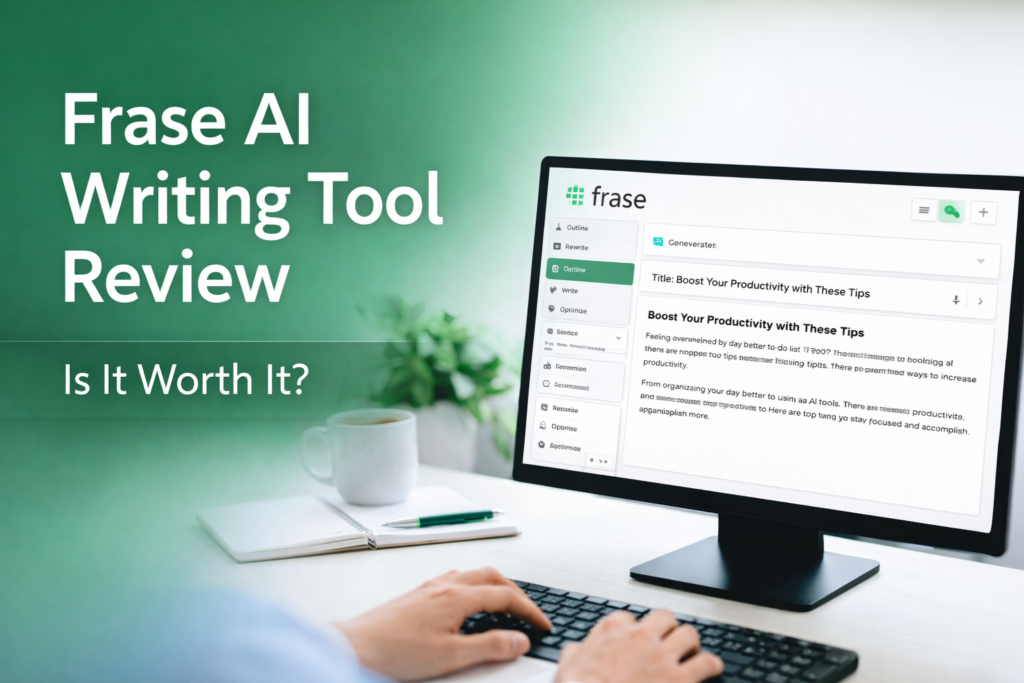
Frase is an AI-powered tool for writing and SEO. It helps content writers research topics, plan articles, and optimize content so it ranks higher on Google and AI search engines. In simple terms, Frase combines content research and writing in one place. You can enter a keyword, and Frase will fetch top search results, suggest an outline, and even draft text for you. According to industry experts, “Frase offers a really impressive AI writing tool. The platform allows you to structure content based on top-ranking search results and optimize this for SEO”. In our own tests of Frase, we found it produced clear and logical articles quickly. Overall, Frase is aimed at people who need to create SEO-friendly content faster – for example, marketing teams, agencies, and publishers. It is especially useful if you want both research and writing help in one tool.
Key Features
Frase has several main features that help you create and improve content:
- SERP Analysis & Research: Frase can analyze Google search results (SERP) for your topic. It collects common headings, questions, and topics from the top-ranking pages. This means you get a quick summary of what your competitors wrote. You can see related questions (from Google’s “People also ask” and places like Reddit) and important keywords for your topic. This saves a lot of time in research. For example, the tool can automatically create a content brief or outline from this data (this takes only a few minutes). In short, Frase helps you find out what content is needed so your article covers key points.
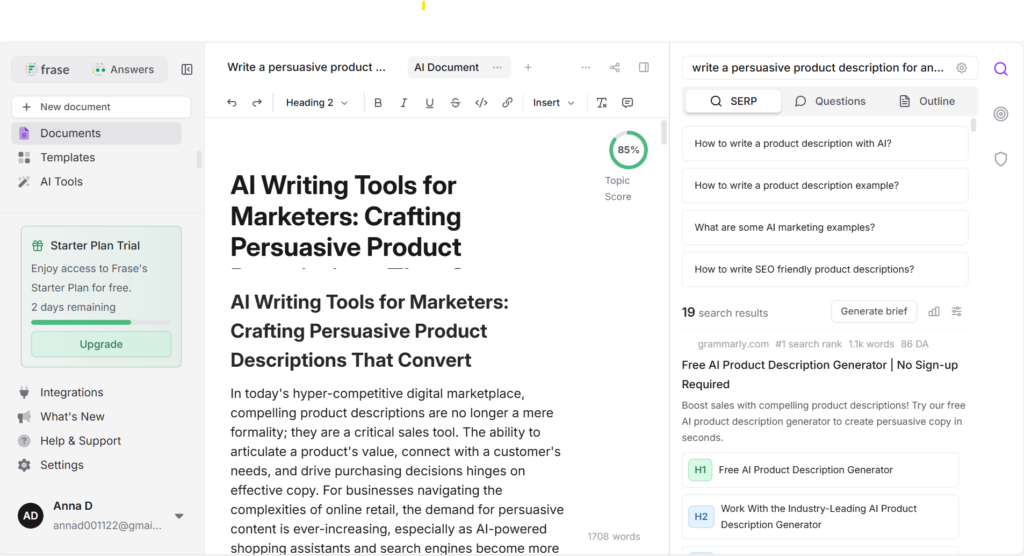
- Outline Builder: After research, Frase helps you build an outline. It shows a list of headings from the SERP data, and you can click to add them to your outline. You can also ask Frase to generate an outline with AI. This feature quickly creates a structured plan for your article, making sure you include important subtopics. In our experience, using Frase’s outline tool is easy. You start a new document, enter a main keyword as the “target search query,” and Frase shows relevant headings and source links on the side. You pick which headings to use (H2, H3, etc.), so you build the article’s structure step by step. (Screenshot suggestion: Frase’s content outline editor showing top search results and suggested headings.)
- AI Writing Assistant: Once you have an outline, Frase can help write the content. It has a built-in AI writer that generates paragraphs for each section. For example, you can ask it to write an introduction, explain a point, or list benefits. The AI text is based on the top search results and your outline, so it stays on topic. In our tests, Frase’s AI wrote in a clear and formal style. The content was grammatically correct and business-friendly. Many users report that Frase’s writing sounds quite natural. However, the AI output may need editing. It can sometimes repeat phrases or sound a bit formal. For instance, our test output sometimes repeated keywords like “AI writing tools” too often. So it’s best to review and polish the text after generation.
- Content Optimization: After writing, Frase lets you optimize the article for SEO. It compares your draft to competitors and gives a Topic Score. The tool suggests missing keywords or topics to include to improve ranking. You can also import or copy your existing content into Frase’s editor. Frase then lists related topics and keyword frequencies that top pages cover. This helps you add the right terms. In short, Frase acts like a writing coach that points out gaps in your content. Our experience shows this feature is handy: it highlights what to add so the article is more complete and search-friendly.
- AI Search Tracking: A unique feature of Frase (the GEO platform) is tracking your content in AI searches. It watches if AI systems like ChatGPT, Google AI, or Perplexity mention your brand or content. It can alert you if you appear (or drop out) in AI-generated answers. While not needed for basic writing, this helps big brands see if their content is answering AI queries.
In summary, Frase is like an all-in-one SEO writing suite: it researches SERPs, builds outlines, writes drafts, and checks SEO – all in one workspace.
Pros & Cons of Frase
Overall, Frase shines when SEO and depth are important. If you need simple one-off blog posts without research, it might be more than you need. But for SEO teams, its pros usually outweigh the cons.
Pricing and Plans
Frase offers tiered pricing with a 7-day free trial. The basic Starter plan (for one writer) costs about $49 per month (billed monthly). This includes 10 AI-optimized articles per month, SEO scoring, and up to 2 AI search platforms to monitor. The Professional plan is around $129 per month, which adds more users (seats), more articles (40/mo), more audit pages, and more AI platforms tracked. For large teams or agencies, the Scale plan is $299/mo with even higher limits (100 articles/mo, 1,000 audit pages, etc.). All paid plans include the full Frase platform (research, writing, optimization). Frase often runs a 20% discount for annual billing. It’s best to check Frase’s official pricing page for the latest details. Remember: you can try Frase free for 7 days (no credit card needed) to see if it fits your needs.
Who Should Use Frase?
Frase is ideal for anyone who creates content and cares about SEO. For example:
- Content marketers and SEOs: Teams that need to publish lots of blog posts or articles can use Frase to speed up research and keep content optimized. The outline and optimization tools save time on SEO work.
- Agencies and brands: Companies managing multiple sites or clients will like Frase’s multi-user and multi-site support. You can handle many domains and seat-based collaboration.
- Technical or research-heavy content: Frase helps writers who need to cover lots of details or data. Its SERP analysis ensures articles include all important points.
- Writers new to SEO: Even beginners benefit from Frase’s guidance. The tool suggests keywords and structure so even non-experts can create SEO-friendly drafts.
It is less suitable for those who need just quick short text. If you only write social media captions or short emails, a simpler writing AI might be cheaper and faster. Also, if you want completely polished articles without editing, remember Frase’s output is a draft that usually needs review.
How to Use Frase (Example)
Here’s a quick example of using Frase to write a blog post:
- Sign up and start a document. After you log in (using the free trial or paid plan), go to Documents and create a new one. Choose the AI Content or Blog option.
- Enter a keyword. In the new document, you will see a field for “Target Search Query” or main keyword. Type in your topic, like “benefits of AI in marketing.” Then click Analyze.
- Review research results. Frase will fetch the top Google results for your keyword. On the right side, you’ll see the outlines of those pages, common subheadings, and questions people ask. For example, you might see headings like “How AI saves time” or questions from forums.
- Build your outline. Click on any heading or question you want to include; Frase adds it to your outline on the left. You can set them as H2 or H3 headings. This gives you a draft outline like: Introduction, H2, H3, etc. (Image: Frase’s content outline editor showing top search results and suggested headings.)
- Generate content. Under each heading, click to have Frase write text. For example, under “Introduction,” click Write for me (AI will generate an intro). You can also select text and use commands like Expand or Rewrite to help write or refine paragraphs.
- Optimize SEO. Once your draft is ready, use Frase’s Optimize tool. Enter your target keyword(s) and click Optimize. Frase will show a content score and suggest adding missing terms or topics. It highlights where to add or change words.
- Finalize the draft. Review the AI-written text. Edit for tone and clarity. Remove any repetition or fix any factual errors (the AI may not always get every fact right). Use Frase’s inline editor for quick changes.
By following these steps, you can go from a topic idea to a drafted, SEO-checked article. Frase’s interface guides you through each step, making the workflow smooth.
Conclusion and Recommendation
Frase is a powerful tool for SEO-focused content creation. It stands out by combining deep research and AI writing in one platform. Our tests confirm it writes clearly and structures articles well. While the output may need editing, Frase’s strengths are its detailed outlines, keyword suggestions, and content optimization features. It is best for content teams, agencies, and anyone who needs well-researched, SEO-rich articles. If you often write long or technical posts, or manage SEO at scale, Frase can save time and help your pages rank better. We recommend trying Frase on its free trial to see how it works for your projects. With its robust feature set and positive user reviews, Frase is a strong choice for creating SEO-friendly content.
Example Screenshot: Frase’s editor with an AI-generated content outline for a keyword (showing headings, questions, and article structure).
1️⃣ Test: Short blog article
Prompt:
Write a 600-word blog post about “Benefits of using AI writing tools for small businesses”.
The output can be seen here ->
Language Quality
Strengths:
- Professional and clear language; sentences are grammatically correct.
- Vocabulary is varied, precise, and business-appropriate.
- Technical terms like “CAGR,” “SEO-optimized,” and “content pipeline” are correctly used.
Weaknesses:
Occasionally reads like a report rather than a blog post, especially in data-heavy sections.
Some sentences are overly long, which slightly reduces readability.
Structural Logic
Strengths:
- Clear hierarchy with headings/subheadings that guide the reader.
- Logical progression: starts with challenges → explains solutions → lists benefits → concludes with best practices.
- Benefits are numbered, making them easy to follow.
Weaknesses:
Introduction and conclusion are a bit dense; a reader could skim them and still understand the points, suggesting minor redundancy.
Some paragraphs feel repetitive (e.g., multiple sections discussing content creation efficiency).
Does It Sound “Robotic”?
Observations:
Text is precise and formal, which may come across as slightly mechanical.
Phrases like “AI writing tools have transitioned from innovative novelties to indispensable assets” or repeated stats-heavy sentences make it sound AI-generated.
Lack of anecdotal examples or storytelling makes it feel less human and relatable.
Repetition Level
Observations:
Some benefit sections reiterate similar points (e.g., content scaling, personalization, and engagement).
Certain ideas appear multiple times: efficiency in content creation, improving digital presence, and freeing up human resources.
“Small businesses” and “AI writing tools” are repeated heavily, though contextually justified.
| Criterion | Score |
|---|---|
| Language Quality | ⭐⭐⭐⭐☆ |
| Structural Logic | ⭐⭐⭐⭐☆ |
| Natural Tone | ⭐⭐⭐☆☆ |
| Repetition Control | ⭐⭐⭐⭐☆ |
2️⃣ Test: SEO content
Prompt:
Write an SEO-optimized article outline for the keyword: best AI writing tools.
The output can be seen here ->
H2 / H3 Headings Quality
Strengths:
- Headings are clear, logical, and accurately reflect the content of each section.
- Numbered steps and benefits in headings improve readability and navigation.
Weaknesses:
Could benefit from more engaging hooks or questions to immediately grab reader attention.
Some headings are long and complex, which may slow down skimming.
Natural Keyword Usage
Strengths:
- Keywords like “AI writing tools,” “SEO content,” and “keyword research” are naturally integrated.
- Maintains good keyword density without feeling forced.
Weaknesses:
- “AI writing tools” is repeated frequently in headings and paragraphs, slightly overused.
- Some long-tail keywords could be better incorporated into H2/H3 headings for SEO impact.
Search Intent Understanding (Commercial Intent)
Strengths:
- The article clearly targets users looking for SEO tools, explaining features, benefits, and use cases.
- Sections like “Top Picks” and “How to Use” align well with commercial intent (readers may want to buy or try tools).
Weaknesses:
- Lacks stronger CTAs (e.g., “Try this tool now”) in headings to reinforce commercial intent.
- Some sections feel more educational than persuasive; purchase-driven intent could be emphasized more.
| Criterion | Score |
|---|---|
| H2 / H3 Headings | ⭐⭐⭐⭐☆ |
| Structure Logic | ⭐⭐⭐⭐☆ |
| Keyword Naturalness | ⭐⭐⭐⭐☆ |
| Commercial Intent | ⭐⭐⭐⭐☆ |
3️⃣ Test: Product description
Prompt:
Write a persuasive product description for an AI writing tool for marketers.
The output can be seen here ->
Sales-Oriented Writing Style
Strong emphasis on benefits, customer pain points, and conversion psychology.
Uses persuasive language, market context, and credibility signals (statistics, trends).
Slightly leans toward an educational/strategic tone rather than direct selling, which softens urgency.
Call to Action (CTA)
CTAs are discussed conceptually (“Buy Now,” “Experience the Difference Today”) but rarely used directly in the body as actionable prompts.
Lacks clear, repeated conversion-focused CTAs that push the reader toward a next step (e.g., “Try Frase,” “Generate Your First Description”).
CTA strength is more theoretical than practical.
Specificity vs. Generic Messaging
Provides concrete examples (benefit reframing, psychology triggers, storytelling use cases).
Clearly explains how AI helps marketers, not just that it helps.
Still somewhat generic in tool positioning—features are described broadly rather than tied to a clearly differentiated product experience.
Overall Verdict:
This is a strong persuasive foundation with solid sales logic and credibility, but it would convert better with more explicit CTAs and sharper product-specific differentiation. Ideal for a mid-funnel or educational sales page; with tweaks, it could perform very well as a bottom-funnel product description.
| Criterion | Score |
|---|---|
| Sales Writing Style | ⭐⭐⭐⭐☆ |
| Call to Action (CTA) | ⭐⭐⭐☆☆ |
| Message Specificity | ⭐⭐⭐⭐☆ |
4️⃣ Test: Social media post
Prompt:
Write a Facebook post promoting an AI writing tool for content creators.
The output can be seen here ->
Tone (Does It Sound Human?)
The tone is professional, polished, and clear, but leans heavily toward an article-style, corporate voice rather than a conversational Facebook tone.
It sounds informative rather than personable; limited use of direct address, casual phrasing, or emotional triggers typical for social media.
With trimming and more conversational language, it could feel significantly more human and native to Facebook.
Length
Far too long for a Facebook post.
Reads like a blog article or landing page rather than social media copy.
Facebook posts promoting tools typically perform best when concise, skimmable, and focused on one core benefit + CTA.
Engaging Hook
The opening sets context well but lacks an immediate scroll-stopping hook.
No direct pain-point question, bold promise, or emotional trigger in the first 1–2 lines.
A stronger hook (e.g., a question, stat, or bold benefit) would improve engagement significantly.
| Criterion | Score |
|---|---|
| Human Tone | ⭐⭐⭐☆☆ |
| Length | ⭐⭐⭐☆☆ |
| Engaging Hook | ⭐⭐⭐☆☆ |
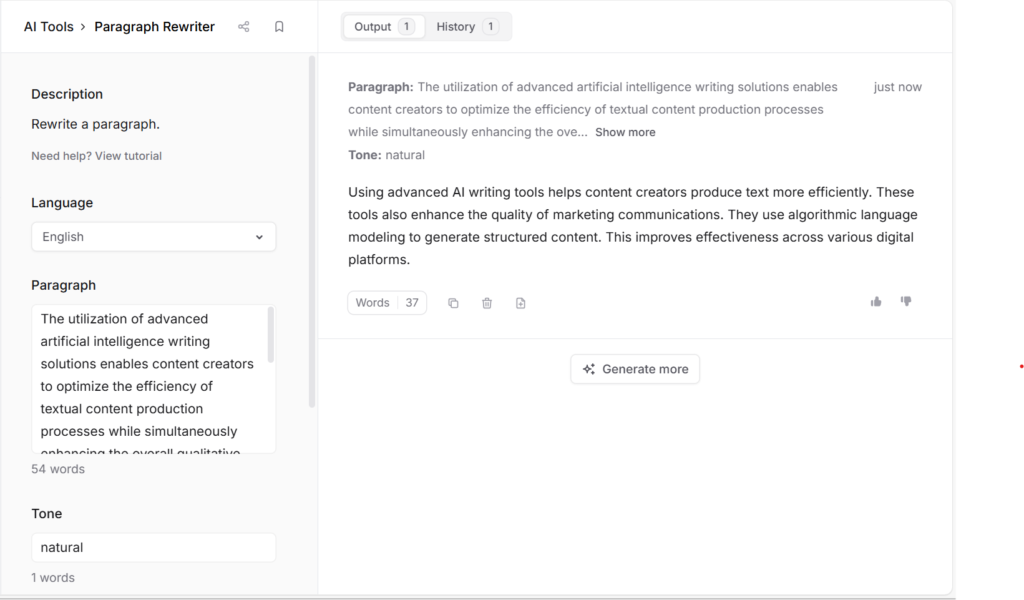
5️⃣ Test: Rewriting
Prompt:
Rewrite the following text to sound simpler and more natural
The output and original text can be seen here ->
Does it preserve meaning?
The rewritten version fully retains the original message.
Key ideas—efficiency, improved quality, AI-driven content generation, and multi-platform effectiveness—are all preserved accurately.
Simplification of language
Complex phrases are successfully simplified (e.g., “utilization of advanced artificial intelligence writing solutions” → “advanced AI writing tools”).
Language is clearer and more accessible, though it could be slightly more conversational by reducing remaining technical phrasing like “algorithmic language modeling.”
Fluency / Readability
EvaluatShorter sentences significantly improve readability.
The text flows well and is easy to understand for a general audience.
Minor cohesion improvements (e.g., smoother sentence transitions) could make it sound even more natural.
| Criterion | Score |
|---|---|
| Meaning Preservation | ⭐⭐⭐⭐⭐ |
| Language Simplification | ⭐⭐⭐⭐☆ |
| Fluency / Readability | ⭐⭐⭐⭐☆ |
📊 The Final Frase Review
| Criterion | Score |
|---|---|
| Ease of use | ⭐⭐⭐⭐☆ |
| Content quality | ⭐⭐⭐⭐☆ |
| SEO usefulness | ⭐⭐⭐⭐⭐ |
| Speed | ⭐⭐⭐☆☆ |
| Value for money | ⭐⭐⭐⭐☆ |
Want to see how this tool compares to others?
Check our full comparison before you decide.
Check Other AI Writing Tool Tests
Read simple, honest reviews of popular AI writing tools. Compare features, prices, SEO help, and real writing results.
Writesonic Review
AI writing, SEO content, and marketing copy test.
Jasper Review
Is this popular AI writing tool still worth it?
Frase Review
AI content briefs, SEO help, and optimization test.
QuillBot Review
A real AI text test with no editing tricks.
Rytr Review
Simple AI writing tool for short content and ideas.
Simplified Review
AI writing, design, and social content in one place.
Scalenut Review
AI SEO writing platform for blogs and rankings.
Grammarly Pro Review
Grammar, tone, AI writing, and editing help tested.