Ready to transform your content creation with AI writing? Writesonic stands out as one of the best AI tools in 2026, making professional content creation accessible to everyone—even complete beginners.
Why Writesonic is Among the Top AI Tools for Business
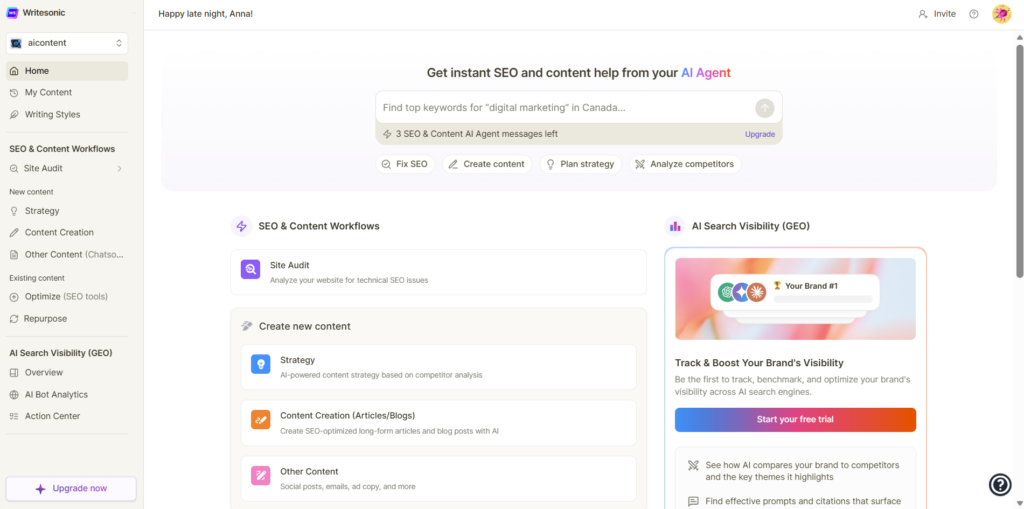
Writesonic’s AI-powered content generation eliminates the guesswork from writing. Whether you’re crafting blog posts, social media content, or marketing copy, this platform delivers AI content that actually converts.
Getting Started in 3 Simple Steps
Step 1: Choose Your Content Type
Writing in Writesonic starts with choosing the right content type, not just clicking “generate.” Select from 100+ templates designed for different needs:
- Blog posts and articles
- Social media captions
- Email campaigns
- Product descriptions
Before you write anything, decide what you want to create: a blog post, product description, landing page copy, or ad text. Writesonic works best when you guide it with a clear goal, because each writing mode is optimized for a different use case.
Step 2: Input Your Requirements
Once you select a template or open the Sonic Editor, the first step is to provide a strong input prompt. This includes the topic, target audience, tone of voice, and purpose of the content. The more context you give, the better the first draft will be. For example, instead of typing “AI writing tools,” try “Write an SEO-friendly introduction about AI writing tools for bloggers, in a neutral and informative tone.”
Step 3: Generate and Refine
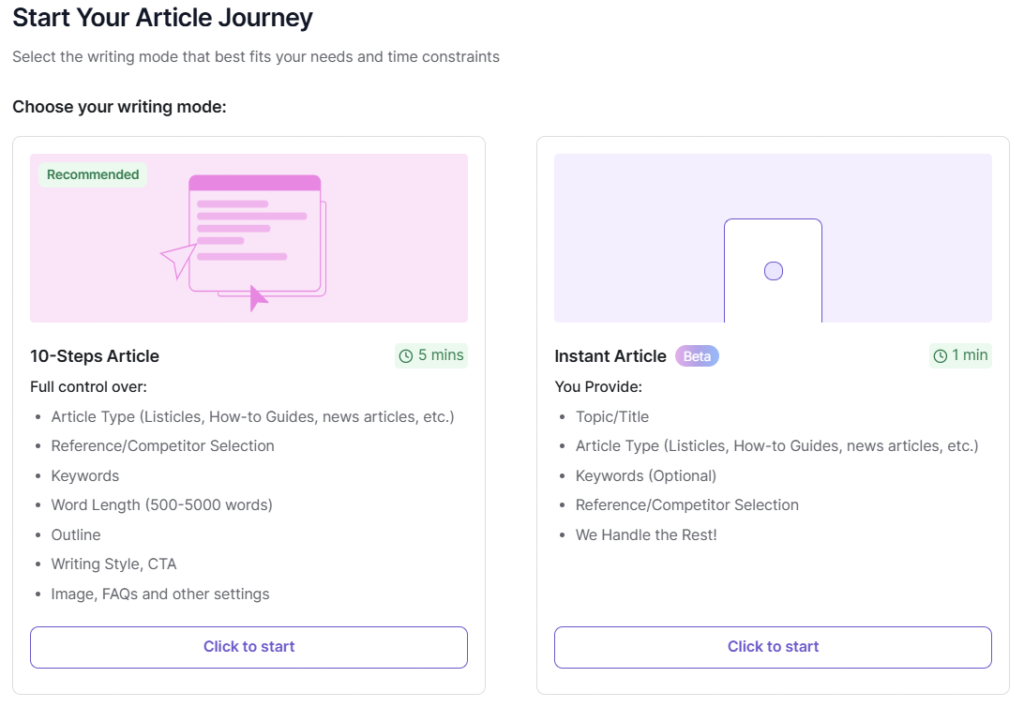
Watch as professional-quality content appears instantly. Edit, adjust, and perfect until it matches your vision. For blog posts, Writesonic usually works best when you generate content in sections, not all at once. Start by asking the tool to create:
- An outline
- An introduction
- Individual sections based on headings
This approach gives you more control and prevents repetitive or generic text. After generating a section, read it carefully and adjust the wording, structure, or examples before moving on to the next part.
Inside the Sonic Editor, you can highlight sentences and use built-in actions like rewrite, expand, or shorten. This is especially useful for improving flow and clarity without rewriting everything manually. Treat Writesonic as a writing assistant rather than a one-click content generator.
One of the most important writing steps is refining the tone. Writesonic allows you to regenerate text with different tones such as professional, casual, persuasive, or friendly. If the text sounds too robotic, try rewriting smaller chunks instead of regenerating the entire article.
To improve readability:
- Break long paragraphs into shorter ones
- Use simple sentence structures
- Add transition phrases manually
AI content often benefits from human rhythm, so don’t hesitate to slightly rephrase sentences to match how real people speak and write.
Advanced Writing Workflow (Control & Optimization)
This workflow is designed for users who want SEO-focused, high-quality, human-like content.
Step 1: Plan Before Writing
Start outside Writesonic by defining:
- Search intent
- Primary and secondary keywords
- Article structure (H1, H2, H3)
This step ensures your content is strategic, not just generated.
Step 2: Generate an Outline First
Use Writesonic to create or refine an outline. Review it manually and adjust headings to match user intent and SEO goals.
Step 3: Write Section by Section
Instead of generating the full article at once, write each section separately inside the Sonic Editor. This gives you more control over flow, depth, and tone.
Step 4: Refine with Editor Tools
Use rewrite, expand, and shorten options to improve clarity and readability. Focus on transitions between sections to make the article feel natural.
Step 5: SEO Optimization
Manually place keywords where they make sense, add internal links, and improve headings. Avoid keyword stuffing — natural language matters more.
Step 6: Human Editing & Fact Check
Review the entire article for accuracy, consistency, and originality. Adjust phrasing to match your brand voice and add examples or insights AI may miss.
Best for:
- SEO articles
- Affiliate content
- Reviews and comparisons
- Long-form blog posts
Writing SEO-Optimized Content with Writesonic
When writing for SEO, include your main keyword naturally in the title, introduction, and a few headings. Writesonic can suggest keyword-rich phrasing, but you should always check that it matches search intent and sounds natural.
A good practice is to:
- Generate SEO-friendly headings first
- Write content under each heading separately
- Add internal links and examples manually
This ensures your article is not only optimized for search engines but also genuinely helpful for readers.
Beyond Writing — Expanded Content Capabilities
Writesonic isn’t limited to just text creation. Some plans also include AI-powered image generation tools, such as Photosonic, which helps you produce visuals that match your written content without needing a separate platform.
There’s also a growing set of SEO tools built into the platform — including real-time SEO scoring, keyword suggestions, and optimization advice as you write — which can help ensure your content isn’t just readable, but also structured for search performance.
Choosing the Right Option for You
Because Writesonic mixes different tools and plans, beginners don’t have to overwhelm themselves with advanced features immediately. You can start with the free plan to test templates, try the Sonic Editor, and get comfortable with AI-assisted drafting. As your needs grow — for example, if you’re creating SEO articles regularly or managing multiple projects — the advanced templates, brand voice customization, and bulk generation features can save tons of time.
And remember, no matter which option you use, AI outputs almost always benefit from human editing — even Writesonic itself advises refining and personalizing generated drafts before publishing to maximize quality.
Pro Tips for Maximum Results
✨ Be specific with your prompts—the more detail you provide, the better your output
✨ Experiment with different tones and styles
✨ Use the regenerate feature to explore multiple variations
Why Choose Writesonic in 2026?
Among AI tools 2026, Writesonic continues leading innovation with:
- Lightning-fast generation speeds
- Multiple language support
- SEO optimization features
- Plagiarism-free guarantee
Ready to experience the power of AI writing?
Join thousands of businesses already using the top AI tools for businessto scale their content creation effortlessly.
Want to see how this tool compares to others?
Check our full comparison before you decide.