Rytr.ai is one of the most affordable and user-friendly AI writing tools in 2026. It’s perfect for beginners who want to generate various types of content quickly without a steep learning curve. In this simple tutorial, I’ll walk you through how to get started and use Rytr effectively.
Note: This post contains affiliate links. If you sign up or purchase through my links, I may earn a commission at no extra cost to you. Full details in my Affiliate Disclosure.
Why Rytr is Great for Beginners
Rytr is very simple and easy to use, yet it can be very helpful and generate various types of texts. In my opinion, it’s absolutely perfect for starting your journey with AI.
It supports content creation in multiple languages and offers a whole list of predefined tones/voices, which is very helpful for matching your style.

Step 1: Sign Up and Log In
- Go to rytr.me.
- Click Sign Up Free (no credit card needed for the free plan).
- Register with your email or Google.
- You’ll get free credits to start generating content immediately.
Step 2: Explore the Dashboard
After logging in, you’ll see a clean dashboard with:
- Write tab for creating content.
- My Documents to browse and organize your saved texts.
- My Voice for custom tone profiles.
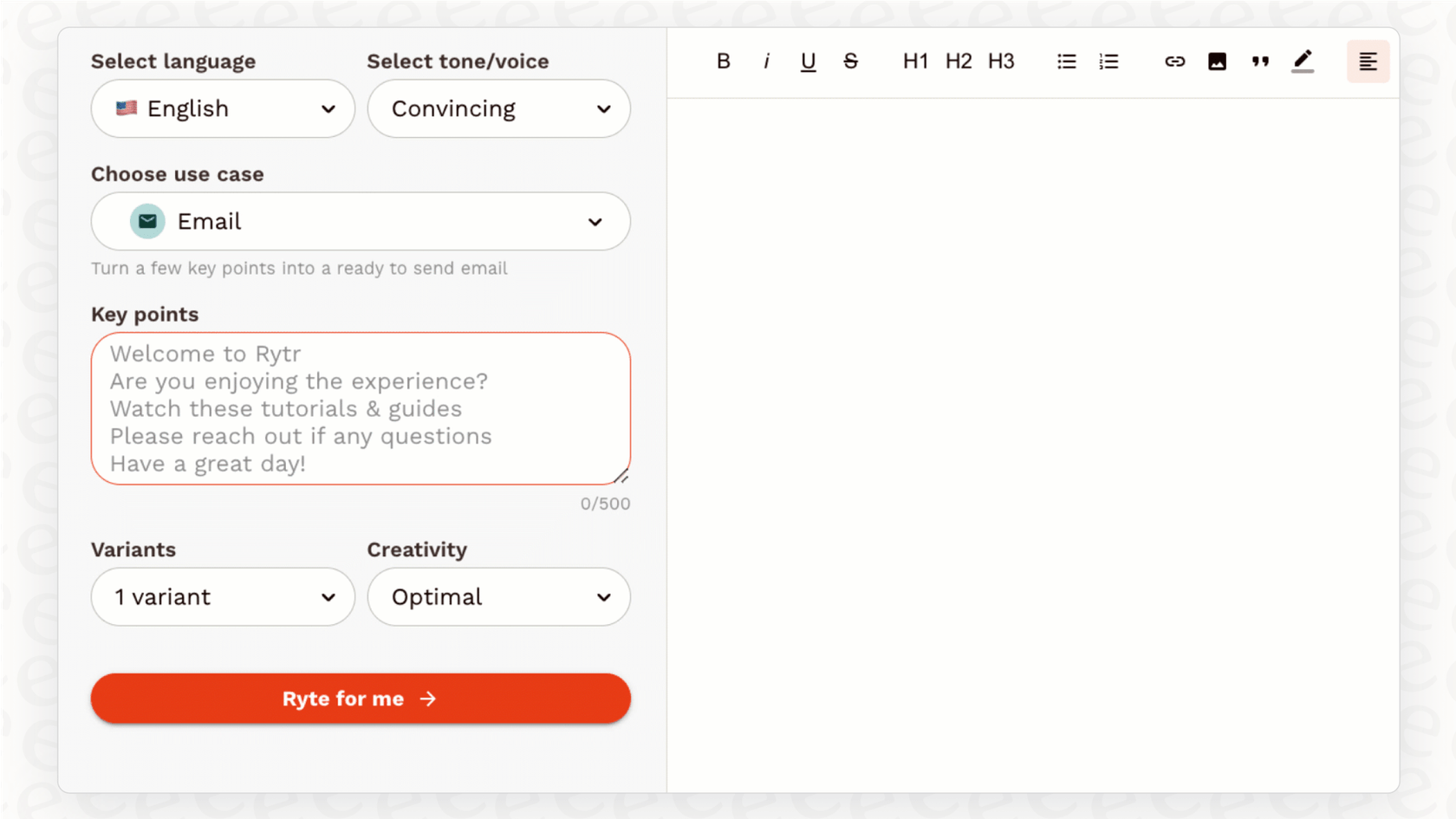
Step 3: Generate Your First Text
- Go to the Write tab.
- Define the use case from the amazing list (e.g., Blog Post, Email, Facebook Post, LinkedIn Post, Product Description, and many others). Depending on the selected purpose, additional fields appear that you need to fill in (e.g., topic, keywords, tone).
Rytr Login: A Complete Guide to the Platform (2025) – eesel AI
- Choose the language and tone/voice from the predefined list.
- Add your input details (e.g., keywords or outline).
- Click Generate – Rytr creates the text instantly.
Step 4: Use My Voice Feature
The My Voice feature allows you to set specific tone profiles that customize the content Rytr generates to sound like you.
- Create a profile by providing sample text in your style.
- Select it for future generations – perfect for consistent branding.
Limitations and Tips
The only limitation is the text length per generation (shorter outputs in free/basic plans). Rytr itself suggests switching to its sister company, Frase, for longer-form content.
Pro Tips:
- Be specific in your inputs for better results.
- Use folders in My Documents to stay organized.
- Experiment with tones for different platforms.
Ready to try Rytr?
Want to see how this tool compares to others?
Check our full comparison before you decide.
View Best AI Writing Tools in 2026
FAQ: Rytr AI Tutorial (2026 Guide)
❓ What is Rytr AI?
Rytr is an AI writing tool that helps you create content like blog posts, emails, and product descriptions in seconds. It uses AI to generate text based on your input.
❓ Is Rytr good for beginners?
Yes, Rytr is very simple to use. You choose a use case, add a short input, and the tool creates content for you.
❓ Is Rytr free to use?
Yes, Rytr has a free plan with limited characters per month. You can upgrade if you need more content.
❓ What can you create with Rytr?
You can create blog ideas, product descriptions, emails, ads, and social media posts. It works best for short content.
❓ How does Rytr work step by step?
You select a use case, choose tone and language, add input, and click generate. The AI creates text based on your instructions.
❓ Can Rytr help with SEO content?
Yes, it can generate titles, descriptions, and keyword-based content. But you should always edit the text before publishing.
❓ Does Rytr sound natural?
It can sound natural, but sometimes it needs editing. Adding your own style improves the final result.
❓ Is Rytr better than other AI tools?
Rytr is good for simple and fast writing. Tools like Jasper or Writesonic may offer more advanced features.
❓ Can Rytr write full blog posts?
It can help create outlines and parts of articles, but for long posts you need to edit and expand the text.
❓ Who should use Rytr?
Rytr is great for beginners, bloggers, marketers, and small business owners who want to create content faster.